









As an Amazon Associate I earn from qualifying purchases.
Quick answer: our top pick is Apple 40W Dynamic Power Adapter (40 W, up to 60 W peak · USB-C PD · Apple original).
Why is my iPhone charging slowly? Check the most common reasons
Most often, the culprit is enabled Optimized Battery Charging, which deliberately pauses the process once it reaches 80 percent, or an underpowered power adapter. If you connect your phone to an old brick with a large USB-A port, fast charging will not activate at all. High device temperature or an unsuitable wireless charger can also be the cause.
Modern Apple smartphones require a USB-C power adapter that supports the USB Power Delivery standard. If you use a small 5 W charger from an older model, charging will take much longer. Only a cable is included with a new phone, so you have to choose a suitable wall charger yourself.
Sometimes the phone interrupts fast charging for safety reasons. This happens when the device gets very hot while gaming, using GPS navigation in the car, or on a hot day. Simply placing the device in a cooler spot will restore the charging speed to normal.
Power adapter wattage and phone model: how many watts do you really need?
Plugging in a 100 W charger will not make the phone charge in a few minutes. It is the electronics inside the iPhone that determine how much power it draws from the outlet. If the phone has a hardware limit of 20 W, it will not draw any more from a more powerful adapter anyway.
For the iPhone 12, 13, 14, 15, and iPhone Air models, peak power consumption during charging is around 20 W. Meanwhile, the iPhone 16e and 17e reach a maximum of around 25 W. For these smartphones, a basic 20 W USB-C power adapter is completely sufficient for everyday use.
Newer generations have higher requirements. Apple states that the iPhone 17, 17 Pro, and 17 Pro Max reach 50 percent in about 20 minutes with a 40 W or more powerful power adapter. In tests, the peak power of the base iPhone 17 is around 28 W, the 17 Pro model reaches about 35 W, and the 17 Pro Max draws about 36 W and will not take more from a more powerful adapter.
For the iPhone 18 Pro and 18 Pro Max, the manufacturer claims a 50 percent charge in about 15 minutes, and for the iPhone Duo in about 20 minutes. This requires a power adapter of at least 60 W, for example supporting USB PD 3.2 with AVS, or the Apple 40 W Dynamic model. Peak power consumption for these is around 45 W for the 18 Pro and around 53 W for the 18 Pro Max, respectively.
Fun fact: The new Apple 40 W Dynamic power adapter can temporarily deliver 60 W, and this is exactly what Apple requires to charge the iPhone 18 Pro as fast as possible.
Fun fact: The iPhone 17e and iPhone Air charge to 50 percent in about 30 minutes using a standard 20 W power adapter, so buying a more powerful wall charger will practically not shorten their charging time.
Below you will find proven accessories that we selected based on official Apple requirements and the actual needs of individual models.
Adapters and a cable that let an iPhone fast charge

1. Apple 40W Dynamic Power Adapter
40 W, up to 60 W peak · USB-C PD · Apple original
Apple's new adapter: 40 W, up to 60 W in bursts. Every iPhone charges at full speed from it, the 17 Pro Max, 18 Pro and Duo included, so there is no guessing whether it is enough.

2. Apple 20W USB-C
20 W · USB-C Power Delivery · Apple original
Apple's own 20 W adapter. iPhone 12, 13, 14, 15 and Air charge at full speed from it. Newer models fast charge too, but their full power needs a stronger adapter.

3. UGREEN Nexode 65W
65 W · 2 x USB-C + USB-A · PPS up to 4.5 A
Three ports and PPS up to 4.5 A, so 45 W phones with PPS get full power. The second port charges earbuds or a watch at the same time. A good pick for a home with phones from different brands.
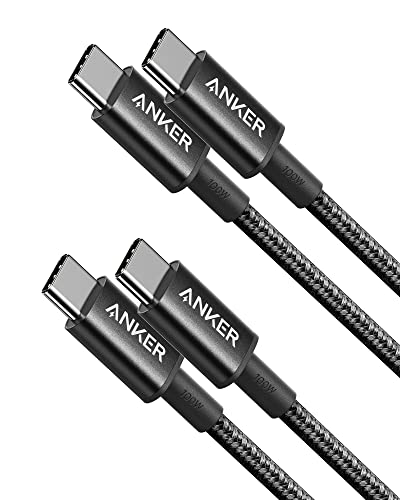
4. Anker 333 USB-C / USB-C 100 W, 90 cm (2x)
USB 2.0 · 480 Mbps · 100 W
A cheap charging cable: 100 W is enough even for a laptop, but data only moves at USB 2.0 speed. Fine for a phone and charger, not for an SSD.
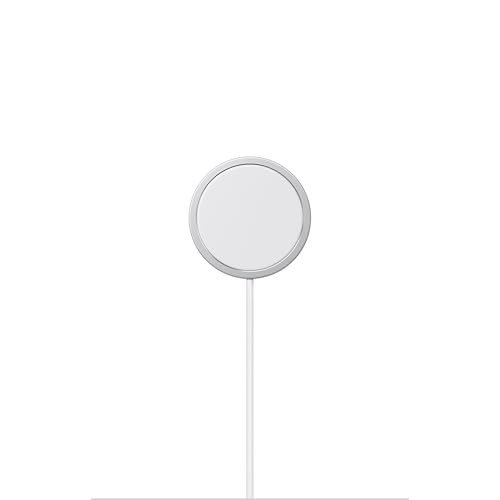
5. Apple MagSafe Charger (1 m)
MagSafe · up to 25 W · 1 m cable
The genuine Apple charger. Charges iPhone 16, 17, and 18 Pro at up to 25 W, but only with a 30 W or higher power adapter, which is not included in the box. Older MagSafe iPhones get 15 W from it.
Stopping charging at 80 percent: system settings
If you notice that your phone is charging smoothly and then suddenly stops at 80 percent, it does not mean your power adapter is faulty. iOS features Optimized Battery Charging. The phone learns your daily routine and pauses charging past 80 percent when it anticipates the device will be connected for an extended period, such as overnight.
A notification will appear on the lock screen with the estimated time full charging will complete. You can tap the notification and select Charge Now so the phone immediately charges to full. However, this feature only works when your overall charge limit is set to 100 percent.
iPhone 15 and newer models introduced an additional feature with a fixed charge limit. You can set it manually between 80 and 100 percent in 5 percent increments. In this mode, the phone finishes charging a few percentage points before the selected threshold.
MagSafe charging and the impact of ambient temperature
MagSafe inductive charging is convenient, but it can be significantly slower if you connect the puck to the wrong power adapter. iPhone 16, 17, and Air models only fast charge wirelessly when the MagSafe charger is paired with a 30 W or higher power adapter. If you use a 20 W adapter, the speed will drop noticeably.
For iPhone 15 and older models, the MagSafe charger delivers up to 15 W with a 20 W power adapter. Wireless power transfer also generates considerable heat, which directly affects charging speeds. When the battery gets too warm, the phone's electronics will automatically throttle charging power.
It is worth remembering that fast charging may not start at all if the phone is exposed to extreme temperatures, meaning it is too cold or too hot. Towards the end, charging always slows down, so the final percentage points take longer.
Frequently asked questions about slow iPhone charging
Why does iPhone stop charging at 80%?
This is caused by the built-in Optimized Battery Charging feature, which learns your habits and delays full charging during extended sessions plugged into the wall. Another reason could be a manually enabled charge limit on iPhone 15 series or newer devices. You can force it to finish charging immediately from the lock screen at any time.
Is a 20 W power adapter enough for iPhone 17?
Such an adapter will charge the phone, but not at the maximum possible speed. iPhone 17 can draw around 28 W at peak, and full fast charging up to 50 percent in about 20 minutes requires a 40 W or higher power adapter. A 20 W brick will increase this time.
Can a more powerful charger damage an iPhone?
There is no such risk because the phone controls the process and only draws as much current as it can accept. You can safely connect your iPhone to a 65 W or 100 W charger featuring the USB Power Delivery standard. The device will adjust the power to its hardware limits.
Why does iPhone charge slowly on MagSafe?
The most common mistake is connecting the magnetic charger to an underpowered power adapter. Newer models, such as iPhone 16 or 17, require an adapter of at least 30 W for fast wireless charging. Slower speeds also often result from the phone heating up, which forces the system to limit power.
Does the cable matter for fast charging an iPhone?
The cable is just as important as the power adapter itself. Fast charging on iPhone 15 and newer models requires a USB-C to USB-C cable, like the one included in the box. Older phones need a USB-C to Lightning cable because fast charging only works with a USB-C power adapter, and you cannot plug a cable with a USB-A connector into it.
Guides for specific models
- Which charger for iPhone? Every model compared
- Which charger for iPhone 17? A simple choice for fast charging (40W+)
- Which charger for Apple iPhone 17 Pro - protocols, watts and full speed
- Which charger for Apple iPhone 17 Pro Max - ranking of compatible chargers
- Which charger for Apple iPhone 17e - protocols, watts and full speed
- Which charger for Apple iPhone Air - how many watts and which protocol
- Which charger for iPhone 16? GaN and MagSafe technology
- Which charger for the iPhone 16e? Best options and tips
- Which charger for Apple iPhone 18 Pro - how many watts and which protocol
Sources
- Apple: Fast charge your iPhone - manufacturer page (support.apple.com)
- Apple: About Charge Limit and Optimized Battery Charging on iPhone - manufacturer page (support.apple.com)
- GSMArena: Apple iPhone 17 Pro Max review, charging speed - industry article (gsmarena.com)
- iGeeksBlog: iPhone 17 Pro Max hits 36W charging speeds in tests - industry article (igeeksblog.com)
- Belkin: iPhone 17 charger guide, 40W USB-C fast charging - industry article (belkin.com)
- 9to5Mac: iPhone 16e charging speed revealed - industry article (9to5mac.com)

Leave a comment
This site is protected by hCaptcha and the hCaptcha Privacy Policy and Terms of Service apply.