

As an Amazon Associate I earn from qualifying purchases.
Quick answer: our top pick is UGREEN USB-C / DisplayPort 1.4 (USB-C to DisplayPort 1.4 · 8K 60 Hz).
Choosing the right hub or adapter for your monitor is crucial for the quality of the displayed image, especially for gamers and graphic design professionals where animation smoothness and sharp details matter. If you are wondering at which resolutions a hub or adapter will allow you to achieve a 144 Hz refresh rate, below you will find an overview of the differences between HDMI and DisplayPort in the context of 144 Hz refresh rates and resolutions.
Why is a 144Hz refresh rate important?
A 144 Hz refresh rate, which means 144 frames per second, is an essential parameter for a smooth visual experience. A higher refresh rate translates to smoother motion on the screen, improving comfort during work and gameplay. However, not every cable and hub can handle such parameters at high resolutions, which is why it is worth exploring the capabilities of specific HDMI and DisplayPort versions.
HDMI - versions and capabilities
The HDMI standard is widely used, but not every version can handle a 144 Hz refresh rate:
- HDMI 1.4 - The bandwidth of this standard is not sufficient to achieve 144 Hz. Even at 1080p resolution, a newer connector is required.
- HDMI 2.0 - Features 18 Gb/s bandwidth and supports 4K 60 Hz. It also supports 144 Hz at 1080p and 1440p (QHD) resolutions, provided that this standard is supported on both ends of the connection.
- HDMI 2.1 - Enables support for 4K at 120-144 Hz, as well as 8K resolution at lower refresh rates.
If you use an adapter or hub with an HDMI 2.1 connector and a compatible monitor, you will achieve a 144 Hz refresh rate even at 4K resolution.
DisplayPort - optimal for high resolutions and refresh rates
DisplayPort offers higher bandwidth than older HDMI versions, making it an excellent choice for professional applications and gaming. Individual versions of this standard offer the following specifications:
- DisplayPort 1.2 - Supports 144 Hz at 1440p resolution and up to 240 Hz at 1080p.
- DisplayPort 1.4 - Supports 4K 120 Hz, 4K 144 Hz with DSC (Display Stream Compression), and up to 240 Hz at 1440p.
- DisplayPort 2.0 - Supports 144 Hz at 8K resolution and even higher refresh rates at lower resolutions.
Fun fact: The USB-C connector has four high-speed transmission lanes, which the hub must divide between the video signal and data transfer. A hub with 4K 60 Hz HDMI output and concurrently running fast USB 3 ports is technically feasible only when using the Thunderbolt or USB4 standard.
Which port type to choose on a hub?
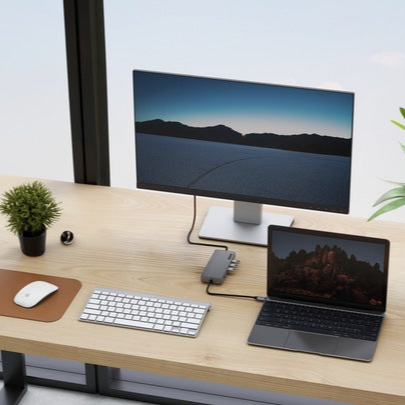
The choice between HDMI and DisplayPort depends on the specifications of your monitor and computer. A standard USB-C hub transmits video via DP Alt Mode using the connector's four high-speed lanes. When the hub also provides USB 3 ports, only two lanes remain for video transmission. This is sufficient for a 4K 30 Hz signal, but makes high refresh rates impossible. When the entire video signal utilizes all four lanes, for example at 4K 60 Hz, the hub's built-in USB ports will only operate in USB 2.0 mode.
For this reason, to achieve a stable 144 Hz, it is best to connect your monitor directly with a USB-C to DisplayPort or USB-C to HDMI 2.1 cable, or alternatively use a Thunderbolt 4 docking station with full 40 Gb/s bandwidth.
Recommended cables for 144 Hz monitors

1. UGREEN USB-C / DisplayPort 1.4
USB-C to DisplayPort 1.4 · 8K 60 Hz
For a monitor with a DisplayPort input, such as a high refresh gaming display. Video goes straight from the laptop's USB-C port, with no hub splitting bandwidth with USB ports.
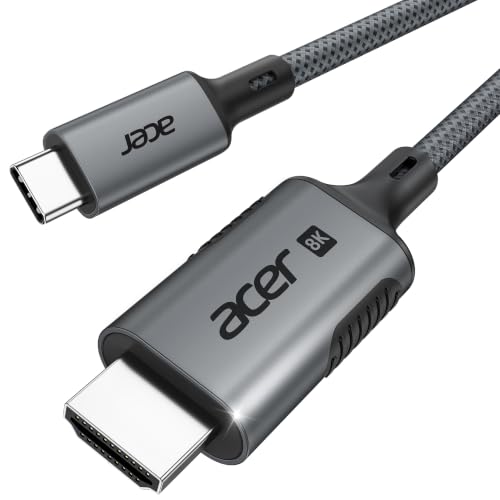
2. Acer USB-C / HDMI 2.1, 2 m
USB-C to HDMI 2.1 · 4K 144 Hz
For a monitor or TV that only has HDMI. The cable handles 4K up to 144 Hz, but only if the laptop's USB-C port provides enough bandwidth.

3. Cable Matters Thunderbolt 4, 1 m
Thunderbolt 4 · Intel certified · 240 W
A certified Thunderbolt 4 cable (40 Gbps) for MacBooks and Thunderbolt laptops. It also works as a regular USB-C cable, so it fits any device with that port.
Summary - which hub to choose to get 144Hz?
Overview of the capabilities of individual standards:
- HDMI 1.4 - no 144 Hz support (HDMI 2.0 port required on both ends)
- HDMI 2.0 - 144 Hz at 1080p and 1440p
- HDMI 2.1 - 120-144 Hz at 4K
- DisplayPort 1.2 - 144 Hz at 1440p
- DisplayPort 1.4 - 120 Hz at 4K (and 144 Hz with DSC compression)
- DisplayPort 2.0 - 144 Hz at 8K
For a high-resolution monitor with a 144 Hz refresh rate, the optimal choice will be an HDMI 2.1 or DisplayPort 1.4/2.0 port, connected via a direct cable or through a Thunderbolt 4 dock.
Sources
- HDMI Licensing Administrator: HDMI 2.0 Specification - manufacturer page (hdmi.org)
- Cable Matters: Does DisplayPort Support 144Hz? - industry article (cablematters.com)
- Big Mess o' Wires: Explaining 4K 60Hz Video Through USB-C Hub - industry article (bigmessowires.com)
- Intel: What Is Thunderbolt 4? - industry article (intel.com)


Leave a comment
This site is protected by hCaptcha and the hCaptcha Privacy Policy and Terms of Service apply.