





As an Amazon Associate I earn from qualifying purchases.
Quick answer: our top pick is Anker 333 USB-C / USB-C 100 W, 90 cm (2x) (USB 2.0 · 480 Mbps · 100 W).
Introduction to USB technology
When choosing a USB-C cable, it is worth understanding the specifics of USB standards. The USB (Universal Serial Bus) interface was created in the 1990s to standardize how accessories connect to computers. Over the years, this standard has gained higher transfer speeds and the ability to power more demanding devices.
Key USB versions
-
USB 2.0: Speeds up to 480 Mb/s (theoretically 60 MB/s).
-
USB 3.2: Covers three speeds: Gen 1 (5 Gb/s), Gen 2 (10 Gb/s), and Gen 2x2 (20 Gb/s, operating exclusively with a USB-C connector). The USB-IF organization recommends describing products directly by speed (USB 5Gbps, 10Gbps, 20Gbps), as the name USB 3.2 alone does not clearly indicate bandwidth.
-
USB 4: Speeds up to 40 Gb/s and Power Delivery support up to 240 W.
Fun fact: USB 3.2 Gen 1 is the exact same 5 Gb/s speed as the former USB 3.0, just operating under a new name.
Basic differences between USB 2.0 and USB 3.2
The main differences between the USB 2.0 and USB 3.2 standards come down to data bandwidth, connector design, and power delivery capabilities:
-
Data transfer speed: USB 2.0 reaches a maximum of 480 Mb/s, while USB 3.2 offers transfers of 5 Gb/s (Gen 1), 10 Gb/s (Gen 2), or 20 Gb/s (Gen 2x2).
-
Device compatibility: The standards are backward compatible, but in practice, the actual speed is determined by the slowest component in the entire setup: the port, cable, or target device. For example, a fast external drive like the Samsung T7 (USB 3.2 Gen 2) can read data at up to 1050 MB/s, but when connected with a USB 2.0 cable, it will be limited to a maximum of 480 Mb/s.
-
Power output vs. transfer speed: Many USB-C cables designed for charging, even those rated at 60 W or 100 W, transfer data solely at the USB 2.0 standard. A cable's charging wattage alone does not indicate data transfer speed.
Data transfer speed
USB 2.0 reaches a theoretical bandwidth of up to 480 Mb/s (megabits per second), which corresponds to a limit of 60 MB/s (megabytes per second). Under real-world conditions, this speed is typically between 20 MB/s and 40 MB/s.
USB 3.2 Gen 2x2 offers transfers up to 20 Gb/s (gigabits per second), which theoretically provides around 2.5 GB/s. In practice, this allows for transfer rates of about 2 GB/s on compatible hardware.
Fun fact: The Gen 2x2 designation means that the USB-C cable uses two 10 Gb/s lanes simultaneously.
|
Cable standard |
Transfer speed |
Maximum power |
|
|
USB-C USB 3.2 Gen 2x2 cable |
20 Gb/s |
100 W |
|
|
USB-C - USB-A USB 2.0 cable |
480 Mb/s |
15 W |
Bandwidth differences matter in several typical use cases:
-
Transferring large files: Copying 4K video footage and backing up drives.
-
Working with external drives: Fast read and write operations on NVMe SSD storage.
-
Docking stations and monitors: Connecting multi-port hubs and transmitting video signals.
Practical difference in data transfer
Differences in transfer time for files of various sizes:
1 GB file:
USB 2.0: from 25 to 50 seconds (at an actual transfer rate of 20-40 MB/s).
USB 3.2 Gen 2x2: about 0.5 seconds (at a transfer rate around 2 GB/s).
10 GB file:
USB 2.0: from 4 to 8 minutes.
USB 3.2 Gen 2x2: about 5 seconds.
100 GB file:
USB 2.0: from 40 minutes to over an hour.
USB 3.2 Gen 2x2: about 50 seconds.
Applications of USB 2.0
Even though newer USB versions provide significantly higher transfer speeds, USB 2.0 remains the primary solution in many areas:
-
Charging devices: Many cables used exclusively for charging smartphones, headphones, or e-book readers rely on the USB 2.0 bus for synchronization.
-
Transferring small files: Bandwidth up to 480 Mb/s is entirely sufficient for syncing documents, individual photos, or audio files.
-
Peripherals: Keyboards, mice, wireless receivers, and basic printers do not require higher bandwidth than USB 2.0.
Applications of USB 3.2
Cables and devices compliant with the USB 3.2 standard excel in more demanding setups:
-
Fast data transfer: USB 3.2 Gen 2x2 reaches up to 20 Gb/s, enabling seamless work with external NVMe SSDs without noticeable lag.
-
Power delivery and office work: Properly selected USB-C cables can support up to 100 W Power Delivery, allowing laptops to be powered while transferring data at the same time.
-
Working with docking stations: The high bandwidth of the USB 3.2 bus allows connecting multi-port hubs supporting external monitors, network adapters, and drives.
Difference in use: USB 2.0 vs. USB 3.2 Gen 2x2
USB 2.0 is designed for basic tasks, such as syncing simple data and connecting peripherals like mice or keyboards.
USB 3.2 Gen 2x2 is used for working with large volumes of data, such as 4K and 8K video recordings, CAD project files, or comprehensive backups, where transfer time directly impacts workflow.
Device compatibility
Before choosing a USB-C cable, it is worth checking the technical specifications of the devices it will be used with:
What to check?
-
USB port standard: A USB-C connector on a computer chassis can support various protocols, ranging from USB 2.0 to USB 3.2, Thunderbolt, or USB 4.
-
Power parameters: Check the supported Power Delivery profile, e.g., 60 W, 100 W, or 240 W.
-
Cable bandwidth: A cable dedicated solely to charging may limit data transfer speeds to 480 Mb/s.
Power consumption and power delivery
USB cables vary in specifications regarding power delivery:
-
USB-C USB 3.2 cables (up to 100 W): Enable stable power delivery for laptops, monitors, and demanding docking stations while maintaining high-speed data transfer.
-
USB-C USB 4 cables (up to 240 W): Compliant with the USB PD 3.1 Extended Power Range specification, designed for workstations and high-performance gaming laptops.
-
USB-C 2.0 cables: Carry 60 W, and with an e-Marker chip up to 100 W or 240 W; only data transfer is slower (480 Mb/s).
Costs and availability
-
USB 2.0: Cables in this standard are the most economical due to their simpler internal design and fewer signal lines.
-
USB 3.2: These cables are positioned in the mid-price range due to shielding and additional transmission lines.
-
USB 4: These are the most structurally advanced cables, which translates to a higher purchase cost.
Data security considerations
The USB standard itself does not encrypt data, so in terms of file confidentiality, no standard is inherently more or less secure than another. Data protection is handled by system software or hardware encryption built into the drive or flash storage itself. The cable is solely responsible for physical signal transmission. High-quality USB 3.2 and USB 4 cables feature proper shielding that protects the signal from electromagnetic interference and transmission errors at high frequencies.
Which cable to choose for different scenarios
For fast work with external drives and simultaneous laptop power delivery, a USB-C cable in the USB 3.2 Gen 2 (10 Gb/s) or Gen 2x2 (20 Gb/s) standard is the best choice.
For advanced docking stations with multiple monitors and the most demanding devices, a USB 4 cable with 40 Gb/s bandwidth and power delivery up to 240 W is the optimal choice.
For a bedside nightstand charger or connecting a mouse and keyboard, a standard USB 2.0 cable is completely sufficient.
Recommended USB-C cables: USB 2.0, USB 3.2 and USB4
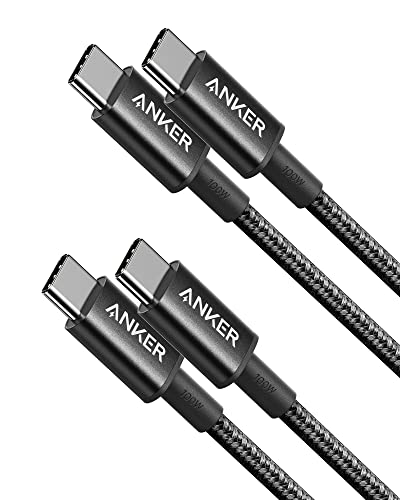
1. Anker 333 USB-C / USB-C 100 W, 90 cm (2x)
USB 2.0 · 480 Mbps · 100 W
A cheap charging cable: 100 W is enough even for a laptop, but data only moves at USB 2.0 speed. Fine for a phone and charger, not for an SSD.

2. UGREEN USB-C 10 Gbps, 240 W, 1 m
USB 3.2 Gen 2 · 10 Gbps · 240 W
A full-featured USB-C cable: 10 Gbps for SSDs, 4K 60 Hz video and up to 240 W charging. One cable for laptop, drive and monitor.

3. Cable Matters USB4 40 Gbps, 2 m
USB4 · 40 Gbps · 240 W
For SSD enclosures and USB4 or Thunderbolt docks when 10 Gbps is not enough. It charges at up to 240 W and carries video up to 8K 60 Hz.
Summary and Conclusions
The choice of cable depends on the nature of the connected devices. USB 3.2 cables offer speeds of up to 20 Gb/s, allowing you to efficiently transfer large datasets to modern SSDs. USB 4 cables provide the highest transfer and power performance. In turn, cheaper USB 2.0 cables remain fully sufficient for charging smaller devices and connecting peripherals. It is worth remembering that the USB standard itself does not encrypt data, and the speed of the entire connection is limited by its slowest component.
Sources
- USB-IF: USB 3.2 Specification Language Usage Guidelines - manufacturer page (usb.org)
- Kingston: What's the Difference between USB 3.0, 3.2 Gen 1 and 3.2 Gen 2? - industry article (kingston.com)
- Samsung: Portable SSD T7 USB 3.2 Gen 2 - industry article (samsung.com)
- Cable Matters: USB-C Charging Cables Explained - industry article (cablematters.com)


Leave a comment
This site is protected by hCaptcha and the hCaptcha Privacy Policy and Terms of Service apply.