








As an Amazon Associate I earn from qualifying purchases.
Quick answer: our top pick is SanDisk Extreme Portable SSD (USB-C · 10 Gb/s · IP65 · carabiner).
Best SSD for MacBook Pro OLED?
Many people assume a drive advertised at 2000 MB/s will be twice as fast on a Mac as a regular 10 Gb/s drive. It won't. Macs don't support USB 3.2 Gen 2x2 (20 Gb/s), so that drive runs at about 1000 MB/s. For large video files, get a Thunderbolt 5 drive or enclosure. For backups, a 10 Gb/s drive is enough.
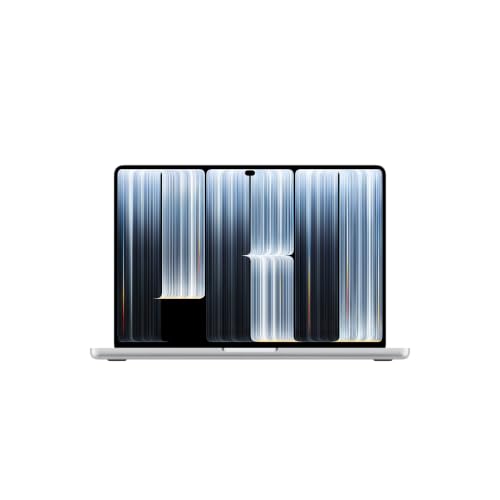
The MacBook Pro with an OLED display (14-inch and 16-inch, M5 Pro or M5 Max chip) has been on sale since November 6, 2026. You choose the internal drive when you buy, and you can't upgrade it later. That's why an external SSD is the easiest way to get room for projects, archives and backups.
A separate article covers monitors for the MacBook Pro OLED.
Fun fact: The MacBook Pro OLED has the same M5 Pro and M5 Max chips as the Liquid Retina XDR model from March 2026.


Thunderbolt 5 in the OLED model: what it means in practice
The laptop has three USB-C Thunderbolt 5 ports with speeds up to 120 Gb/s. Besides those, there's HDMI, an SDXC card reader, a headphone jack and MagSafe 3. So you can plug in a fast drive and still have free ports.
Thunderbolt 5 drives and enclosures reach full speed only on Macs with Thunderbolt 5 ports. This laptop is one of the few where you'll actually benefit.
Makers of Thunderbolt 5 enclosures quote up to about 7000 MB/s, and a ready-made Thunderbolt 5 drive reaches over 6000 MB/s. No USB drive can match that. USB4 enclosures go up to 40 Gb/s, and the maker of a ready-made USB4 drive quotes up to 3800 MB/s.
In practice, it works like this. For 8K video and large projects, choose Thunderbolt 5. For 4K video, USB4 is enough. For backups and photos, 10 Gb/s is enough.
Fun fact: The cheaper MacBook Pro M6 has Thunderbolt 4, while the OLED model has Thunderbolt 5. So the same Thunderbolt 5 drive runs at different speeds in these two laptops.
Before you pick a drive, check three things:
- Port on the Mac: all three USB-C ports on the OLED model are Thunderbolt 5, so plug the drive straight into them.
- Speed on the package: look for values in Gb/s (10, 40 or 80), not just MB/s in big print.
- Drive inside the enclosure: an M.2 enclosure needs a separate NVMe M.2 2280 drive.
Below, we've grouped drives and enclosures by the speed they deliver over Thunderbolt 5, USB4 and 10 Gb/s ports.
SSD drives for MacBook Pro OLED we recommend

1. SanDisk Extreme Portable SSD
On saleUSB-C · 10 Gb/s · IP65 · carabiner
Another of the best-selling external drives. Rubberized IP65 body and a carabiner loop, so it handles life in a bag well. On a Mac and iPad it runs at 10 Gb/s.
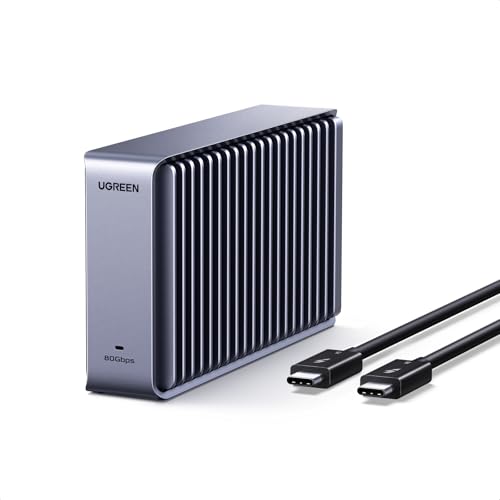
2. UGREEN 80Gbps Thunderbolt 5 M.2 NVMe enclosure
Thunderbolt 5 · 80 Gb/s · up to 7000 MB/s
Enclosure for an M.2 NVMe drive, compatible with Thunderbolt 5, 4 and USB4. The manufacturer states up to 7000 MB/s at 80 Gb/s, but only a Thunderbolt 5 port delivers that speed. You buy the drive separately.
See UGREEN 80Gbps Thunderbolt 5 M.2 NVMe enclosure on Amazon →

3. OWC Envoy Ultra Thunderbolt 5 portable SSD
Thunderbolt 5 · over 6000 MB/s · ready-made drive
A ready-made Thunderbolt 5 drive from OWC. The manufacturer states over 6000 MB/s, a speed no USB drive can reach. It only makes sense in a Thunderbolt 5 port.
Ready-made drive or M.2 enclosure
A ready-made Thunderbolt 5 drive is simpler: take it out of the box, plug it in and start working. You don't have to match anything or assemble anything. It's a good fit if you don't want to worry about whether the drive and enclosure work together.
An enclosure gives you more freedom. You choose the capacity of the M.2 drive yourself and can swap it for a bigger one later. Just remember that you buy the NVMe M.2 2280 drive separately, so you put the whole thing together yourself.
For backups, photos and a music library, a portable USB-C SSD running at 10 Gb/s is enough. For editing video straight from the drive, a ready-made USB4 drive or a USB4 enclosure for an M.2 drive is a better choice. One limit: USB4 gear tops out at 40 Gb/s, so with 8K it won't use the full speed of the ports.
In short: for 8K video and large projects, get a Thunderbolt 5 drive or enclosure. For 4K video, go with USB4. For backups, a 10 Gb/s drive is enough.
The 2000 MB/s trap, drive format and Time Machine
Drives with 2000 MB/s printed on the box often rely on a standard that the Mac doesn't support. You end up with the speed of an ordinary 10 Gb/s drive, not double that. If you want a real speed boost, look for USB4 or Thunderbolt.
Format a drive for your Mac as APFS in Disk Utility. Choose exFAT only if the drive also needs to work with Windows. For everyday work on a Mac alone, APFS is the natural choice.
A 10 Gb/s drive is enough for Time Machine backups. Faster Thunderbolt 5 won't noticeably speed up background backups, so there's no reason to buy it for that.
There's one more interesting option. A Mac with Apple silicon can run macOS from an external NVMe drive over Thunderbolt or USB4. It's handy when you want a second system on a separate drive.
Frequently asked questions about drives for the OLED MacBook Pro
Which SSD for the OLED MacBook Pro?
For 8K video and large projects, choose a Thunderbolt 5 drive or enclosure. For 4K video work, USB4 is enough. For backups and photos, get a portable 10 Gb/s SSD.
Does the OLED MacBook Pro have Thunderbolt 5?
Yes. It has three USB-C Thunderbolt 5 ports with speeds up to 120 Gb/s. That means Thunderbolt 5 drives and enclosures run at full speed here.
Is a Thunderbolt 5 drive worth buying for the OLED MacBook Pro?
It is if you work with 8K video or very large projects and copy a lot of data. For photos, documents and Time Machine, you won't see a difference compared with a 10 Gb/s drive. In that case, a simpler drive is the better pick.
Which drive for Time Machine on the OLED MacBook Pro?
A 10 Gb/s drive is enough, for example a portable USB-C SSD. Format it as APFS in Disk Utility. A faster drive won't speed up backups in any meaningful way.
Ready-made drive or M.2 enclosure for the OLED MacBook Pro?
A ready-made drive is simpler because it works as soon as you plug it in. An enclosure lets you choose the capacity of the M.2 drive, but you buy the NVMe M.2 2280 drive separately. Pick it if you want to decide on capacity yourself.
See also
- Which charger for Apple MacBook Pro OLED 14 / 16 - original and cheaper alternatives
- Best docking station for MacBook Pro OLED - Thunderbolt 5 and up to four displays
- Best monitor for MacBook Pro OLED (M5 Pro and M5 Max) - up to four displays on one cable
- Best external SSD for Mac mini M6 - which port gives full speed
- Best SSD for MacBook Pro M6 - Thunderbolt 4, USB4 and Time Machine
Sources
- Apple: MacBook Pro (PROLED XDR) - Tech Specs - manufacturer page (apple.com)
- CineD: Apple touch screen MacBook Pro announced - industry article (cined.com)
- Tom's Guide: MacBook Pro OLED vs MacBook Pro M6 - industry article (tomsguide.com)
- OWC: Get the most out of the new M6 and M5 Pro Mac mini with these docks and drives - industry article (owc.com)
- Thewearify: Best external storage for Mac mini - industry article (thewearify.com)

Leave a comment
This site is protected by hCaptcha and the hCaptcha Privacy Policy and Terms of Service apply.