








As an Amazon Associate I earn from qualifying purchases.
Quick answer: our top pick is LG UltraGear OLED 27GX704A (27 inch · OLED · 1440p · 240 Hz).
Best monitor for RTX 5070 Ti? Quick answer
Which monitor won't hold this card back? The safest pick is a 27-inch 1440p screen with a 240 Hz refresh rate. It gives you smooth motion in fast games.
The other route is a 4K monitor with a 160 Hz refresh rate. Choose it if you mostly play single-player games, want a sharper image and don't mind using DLSS upscaling.
Both options make sense. The difference is what matters more to you: smooth motion or fine detail.
What the card outputs and what resolution NVIDIA shows its results in
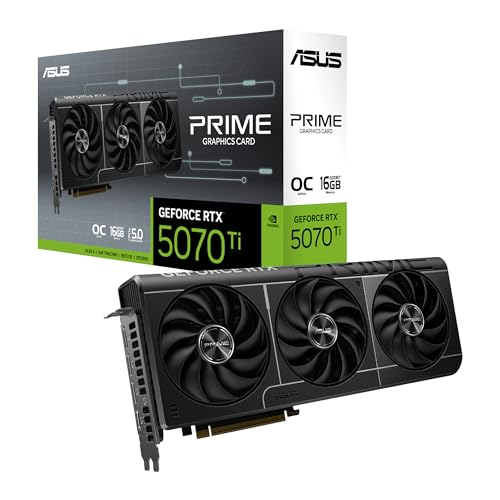
The GeForce RTX 5070 Ti has 16 GB of GDDR7 memory and four display outputs: three DisplayPort 2.1b and one HDMI 2.1b. According to NVIDIA, the card supports up to 4K at 480 Hz or 8K at 165 Hz with DSC compression. That is far more than a 1440p 240 Hz or 4K 160 Hz monitor needs, so the ports won't limit you with either one.
Fun fact: The RTX 5070 Ti can drive four independent 4K monitors at 165 Hz.
NVIDIA doesn't say outright which monitor resolution it aims this card at. On its website it quotes PCWorld instead, which reports very good results in both 1440p and 4K. So the card handles both resolutions, and the choice depends on how you play.
Fun fact: NVIDIA shows the card's own performance charts in 1440p, with maximum settings and DLSS, not in 4K.
We picked the monitors below based on what we described above: resolution, refresh rate and G-SYNC compatibility.
Best monitors for the RTX 5070 Ti we recommend

1. LG UltraGear OLED 27GX704A
27 inch · OLED · 1440p · 240 Hz
1440p 240 Hz OLED monitor with a 0.03 ms response time and DisplayHDR True Black 400 certification, according to LG. It has DisplayPort 1.4 and two HDMI 2.1 ports, and it is G-SYNC compatible.

2. ASUS TUF Gaming VG27UQ1A
27 inches · 4K · 160 Hz · Fast IPS
A 4K 160 Hz monitor with a Fast IPS panel, according to ASUS. It has DisplayPort 1.4 with DSC compression and two HDMI 2.1 ports, and it is G-SYNC compatible. A sensible way into 4K without paying extra for an OLED.

3. ASUS TUF Gaming VG27AQ3A
27 inches · 1440p · 180 Hz · Fast IPS
A 1440p 180 Hz monitor with a Fast IPS panel and 2 x 2 W speakers. According to ASUS, the HDMI 2.0 inputs run up to 144 Hz, and the full 180 Hz comes from DisplayPort 1.4, so connect the card with a DisplayPort cable.
1440p 240 Hz or 4K: fast games vs. image sharpness
Evetech points out that 1440p gives you higher frame rates and headroom for esports titles. If you play online shooters where fast reactions matter, this resolution is the more comfortable choice. According to Thewearify, the most common recommendation for this card is a 1440p 240 Hz monitor, including a 27-inch QD-OLED version.
4K is for players who are willing to tune their settings and use upscaling. In RPGs and adventure games you notice the difference in sharpness right away, and DLSS 4 with Multi Frame Generation helps in the heavier ones. A 4K 240 Hz OLED monitor is already a top-shelf pick.
Can't decide? Some monitors have two modes, for example 4K at 160 Hz and 1080p at 320 Hz. You use 4K in single-player games and switch to the higher refresh rate in fast shooters. Honestly, though, 1080p mode costs you sharpness.
A 1440p 180 Hz monitor also makes sense if you don't care about squeezing out every last frame.
What if you already have an old monitor? In its Edge Up material, ASUS explains that the card will only display as many frames as your monitor's refresh rate allows. The card won't go to waste, but it will run below its potential.
If you're buying just one monitor, get a 27-inch 1440p 240 Hz model, and an OLED if your budget allows.
OLED or IPS, and how to connect your monitor
OLED monitor makers quote response times around 0.03 ms, which gives very clean motion in fast games. There's one catch: an OLED panel needs a bit more care, so manufacturers add features to protect it. A 1440p 180 Hz IPS monitor is the calmer choice if you'd rather not think about the panel.
Connect the card to the monitor with a DisplayPort cable. On gaming monitors, this is usually the input with the highest refresh rate. On some 1440p monitors, HDMI 2.0 tops out at 144 Hz, and 180 Hz is only available over DisplayPort, according to the ASUS specs for one such model. Check the seller's listing for what's in the box, including the cable.
Turn on G-SYNC too. The card supports it, and a G-SYNC or FreeSync compatible monitor matches its refresh rate to the frames coming from the card. That gets rid of screen tearing, even when the frame rate fluctuates.
We cover the power supply for the RTX 5070 Ti in a separate article.
Q&A: monitor for the RTX 5070 Ti
Which monitor for the RTX 5070 Ti?
The most commonly recommended option is a 27-inch 1440p 240 Hz monitor, ideally an OLED if your budget allows. If you prefer a sharper image in single-player games, go for 4K 160 Hz with DLSS upscaling.
Is 1440p or 4K better for the RTX 5070 Ti?
It depends on what you play. In fast online games, 1440p is the better pick because it gives you extra frames. In single-player games where detail matters, 4K looks better.
Can the RTX 5070 Ti make use of a 240 Hz monitor?
The card outputs as many frames as it can render, and the monitor shows up to 240 per second. How many you actually see depends on the game and your settings. In heavier titles, DLSS 4 with Multi Frame Generation can help.
Is an OLED monitor worth buying for the RTX 5070 Ti?
If your budget allows, yes, especially a 1440p 240 Hz model, which is the most common recommendation for this card. A 1440p 180 Hz IPS monitor is a sensible alternative. With OLED, look for panel protection features.
Which cable should I use to connect a monitor to the RTX 5070 Ti?
A DisplayPort cable, as long as the monitor has that input, and gaming monitors usually do. That's where you'll most often get the full refresh rate. Check the seller's listing for what's in the box.
Sources
- NVIDIA: GeForce RTX 5070 family - manufacturer page (nvidia.com)
- Thewearify: Best monitor for 5070 Ti - industry article (thewearify.com)
- Evetech: Best monitor for RTX 5070 Ti, 4K vs 1440p ultrawide - industry article (evezone.evetech.co.za)
- Box.co.uk: Best graphics card for your monitor - industry article (box.co.uk)
- ASUS Edge Up: Is your gaming monitor limiting the impact of your new graphics card? - industry article (edgeup.asus.com)

Leave a comment
This site is protected by hCaptcha and the hCaptcha Privacy Policy and Terms of Service apply.