








As an Amazon Associate I earn from qualifying purchases.
Quick answer: our top pick is ASUS TUF Gaming VG27UQ1A (27 inch · 4K · 160 Hz · 2x HDMI 2.1).
Best monitor for PS5 Pro? Quick answer
Which monitor should you buy so the PS5 Pro can show what it's capable of? One with a 27-inch screen, 4K resolution, an HDMI 2.1 input and VRR support.
That combo lets the console send 4K at 120 Hz, and at a desk, 27 inches gives you a sharp picture without leaning back from the screen. The rest, like the panel type, speakers or extra ports, comes down to taste and what else is on your desk.

What the PS5 Pro sends to a monitor
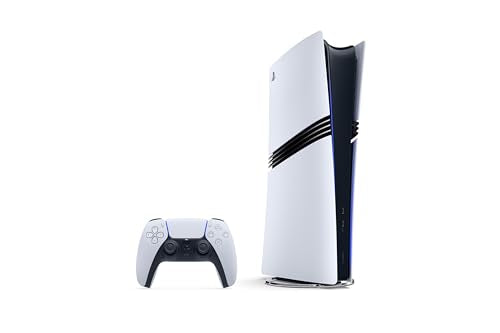
Before you pick a screen, it helps to know what the console can actually send it. Sony lists these capabilities:
- 4K at 120 Hz: the console supports the HDMI 2.1 spec, and compatible games can run at up to 120 frames per second.
- 2160p and 1440p resolutions: automatic mode picks the highest one your screen supports.
- VRR: the refresh rate adjusts on the fly to match the number of frames the game is showing. The result depends on the screen.
- HDR: you can choose "always on" or "on when supported".
- PSSR: AI-assisted image upscaling, designed with 4K screens in mind. The image quality enhancement setting is on by default.
- HDMI only: there is no DisplayPort on the back of the console.
The console also supports 8K gaming, but that requires an 8K 60 Hz screen with Display Stream Compression. On a regular desktop monitor, it doesn't matter.
Fun fact: the PS5 Pro turns off VRR when it outputs 8K.
We picked the monitors in the list below by one rule: according to the manufacturers' specs, all of them have HDMI 2.1 inputs.

Best monitors for PS5 Pro we recommend
1. ASUS TUF Gaming VG27UQ1A
27 inch · 4K · 160 Hz · 2x HDMI 2.1
A 4K monitor with two HDMI 2.1 inputs according to ASUS, so the PS5 can send it a 4K picture at 120 Hz. It supports variable refresh rate (FreeSync Premium, G-SYNC Compatible) and has 2 x 2 W speakers.
2. LG UltraGear OLED 27GX704A
27 inch · OLED · 1440p · 240 Hz
A 1440p OLED monitor with two HDMI 2.1 inputs and DisplayHDR True Black 400 certification according to LG. The PS5 offers a 1440p resolution in its settings, so it suits this screen. A pick for those who prefer OLED black levels and contrast over 4K resolution. It has no speakers.
HDMI 2.1 in a monitor: why "4K 144 Hz" alone isn't enough
It's easy to spot "4K 144 Hz" in a monitor's specs and assume you're set. But some cheaper monitors only deliver 4K at 120 Hz over DisplayPort. The console has no such output, so the only thing that matters is whether the screen has an HDMI 2.1 port.
Picture an evening with a game where the frame rate keeps rising and dropping. On a screen without VRR, the image can stutter slightly and tear horizontally. On a screen with VRR, the same moment looks smoother, because the monitor keeps up with the console, not the other way around.
After you connect the monitor, check the console settings. Sony recommends looking at a few things:
- in the resolution settings, choose automatic mode or 2160p,
- turn on "120 Hz Output," which works on screens and in games that support 120 Hz,
- turn on VRR if the monitor supports it,
- use the cable that came with the console or an Ultra High Speed cable,
- plug the cable into the monitor's HDMI 2.1 port, because not every HDMI input on a screen has it.
Fun fact: when 4K at 120 Hz doesn't go through, the PS5 may output 1080p at 120 Hz instead.
Refresh rates above 120 Hz can be a trap too. A 240 Hz monitor with HDMI 2.1 will accept any signal from the console, including 4K at 120 Hz, but the console won't send more than 120 Hz. The higher refresh rate only pays off if you also connect a PC to the same monitor.
IPS or OLED, 4K or 1440p
Once you have a monitor with HDMI 2.1 and VRR, the next choice is the panel. OLED gives the best contrast in HDR: blacks are truly black, and bright elements stand out sharply against them. You can see it clearly in dark scenes and in games with lots of lighting effects. There are also 4K OLED models with USB-C and 90 W charging that can handle a laptop on the same desk.
A non-OLED 4K monitor is a sensible pick if you care about a sharp image and a reasonable budget. Just keep in mind that some monitors have no speakers, so a headset or separate speakers will come in handy on your desk. If you mainly plan to play the new Grand Theft Auto, a separate article covers monitors for GTA 6 on PS5.
1440p makes sense too. The console lists it in its settings, so a 1440p OLED monitor will show the image without any fuss. It suits people who value black levels and contrast more than pixel count. Downside: this kind of screen has fewer pixels than 4K.
Our advice: if you mostly play on a console and care about HDR, go for a 27-inch 4K OLED monitor with HDMI 2.1. If you prefer a cheaper option, stick with a 4K monitor with HDMI 2.1 and VRR.
Frequently asked questions about monitors for PS5 Pro
Which monitor for PS5 Pro?
Ideally a 27-inch 4K monitor with an HDMI 2.1 input and VRR support. Such a screen will accept 4K at 120 Hz from the console and smooth out the image in games that don't hold a steady frame rate. If HDR and contrast matter to you, consider an OLED version.
Does a monitor for PS5 Pro need HDMI 2.1?
Yes, if you want to see 4K at 120 Hz. The console only has an HDMI output and no DisplayPort, so a monitor that offers 4K 120 Hz only over DisplayPort won't do you any good. Check that the cable goes into the monitor's HDMI 2.1 port.
Does PS5 Pro support a 1440p monitor?
Yes. In the resolution settings, the console lists 1440p next to 2160p, so a 1440p monitor will work normally. It's best if it has HDMI 2.1 and VRR, so you can make use of the higher refresh rate.
Will PS5 Pro make use of a 240 Hz monitor?
Only up to 120 Hz. A 240 Hz monitor with HDMI 2.1 will accept any signal from the console, but the PS5 Pro won't send more than 120 Hz. The higher refresh rate helps when you also connect a PC to the monitor.
Is an OLED or IPS monitor better for PS5 Pro?
OLED gives the best contrast in HDR and deep blacks, so it looks best in dark scenes. A 4K IPS monitor with HDMI 2.1 and VRR is a sensible alternative if you want a simpler choice. In both cases, the HDMI 2.1 input matters most.
Sources
- PlayStation Support: How to change PS5 console resolution - manufacturer page (playstation.com)
- PlayStation Blog: Welcome PlayStation 5 Pro - manufacturer page (blog.playstation.com)
- TechRadar: The best monitors for PS5 and PS5 Pro - industry article (techradar.com)
- RTINGS: The best PS5 monitors - industry article (rtings.com)
- Empire: Best monitors for PS5 - industry article (empireonline.com)
- Itechguides: Best 4K monitors for PS5, 120Hz, VRR and HDR buying guide - industry article (itechguides.com)

Leave a comment
This site is protected by hCaptcha and the hCaptcha Privacy Policy and Terms of Service apply.