








As an Amazon Associate I earn from qualifying purchases.
Quick answer: our top pick is SanDisk High Endurance 128 GB (128 GB · UHS-I · U3, V30 · up to 100 MB/s).
Best microSD card for Wyze camera? Short answer: High Endurance 128 or 256 GB
256 GB is the size where there's no doubt the camera will accept the card. For the Wyze Cam v4 and Cam Pan v4, get a microSD card from the High Endurance line, in 128 or 256 GB.
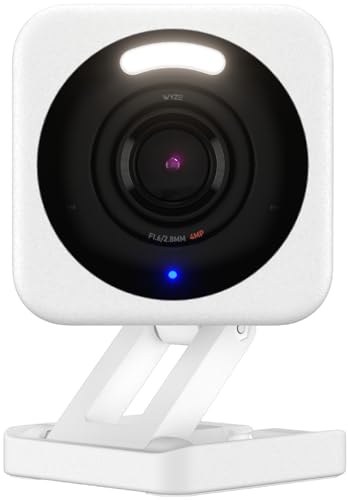
The Wyze Cam v4 is a wired 2.5K camera, sold mainly in the US. The microSD card is optional and isn't included with the basic version. Check the seller's listing for what's in the box.
If the camera stays put at home and records around the clock, go with 256 GB. The extra space gives you a longer archive before the oldest clips start getting overwritten. If you take the camera on trips, say to a cabin or a rental, 128 GB is enough. Shorter stays don't need a big archive.
Card limit and format: why sources say 256 GB or 512 GB
Sources give different limits. GearLab mentions cards up to 512 GB, and Consumer Reports also lists 512 GB as the maximum. Wyze support for the Cam Pan v4 says cards up to 32 GB in FAT32 and up to 512 GB in exFAT.
On the other hand, Wyze forum users treat 256 GB as the safe ceiling. They use cards of that size in exFAT in their v4 cameras. A 512 GB card will probably work, but 256 GB is the no-risk choice.
The format depends on capacity. Cards up to 32 GB need FAT32, and larger ones need exFAT. So at 128 and 256 GB, you'll be using exFAT.
Fun fact: the Wyze product page changed its stated card limit from 512 to 256 GB. We know this from the Wyze forum.
We picked cards from lines built for continuous recording, in sizes that make sense for this camera.
Our advice: if you don't want to take a risk, buy a High Endurance 256 GB card. Pick 128 GB when the camera only has a temporary job.
The microSD cards for Wyze cameras we recommend

1. SanDisk High Endurance 128 GB
128 GB · UHS-I · U3, V30 · up to 100 MB/s
A card for continuous recording in security cameras and dash cams. SanDisk rates the 128 GB version for up to 10,000 hours of Full HD recording, less at 4K.

2. SanDisk High Endurance 256 GB
256 GB · UHS-I · U3, V30 · up to 100 MB/s
A card for continuous recording in security cameras and dash cams. SanDisk rates the 256 GB version for up to 20,000 hours of Full HD recording, less at 4K.

3. SanDisk Extreme 512 GB
512 GB · UHS-I · A2, U3, V30 · up to 245 MB/s
SanDisk Extreme in a 512 GB capacity. The V30 rating handles 4K recording, while A2 speeds up app and game loading times.
Continuous recording without a subscription
With a card inside, the camera saves footage locally. You don't need to pay for cloud storage to have an archive you can go back to.
Fun fact: according to GearLab, the Wyze Cam v4 records around the clock with a microSD card and no subscription.
This mode puts real strain on the card. Standard cards wear out faster under constant recording, so a High Endurance card is the better pick. SanDisk designs this series for cameras and dash cams.
The camera records in a loop. When the card fills up, the oldest footage is deleted and new footage takes its place. You don't have to clear anything by hand. Copy any important clip to your phone or computer before its turn to be overwritten comes.
How to insert and format the card in the app
Put the card into the slot in the camera, then open the Wyze app. The camera formats the card from there, so you don't need to do it on a computer.
Formatting erases all data on the card. If you used it for something else before, copy off anything you want to keep first.
After formatting, the camera manages the space on its own. You don't need to pick a file system, as long as the capacity is within the limits described above.
If the card isn't recognized, check its capacity and format first. A card larger than 32 GB formatted as FAT32 is the most common cause of problems.
Frequently asked questions about Wyze cards
Which microSD card for Wyze Cam v4?
A High Endurance card with 128 or 256 GB of capacity. The 256 GB version gives you more room for footage, while 128 GB is enough if your needs are smaller.
Does the Wyze Cam v4 support a 512 GB card?
According to GearLab and Consumer Reports, yes. Wyze support for the Cam Pan v4 also lists 512 GB in exFAT. For the Cam v4, though, a 256 GB card is the safer pick, since users have confirmed it works.
What format should the card be for Wyze?
FAT32 up to 32 GB, and exFAT up to 512 GB. So 128 and 256 GB cards will be exFAT. You do the formatting in the Wyze app.
Does the Wyze Cam record without a subscription?
Yes, as long as there's a microSD card in the camera.
Do you need a High Endurance card for a Wyze camera?
It's not required. The camera will accept a standard card too. But with continuous recording, a standard card wears out faster, so High Endurance is the smarter choice.
See also
- Best microSD card for Reolink camera - capacity limit per model and Home Hub
- Best microSD Card for Xiaomi Camera - Limit for Each Model
- Best microSD card for eufy camera - 128 GB or more
Sources
- Wyze: Cam Pan v4 microSD card troubleshooting - manufacturer page (support.wyze.com)
- GearLab: Wyze Cam v4 review - industry article (techgearlab.com)
- Consumer Reports: Wyze Cam v4 - industry article (consumerreports.org)
- Wyze forum: max SD card for Wyze Cam v4 - industry article (forums.wyze.com)
- SanDisk: High Endurance microSD - industry article (sandisk.com)

Leave a comment
This site is protected by hCaptcha and the hCaptcha Privacy Policy and Terms of Service apply.