








As an Amazon Associate I earn from qualifying purchases.
Quick answer: our top pick is Lexar Professional SILVER PLUS 256 GB (256 GB · UHS-I · A2, U3, V30 · up to 205 MB/s).
Best microSD card for Antigravity A1? The simple answer: A2 V30 from the manufacturer's list
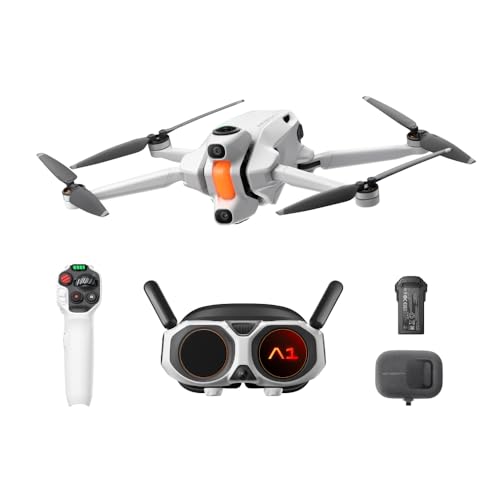
For the Antigravity A1, buy a microSDXC A2 V30 card from the list provided by Antigravity. 256 GB is enough to start with, but if you fly often and record in 8K, get 512 GB or 1 TB.
The drone supports cards up to 1 TB. The internal 20 GB fills up quickly, so a card is in practice a must, not an extra. Tom's Guide says the slot requires a V30 card or faster.
Don't look for the most expensive models with the highest speed classes. Below I explain why V30 is more than enough.

Why V30 is enough and why you need more capacity
The V30 class means a minimum sustained write speed of 30 MB/s, or 240 Mb/s (SD Association data). The drone records at a maximum bitrate of 170 Mb/s, so a V30 card has plenty of headroom.
The conclusion is simple: a V60 or V90 card won't improve anything here. You pay extra for a spec the drone won't use. It's better to spend that money on more capacity.
The Antigravity A1 records 8K video (7680x3840) at 30, 25 and 24 fps, 5.2K at up to 60 fps, and 4K at up to 100 fps. It uses H.264 and H.265 encoding. The higher the resolution, the faster storage runs out, and at 8K the 20 GB of internal memory is not much.
Fun fact: a V30 card writes at least 240 Mb/s, while the drone records at 170 Mb/s at most, so there is headroom.
We selected cards from the official Antigravity list, in capacities from 256 GB to 1 TB. Not every capacity is available in every market.
Recommended microSD cards for Antigravity A1
1. Lexar Professional SILVER PLUS 256 GB
256 GB · UHS-I · A2, U3, V30 · up to 205 MB/s
A Lexar card with read speeds up to 205 MB/s, A2, and V30 ratings. One of the bestsellers among microSD cards.

2. Kingston Canvas Go! Plus 512 GB
512 GB · UHS-I · A2, U3, V30 · up to 200 MB/s
Kingston Canvas Go! Plus (Gen4) in 512 GB capacity, with A2 and V30 classes and read speeds up to 200 MB/s.

3. Lexar Professional SILVER PLUS 1 TB
1 TB · UHS-I · A2, U3, V30 · up to 205 MB/s
Lexar SILVER PLUS with 1 TB capacity, read speeds up to 205 MB/s, A2, and V30 ratings.
Buying on Black Friday? Read our guide: best microSD card for Switch 2, cameras and phones.
Cards from the Antigravity list
Antigravity recommends A2 V30 microSDXC cards from three brands. All of them are available in capacities from 64 GB to 1 TB:
- SanDisk Extreme PRO (V30 U3 A2),
- Lexar Silver Plus,
- Kingston CANVAS Go! Plus.
The 64 GB and 128 GB cards are on the list, but they fill up quickly with 8K recordings. That is why the comparison above starts at 256 GB.
Which one should you choose? If the price is similar, simply pick the one that is available in the capacity you need. All three series are on the manufacturer's list, so the differences in practice will be small. The Kingston Canvas Go! Plus in the 512 GB version is sometimes sold without an SD adapter, which does not matter if the card is only going into the drone.
If you fly often and go on longer trips, 1 TB is a sensible choice. Do you fly less often and offload your footage after every trip? 256 GB is enough.
Goggles, INSV files and formatting
The Vision goggles have their own memory, about 30 GB. It is a separate resource from the card in the drone, so do not include it when planning recording capacity.
Fun fact: the Vision goggles have their own ca. 30 GB of memory, more than the drone itself with its 20 GB.
Drone recordings are saved as INSV files. You export them in the Antigravity app or in Antigravity Studio, so you cannot open them like a regular MP4 file in any player.
The file system is exFAT, the same as in the drone's built-in memory. A new microSDXC card usually comes with it from the factory, but before the first flight it is worth formatting it in the drone to avoid write problems.
A few practical rules:
- buy cards from the Antigravity list, not random substitutes,
- choose A2 V30, a higher speed class will not help,
- offload your footage after flights and only then clear the card.
Frequently asked questions about cards for the Antigravity A1
Which microSD card for the Antigravity A1?
A microSDXC A2 V30 card from the manufacturer's list: SanDisk Extreme PRO, Lexar Silver Plus or Kingston CANVAS Go! Plus. Start with 256 GB, and for frequent flying get 512 GB or 1 TB.
What is the maximum card capacity in the Antigravity A1?
The drone supports microSD cards up to 1 TB. Such capacities are on the list of cards recommended by Antigravity, although not every one is available in every market.
Does the Antigravity A1 record without a microSD card?
Yes, it has 20 GB of built-in memory with the exFAT file system. However, it fills up quickly with 8K recordings, so a card is practically a must.
Does the Antigravity A1 need a V60 card?
No. The drone records at a bitrate of up to 170 Mb/s, and the V30 class guarantees a write speed of 240 Mb/s. V60 or V90 will not help here, so it is better to choose a larger capacity.
What cards does the manufacturer of the Antigravity A1 recommend?
Antigravity recommends A2 V30 microSDXC cards: SanDisk Extreme PRO, Lexar Silver Plus and Kingston CANVAS Go! Plus. Each of these series is on the list in capacities from 64 GB to 1 TB.
See also
- Best microSD card for Insta360 X5 - UHS-I V30, not UHS-II
- Best microSD card for Insta360 GO Ultra - UHS-I V30 up to 2 TB
- Best microSD card for Insta360 X6 - UHS-I V30 and only 47 GB built in
Sources
- Antigravity: A1 specifications - manufacturer page (antigravity.tech)
- Tom's Guide: Antigravity A1 review - industry article (tomsguide.com)
- BGR: Antigravity A1 8K 360 drone review - industry article (bgr.com)
- Engadget: Antigravity A1 drone review - industry article (engadget.com)
- DroneDJ: Antigravity A1 360 video drone now available - industry article (dronedj.com)

Leave a comment
This site is protected by hCaptcha and the hCaptcha Privacy Policy and Terms of Service apply.