








As an Amazon Associate I earn from qualifying purchases.
Quick answer: our top pick is Apple Magic Keyboard with Touch ID (Touch ID · Bluetooth · USB-C · compact).
Best keyboard for iMac M6? Start with what you want it to do for you
Three Apple devices: that's how many you can pair with a single Logitech keyboard and switch between. On a desk with an iMac, a MacBook and an iPad, that saves you one keyboard per device.
If you want to unlock your computer with a fingerprint, you need an Apple keyboard with Touch ID. If backlighting and working across several devices matter more, get a Bluetooth keyboard from another brand.
A common worry is whether a third-party keyboard will work with the new iMac at all. It will. The wireless models we cover below connect over Bluetooth 6, so they don't need a USB receiver and don't take up a port. The only thing you lose is the fingerprint reader, because only two Apple keyboards have one.
The keyboard in the box and what Touch ID changes
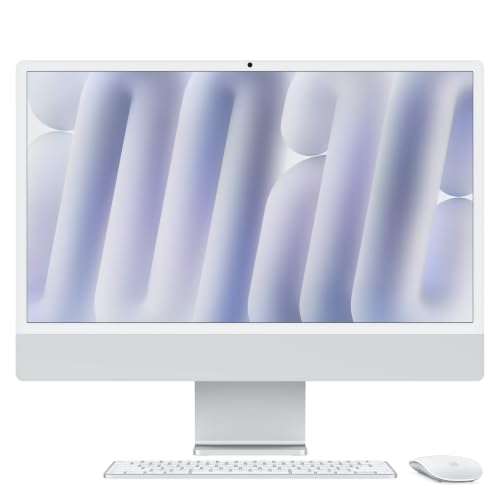
The iMac with M6 has been on sale since November 6, 2026. An Apple keyboard comes in the box, but which one depends on the configuration. It can be a Magic Keyboard with a lock key, with Touch ID, or with Touch ID and a numeric keypad. Check the exact version in the configuration details when you order.
Instead of the default keyboard, you can pick the version with Touch ID and a numeric keypad in the configurator. A keyboard bought together with the iMac is already paired, so it works right out of the box.
The difference in daily use is clear. With the lock-key keyboard, you unlock your Mac with a password. With the Touch ID version, a fingertip is enough. Touch ID works on Macs with Apple silicon running macOS 15.1 or later.
Fun fact: after you start or restart the iMac, the first login requires typing your password. Only after that does Touch ID work.
We picked Apple keyboards with Touch ID and Logitech models that connect over Bluetooth and have backlighting or switching between devices. Some versions may not be available everywhere, so check what you see in the boxes below.
Our advice: if logging in with your fingerprint will save you time every day, choose the Apple keyboard with Touch ID, and keep the Logitech models for a desk shared with other devices.
Keyboards for iMac M6 we recommend

1. Apple Magic Keyboard with Touch ID
Touch ID · Bluetooth · USB-C · compact
Apple keyboard with a Touch ID sensor for Macs with Apple silicon. It pairs easily and charges with a USB-C cable.

2. Apple Magic Keyboard with Touch ID and Numeric Keypad
Touch ID · numeric keypad · Bluetooth · USB-C
Full-size Apple keyboard with Touch ID, a numeric keypad and navigation keys. For people who type a lot of numbers.
See Apple Magic Keyboard with Touch ID and Numeric Keypad on Amazon →

3. Logitech MX Keys S
backlight · numeric keypad · Bluetooth · 3 devices
Full-size keyboard with quiet, low-profile keys and a backlight. It connects over Bluetooth to three devices, so it works with an iPad too.

4. Logitech MX Keys Mini
compact · backlight · Bluetooth · USB-C
Smaller version of the MX Keys without a numeric keypad, with a backlight and USB-C charging. It leaves more room for your mouse.

5. Logitech Pebble Keys 2 K380s
slim · Bluetooth · 3 devices · AAA batteries
Lightweight Bluetooth keyboard that switches between three devices. It's enough for typing when you don't need Touch ID or a backlight.
Keyboard layout, Control and Option keys, and multiple devices
Pick the keyboard layout for your country. It matters more than it seems, because accented letters and special characters sit in different places, and after typing on the wrong layout for a while it's hard to switch back.
The second thing is modifier keys. The easiest option is a Mac version with Command and Option keys. If you already have a Windows-layout keyboard, you don't need to replace it. You can change how Control, Option and similar keys behave in System Settings.
A numeric keypad comes in handy when you type a lot of numbers, for example in spreadsheets or bookkeeping. For writing and browsing, a compact keyboard is usually enough, and it leaves more room for the mouse.
If you work on an iMac and have an iPad or a MacBook next to it, a keyboard with device switching is useful. Logitech models pair with up to three Apple devices. You won't get Touch ID on the iMac with them, but you also won't have to unplug and reconnect one keyboard from device to device.
Pairing and charging made simple
Magic Keyboard pairs and charges with the same USB-C cable connected to the Mac. You don't need to look for a receiver or go through a long setup. Plug in the cable and the keyboard is ready.
Fun fact: according to Apple, the battery in the Magic Keyboard with Touch ID lasts about a month or more between charges.
Keyboards from other brands pair over Bluetooth in the Mac settings, like any other wireless accessory. How they are powered depends on the model: some charge over USB-C, others run on batteries. Check the description of the model you want before you buy it.
Frequently asked questions about keyboards for the iMac M6
Which keyboard comes with the iMac M6?
It's one of the Magic Keyboard models, and the exact version depends on the configuration you choose. Along with the Magic Mouse in the box, you get a keyboard with a lock key, with Touch ID, or with Touch ID and a numeric keypad.
Does Touch ID work with a keyboard from another brand?
No. Only Apple keyboards have a Touch ID sensor. If you want to log in with your fingerprint, start with a Magic Keyboard with Touch ID, and treat keyboards from other brands as a comfortable add-on for typing.
Does a Logitech keyboard work with the iMac M6?
Yes, it connects over Bluetooth and doesn't need a USB receiver. Choose the Mac layout version or remap the modifier keys in the system settings. Just keep in mind that it won't unlock the computer with your finger.
How do I pair and charge the Magic Keyboard?
Connect it to the Mac with a USB-C cable. The same cable is used for pairing and for charging. If the keyboard came with the iMac, it's already paired.
Is a keyboard with a numeric keypad worth it?
Yes, if you often type numbers or codes, or work in spreadsheets. The version with a keypad is wider, so it takes up more desk space. If you don't type many numbers, a compact keyboard will be more comfortable.
Sources
- Apple: iMac technical specifications - manufacturer page (apple.com)
- Apple Support: Magic Keyboard with Touch ID for Mac models with Apple silicon - manufacturer page (support.apple.com)
- Apple Support: Magic Keyboard for iMac - manufacturer page (support.apple.com)
- Apple Support: change the behavior of the modifier keys on Mac - manufacturer page (support.apple.com)
- MacRumors: Apple announces new iMac with M6 chip - industry article (macrumors.com)
- iThinkDifferent: best keyboards and mice for the M6 Mac mini - industry article (ithinkdiff.com)
- Digital Trends: Apple refreshes the iMac with M6 - industry article (digitaltrends.com)

Leave a comment
This site is protected by hCaptcha and the hCaptcha Privacy Policy and Terms of Service apply.