








As an Amazon Associate I earn from qualifying purchases.
Quick answer: our top pick is Anker Power Bank 25000mAh 165W (25,000 mAh · up to 100 W from one port · 2 built-in cables).
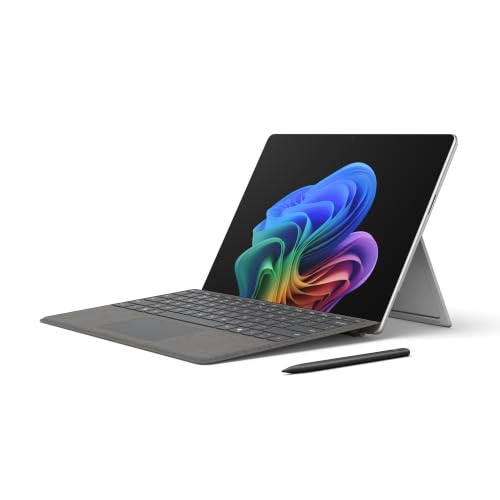
Best power bank for Surface Pro 13 (2026)? Start with USB-C PD 65 W and 20,000 mAh
The Surface Pro 13-inch has a 53 Wh battery, and a 20,000 mAh power bank holds about 74 Wh. That's enough for a full charge of the tablet with some to spare. Look for a model with USB-C Power Delivery of at least 60 W, ideally 65 W.
If you work on the move all day and don't always have an outlet, get 25,000 mAh. That's about 92 Wh, or almost two tablet batteries. You connect the power bank to one of the two USB-C 4.0 ports on the left side. The Surface Connect port on the right isn't needed for this.
The first worry: could a powerful power bank, say 100 W, harm the tablet? No. The devices agree on the power between themselves over USB PD. The Surface draws only what it needs, and the extra power from the power bank simply goes unused.
How many watts you really need and why 30 W is too little
In a footnote to the specs, Microsoft says fast charging requires a 65 W Surface power supply or a USB-C PD charger of at least 60 W. The power bank should have the same rating. In a load test, Notebookcheck recorded a draw of 60.3 W, then about 39 W, which is why it recommends a 65 W power supply.
A weaker power bank, say 30 W, will still charge the tablet, but slowly. When you're working and the Surface draws more than it receives, the battery fills slowly or not at all. Windows may then show the message "To speed up charging, use a higher-watt charger". It means the port has reported slow charging.
The "total" power in a power bank's description is the sum of all ports. Look at the figure for a single USB-C port, because that's what reaches the tablet. If you plug a phone into the second port, the power available to the Surface may drop.
Below, we've gathered USB-C power banks that deliver at least 100 W from a single port, with capacities of around 25,000 mAh. Our advice: for work in the city and shorter trips, get 20,000 mAh with 65 W. For a whole day without an outlet, get 25,000 mAh with 100 W or more.
Our recommended power banks for Surface Pro 13 (2026)

1. Anker Power Bank 25000mAh 165W
25,000 mAh · up to 100 W from one port · 2 built-in cables
A power bank for heavy users: 165 W total, up to 100 W from one port, and two built-in cables (one retracts out to 70 cm). At 90 Wh it fits the carry-on limit.

2. Anker Power Bank 20000mAh 87W
20,000 mAh · up to 65 W from one port · built-in cable
87 W total and up to 65 W for one device, so there is headroom for more demanding phones and a laptop. Anker says the built-in cable survives over 10,000 bends.
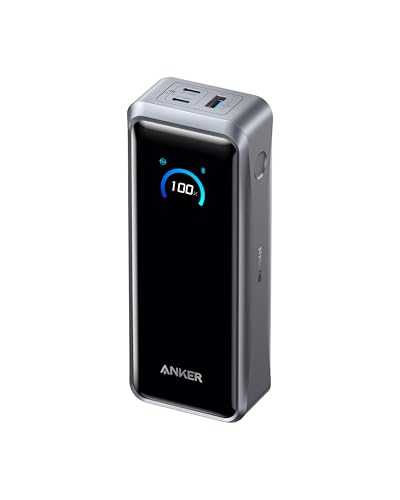
3. Anker Prime Power Bank 26,250mAh 300W
Up to 140 W per port · 300 W total · display
The most powerful on the list: up to 140 W from a single USB-C port, so it has headroom even for bigger laptops. The display shows power and time remaining. About 99 Wh, which is within the carry-on limit.

4. INIU Power Bank 20000mAh 65W
20,000 mAh · up to 65 W · USB-C
Compact 20,000 mAh power bank with 65 W over USB-C and three ports. 65 W is enough to keep a USB-C laptop charging while you work.

5. UGREEN Nexode Power Bank 25000mAh 145W
25,000 mAh · up to 140 W per port · 3 USB-C ports
Up to 140 W from a single USB-C port (USB PD 3.1) plus three USB-C ports. Plenty of power headroom for devices that need 65 or 100 W.
How many times a power bank charges a tablet, and which cable to pick
By the numbers, 20,000 mAh is about 1.4 Surface Pro batteries, and 25,000 mAh is about 1.7. The formula is simple: Wh = (mAh / 1000) x voltage, and power banks usually run at 3.7 V. In real use you get a bit less, because the converters lose some energy. So count on one full charge plus a top-up for your phone or earbuds.
The cable matters once you charge above 60 W. A USB-C cable then has to support 5 A and have an E-Marker chip. An ordinary phone cable often doesn't have one. Before you hit the road, check the cable's description for 5 A and 100 W (or more).
A 60 W cable will work too, but it caps the power at 60 W. If your power bank has a built-in cable, check its description to see how much power it carries.
Fun fact: E-Marker chips are also required in USB-C cables made for data transfer faster than 480 Mb/s, not just those for high power.
Power bank on a plane
According to the FAA, batteries up to 100 Wh are allowed on board. The 101-160 Wh range needs airline approval, and anything above 160 Wh is banned. Both sizes covered here, 20,000 and 25,000 mAh, fit within the limit with no extra formalities.
Carry the power bank in your carry-on. The FAA prohibits power banks and portable chargers in checked baggage. Put it in your backpack together with the cable, so you have everything at hand at security.
For models around 90 Wh, look at the label, because the manufacturer lists the Wh value there. Engadget notes that among power banks for laptops, a 25,000 mAh model is rated at 90 Wh by its manufacturer. If your airline has its own rules, check them before you fly.
Fun fact: 100 Wh is roughly 27,000 mAh, and that's the usual threshold above which you need airline approval.
Frequently asked questions about a power bank for Surface Pro 13
How many watts should a power bank for Surface Pro 13 (2026) have?
At least 60 W from a single USB-C PD port, and ideally 65 W. That's the power Microsoft lists for fast charging. A stronger model, such as 100 W, is fine too, because the tablet draws only what it needs.
How many times will a 20,000 mAh power bank charge a Surface Pro?
About 1.4 times, so one full charge with a little to spare. The calculation ignores converter losses, so in practice you'll get slightly less. For a longer workday, consider 25,000 mAh, which gives about 1.7 batteries.
Is a 30 W power bank enough for Surface Pro 13?
For a top-up during a short break, yes, but for fast charging it's not enough. Microsoft requires at least 60 W, and in Notebookcheck's test the tablet drew as much as 60.3 W. Windows may also show a slow charger warning.
Which cable for a 65 W or stronger power bank?
For power above 60 W you need a 5 A USB-C cable with an E-Marker chip. A cable without one will limit the power, and the tablet will charge more slowly. Check the description to see whether the cable lists 5 A or 100 W and more.
Can I take a 25,000 mAh power bank on a plane?
Yes, because it fits within the 100 Wh limit set by the FAA. Carry it in your carry-on, since power banks aren't allowed in checked baggage. Check your airline's rules before you fly.
Sources
- Microsoft: Surface Pro (specyfikacja i przypisy) - manufacturer page (microsoft.com)
- Microsoft Learn: USB Type-C troubleshooting notifications - manufacturer page (learn.microsoft.com)
- FAA PackSafe: Airline passengers and batteries - manufacturer page (faa.gov)
- Notebookcheck: Surface Pro OLED 2026 review - industry article (notebookcheck.net)
- Tom's Hardware: new Surface Pro and Surface Laptop - industry article (tomshardware.com)
- TechRadar: how to travel safely with a portable power bank - industry article (techradar.com)
- Total Phase: what is an E-Marker - industry article (totalphase.com)

Leave a comment
This site is protected by hCaptcha and the hCaptcha Privacy Policy and Terms of Service apply.