

As an Amazon Associate I earn from qualifying purchases.
Quick answer: our top pick is Turtle Beach Stealth 600 (PlayStation) (USB dongle 2.4 GHz · Bluetooth · up to 80 hours · microphone).
Best headsets for GTA 6 on PS5? A wireless set with a USB transmitter
It's past 10 p.m., everyone at home is asleep, and you want to fire up GTA 6 without waking the whole building. Your regular Bluetooth headphones are within reach, but the PS5 won't see them. Buy a wireless headset in the PlayStation version, with a USB transmitter in the box.
The game launches on November 19, 2026 on PS5 and Xbox Series X|S. You plug the transmitter into the console's port and the headset connects to it on its own, with no pairing in the menu. You get sound without a cable and can play from the couch instead of sitting right by the TV.
Why regular Bluetooth headphones don't work with the PS5
The PS5 doesn't support Bluetooth audio, so you can't pair the headphones you use with your phone. It's a console limitation, not a flaw in your headphones. Three options work on the PS5:
- a wireless headset with its own USB transmitter (2.4 GHz),
- wired headphones plugged into the DualSense controller,
- a Bluetooth-to-USB adapter that you connect regular headphones to.
Is an adapter a good idea? You'll get sound, but the headphones' microphone usually won't work. For in-game chat you'd use the mic in the controller, which also picks up button clicks and room noise. If you want voice chat to be comfortable, a headset with its own transmitter is the better choice.
Fun fact: the DualSense controller connects to the console wirelessly, yet regular Bluetooth headphones still can't.
We picked headsets in the PlayStation version with a USB transmitter, because it's the simplest way to get wireless audio on the PS5.
Headsets for GTA 6 on PS5 we recommend

1. Turtle Beach Stealth 600 (PlayStation)
USB dongle 2.4 GHz · Bluetooth · up to 80 hours · microphone
One of the most popular headsets for PS5. It connects through a USB dongle, and to your phone over Bluetooth. The manufacturer claims up to 80 hours on a single charge.

2. SteelSeries Arctis Nova 5 (PlayStation)
USB-C dongle 2.4 GHz · Bluetooth · app with sound profiles
A lightweight headset with a USB-C dongle and one-button switching to Bluetooth. You set the game sound profiles in the app on your phone.
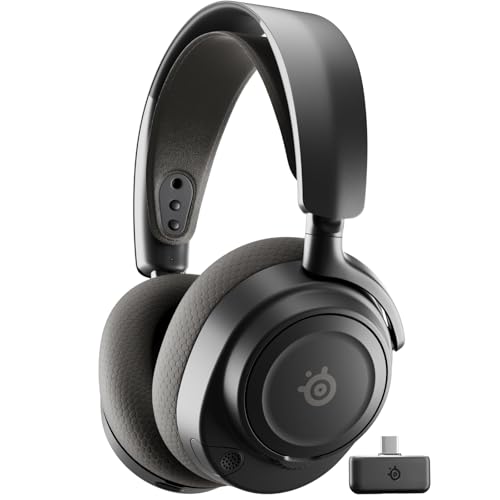
3. SteelSeries Arctis Nova 7 (PlayStation)
USB-C dongle 2.4 GHz · simultaneous Bluetooth · retractable microphone
The higher-end model: you hear audio from the console and from your phone at the same time, so a call or music from your phone doesn't interrupt your game. The microphone tucks into the ear cup.
Tempest 3D Audio in GTA 6 and how to set it up
GTA 6 uses the PS5's Tempest 3D AudioTech. In the city, that means you can hear direction: which side a police car is coming from, or where the gunshots are. 3D audio works on headphones and on TV speakers, but the effect is strongest on headphones.
Setup takes a minute. Go to Settings, then Sound, then 3D Audio (Headphones) and create a custom profile. Do it with the headset you'll actually play in, and in a quiet room so nothing drowns out the console.
Fun fact: while you build the profile, the PS5 plays sounds from different directions and asks where you hear them coming from.
Wired headsets for the controller: the simplest option
Wired headsets with a 3.5 mm plug are the least hassle. You plug them into the controller and play. No transmitter, no pairing, no charging, and the controller has its own mic for chat.
The downside is obvious: the cable runs from the controller to your head, which can get annoying on a couch. If you sit close and want to start right away, it's a good choice. A separate article covers the best controller for GTA 6.
PlayStation version vs. Xbox version
Xbox versions of headsets use a different transmitter and don't work with the PS5 the same way. So when you buy, check the version in the listing, not just the model name. The PlayStation version also works with a PC, so one headset covers both your console and your computer.
Pay attention to the transmitter type. You plug a USB-C connector into the USB-C port on the front of the console, and a USB-A connector into a USB-A port. Check what's included in the seller's listing, because not every bundle comes with the same accessories.
If you're buying just one: get a wireless headset in the PlayStation version with a USB transmitter. Late-night gaming stays cable-free and the mic works with no fuss.
Frequently asked questions about headsets for GTA 6 on PS5
Which headset for GTA 6 on PS5?
The most convenient is a wireless headset in the PlayStation version with a USB transmitter in the box. If you prefer simplicity, get a wired headset with a 3.5 mm plug and connect it to the controller.
Do Bluetooth headphones work with the PS5?
Not directly, because the console doesn't support Bluetooth audio. You can use a headset with its own USB transmitter, or a Bluetooth-to-USB adapter. With an adapter, the headset's mic usually doesn't work, so you talk through the mic in the controller.
Does GTA 6 have 3D audio on PS5?
Yes, the game uses the console's Tempest 3D AudioTech. To tune the effect to you, create a profile in the 3D audio settings for headphones. It only takes a moment.
Do Xbox headsets work with the PS5?
Xbox versions use a different transmitter and don't work with the PS5 the same way. Look for the PlayStation version, which also works with a PC.
How do I connect a wired headset to the PS5?
Plug the 3.5 mm connector into the jack on the DualSense controller. The chat mic is built into the controller, so you don't need any extra accessories.
See also
- Best Monitor for GTA 6 on PS5 and PS5 Pro - 4K, HDR and 30 FPS
- PS5 storage full? How to free up space and which SSD to add
Sources
- PlayStation Support: 3D audio on PS5 - manufacturer page (playstation.com)
- Rockstar Games Newswire: Pre-load Grand Theft Auto VI - manufacturer page (rockstargames.com)
- What Hi-Fi?: Why your Bluetooth headphones won't work with your PS5 - industry article (whathifi.com)
- Laptop Mag: How to connect Bluetooth headphones to PS5 - industry article (laptopmag.com)
- Android Central: How to connect Bluetooth headphones to PS5 - industry article (androidcentral.com)
- Beebom: GTA 6 PS5 exclusive features - industry article (beebom.com)

Leave a comment
This site is protected by hCaptcha and the hCaptcha Privacy Policy and Terms of Service apply.