








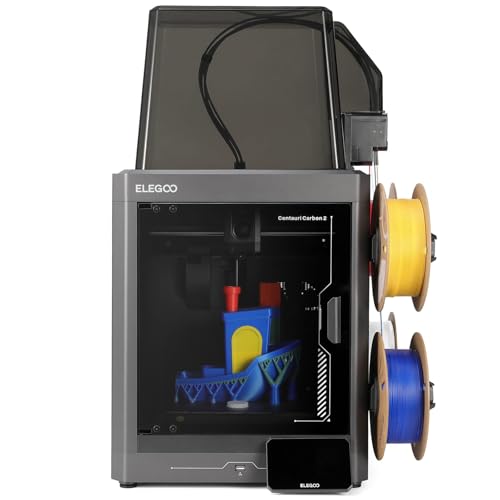
As an Amazon Associate I earn from qualifying purchases.
Quick answer: our top pick is ELEGOO PLA 1.75 mm, 1 kg (PLA · 1.75 mm · 1 kg · cardboard spool).
Best filament for Elegoo Centauri Carbon 2? Short answer
You load a new spool into CANVAS and aren't sure the printer will take it. Two spools look alike, but one is soft as rubber and can jam the feed. For everyday printing on the Centauri Carbon 2, buy PLA and PETG. Use ABS and ASA in the enclosed chamber. Run TPU separately, outside CANVAS.
The hardened steel nozzle heats up to 350 °C, and the bed up to 110 °C. The high bed temperature helps with ABS, ASA and PC, which like a hot surface. In its FAQ, Elegoo also lists support for PLA-CF and PETG-CF.
Thanks to the hardened nozzle, you can print carbon fiber right away, but keep an eye on feeder wear.
Which materials fit and how they work with CANVAS
Before you add a spool to your cart, check three things on its label:
- filament diameter: it should be 1.75 mm,
- material type: rigid or flexible,
- spool hole diameter, because it decides whether the spool fits the holder.
Below is a list of the materials the printer supports and how they behave in CANVAS:
- PLA: works with CANVAS. The easiest way to start and a good choice for prints around the house.
- PETG: works with CANVAS. Stronger and more heat resistant than PLA, but sensitive to moisture.
- ABS and ASA: work with CANVAS. Print them in the enclosed chamber and on a well-heated bed. ASA is a good fit for parts exposed to sun and rain.
- PC: works with CANVAS and takes advantage of the bed's 110 °C.
- PLA-CF and PETG-CF: work with CANVAS, but the fibers wear down the feeder parts. You need to check and replace them.
- TPU: not through CANVAS. Soft filament bends in the tube and jams the feed, so you run it separately.
Fun fact: In its filament guide, Elegoo says PLA has almost no smell, and if it does, it's slightly sweet.
We picked the products below based on whether they are 1.75 mm filaments of the types the printer supports, and whether they work with CANVAS or run outside it as TPU. If you're buying just one, get 1.75 mm PLA or PETG on a spool with a hole that fits the holder, because both work in CANVAS with no extra steps.
Filaments for the Elegoo Centauri Carbon 2 we recommend

1. ELEGOO PLA 1.75 mm, 1 kg
PLA · 1.75 mm · 1 kg · cardboard spool
Standard ELEGOO PLA on a 1 kg cardboard spool. The manufacturer states a diameter accuracy of 0.02 mm.

2. SUNLU PETG 1.75 mm, 1 kg
PETG · 1.75 mm · 1 kg
PETG for functional parts: stronger and more heat resistant than PLA. It's worth drying it before printing.
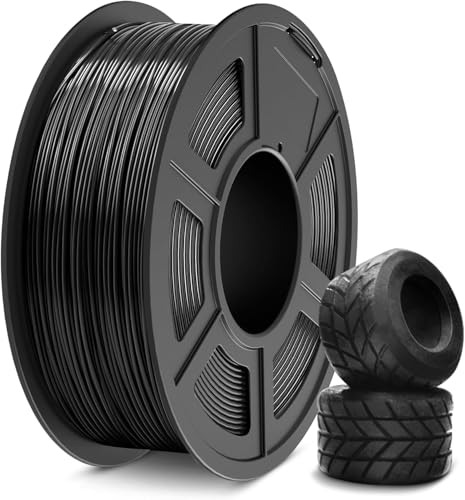
3. SUNLU TPU 95A 1.75 mm, 1 kg
TPU 95A · 1.75 mm · 1 kg · flexible
Flexible 95A filament in a version for faster printing. It needs to be dried before printing.

4. SUNLU PLA 1.75 mm, 1 kg
PLA · 1.75 mm · 1 kg
Standard SUNLU PLA on a 1 kg spool, one of the most popular filaments.
Spools: hole size, cardboard, and adapters
The holder fits spools with a 53-58 mm hole. If the hole is larger, you need a printed adapter. You can check the size on the spool or in the seller's description.
Be careful with cardboard, too. Tom's Hardware described a cardboard spool from another brand that jammed and broke the holder. So a cardboard spool isn't a problem in itself, but with third-party filament, measure the hole and the diameter of the whole spool.
Filament from other brands works as long as it meets these conditions: 1.75 mm, the right hole size, and a material from the supported list. A smooth spool helps too, because in CANVAS the filament moves back and forth many times during color changes.
TPU step by step, drying, and mixing materials
With the Combo version, for TPU you attach the soft filament adapter and disconnect the CANVAS cable. The adapter model is on the USB drive that comes with the printer. Then you load the spool directly.
Be patient at the start. The bed for TPU defaults to 35 °C, and after auto-leveling at 60 °C it takes about 15-25 minutes to cool to that temperature. Don't interrupt the wait, because the printer does it on purpose.
Tom's Hardware noted that in their test, CANVAS fed TPU as hard as 95A, even though Elegoo doesn't support that. Treat it as a curiosity, not a recommendation. Stick to the manufacturer's guidance.
The spools in CANVAS hang outside and there is no drying, as the Irish Examiner pointed out. So dry PETG and TPU before printing, and with other materials, don't leave the spool uncovered for long.
Don't mix filaments with very different nozzle temperatures, because the hotend will clog. After a high-temperature filament, you need to purge it. Elegoo describes one safe pair for supports: PLA and PETG, when the second material is the support interface layer. You can load those two into two CANVAS channels.
Fun fact: Notebookcheck noted that in one of their test models, the printer changed color 74 times and left a lot of nozzle purge waste.
Frequently asked questions about filament for the Centauri Carbon 2
Does the Elegoo Centauri Carbon 2 print TPU?
Yes, TPU is on the list of supported materials. You print it outside CANVAS, though, with the soft filament adapter and the CANVAS cable disconnected. The filament must be dried before printing.
Which spools fit CANVAS in the Centauri Carbon 2?
1.75 mm spools with a 53-58 mm hole, with rigid filament: PLA, PETG, ABS, ASA, or PC. A larger hole needs an adapter. Cardboard spools from other brands can jam in the holder.
Does the Centauri Carbon 2 print PLA-CF and PETG-CF?
Yes, both materials are on the manufacturer's list, and the nozzle is hardened. The fiber passes through CANVAS, but it wears down the feeder parts. Check them from time to time and replace them when they wear out.
Does third-party filament work in the Centauri Carbon 2?
Yes, if it's a material from the supported list, 1.75 mm in diameter, on a spool that fits the holder. Elegoo doesn't limit you to its own spools. Measure the hole before you buy.
What temperature should I dry filament at for the Centauri Carbon 2?
According to Elegoo's drying guide: PLA at 55 °C for 6 hours, PETG at 60 °C for 8-10 hours, TPU at 70 °C for 6-10 hours. Drying is mandatory for TPU.
Sources
- ELEGOO Wiki: Centauri Carbon 2 Combo FAQ - manufacturer page (wiki.elegoo.com)
- ELEGOO: Centauri Carbon 2 Combo - manufacturer page (elegoo.com)
- ELEGOO Wiki: The filament load is stuck - manufacturer page (wiki.elegoo.com)
- ELEGOO Wiki: How to Install the TPU Adapter and Print TPU - manufacturer page (wiki.elegoo.com)
- ELEGOO Wiki: How to set a smooth support contact surface - manufacturer page (wiki.elegoo.com)
- ELEGOO Wiki: Guide to FDM Printing Filament - manufacturer page (wiki.elegoo.com)
- Tom's Hardware: Elegoo Centauri Carbon 2 review - industry article (tomshardware.com)
- Irish Examiner: Elegoo Centauri Carbon 2 review - industry article (irishexaminer.com)
- Notebookcheck: Elegoo Centauri Carbon 2 review - industry article (notebookcheck.net)

Leave a comment
This site is protected by hCaptcha and the hCaptcha Privacy Policy and Terms of Service apply.