








As an Amazon Associate I earn from qualifying purchases.
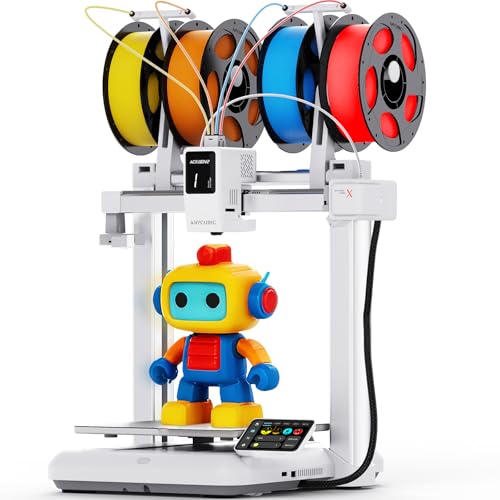
Quick answer: our top pick is Anycubic PLA 1.75 mm, 1 kg (PLA · 1.75 mm · 1 kg).
Best filament for Anycubic Kobra X? PLA and PETG to start
You send a model to print in the evening and go to bed. In the morning you find that the filament you bought in a hurry doesn't suit this printer. For the Kobra X, PLA and PETG are safe buys, and with TPU you need to watch the hardness.
TPU 95A works only in single-color printing. If you want to combine soft and hard materials in one print, look for TPU 68D. Anycubic lists these filaments in the specs: PLA, PETG, TPU, PVA, PLA-CF, PETG-CF and ASA. The nozzle heats up to 300°C (572°F) and the bed to 100°C (212°F).
Fun fact: The Kobra X claims 19 colors, not 20. The reason is simple: one of the four channels on the toolhead is taken up by the external ACE.
What you can print and what to leave alone
Below are the materials from official Anycubic sources, plus notes from reviews, with the source named wherever the information doesn't come from the manufacturer.
- PLA: yes. It's on Anycubic's list. A good choice for your first spool and for prints around the house.
- PETG: yes. Also on the list. Reach for it when you need functional parts that are stronger than PLA.
- PLA-CF and PETG-CF: yes. Both are on the official list of supported filaments.
- TPU 95A: yes, but only in a single color. Combining PLA or PETG with TPU 95A is not supported.
- TPU 68D: yes. It runs reliably in multicolor printing. Anycubic allows combining it with PLA, as well as two TPU 68D filaments in one print.
- TPU 85A: unofficially. Anycubic marks it as unsupported, but in Tom's Hardware's tests the ACE Gen 2 toolhead handled both 95A and 85A.
- PVA: yes. Anycubic allows combining PLA with PVA in one print.
- ASA: with caveats. It's on the list, but you'll find the details in the next section.
- ABS and nylon: no. TechRadar says the open design isn't suited to them.
TPU is too flexible to feed straight through a PTFE tube. According to Anycubic's guide, you need to remove the tube for a moment and feed the filament into the extruder by hand. Do it slowly every time you load TPU.
Take two cases. If you print desk gadgets and drawer organizers, plain PLA is enough. If you're making a garage hook or a part that has to survive a good yank, PETG is the better pick, and TPU is the one for soft feet and covers.
In short: for everyday printing, go with PLA or PETG, and buy TPU in a hardness that matches whether you print in one color or several.
Below we've gathered 1.75 mm filaments on 1 kg spools, chosen by the type of material from the list supported by the Kobra X: PLA, PETG and TPU 95A for single-color printing.
Filaments for the Anycubic Kobra X we recommend

1. Anycubic PLA 1.75 mm, 1 kg
PLA · 1.75 mm · 1 kg
Basic Anycubic PLA on a 1 kg spool. The manufacturer states a diameter accuracy of 0.02 mm.

2. SUNLU PLA 1.75 mm, 1 kg
PLA · 1.75 mm · 1 kg
Standard SUNLU PLA on a 1 kg spool, one of the most popular filaments.

3. SUNLU PETG 1.75 mm, 1 kg
PETG · 1.75 mm · 1 kg
PETG for functional parts: stronger and more heat resistant than PLA. It's worth drying it before printing.
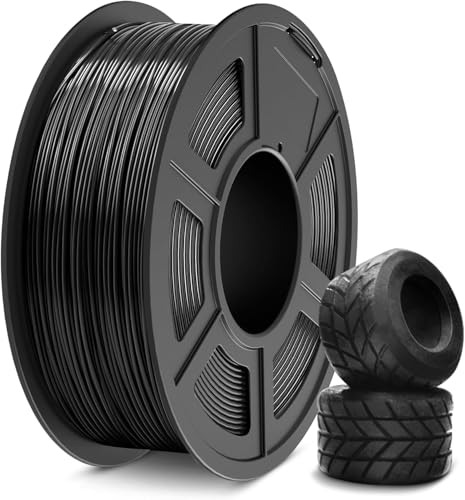
4. SUNLU TPU 95A 1.75 mm, 1 kg
TPU 95A · 1.75 mm · 1 kg · flexible
Flexible 95A filament in a version for faster printing. It needs to be dried before printing.
ASA and ABS on an open frame
Skip ABS. TechRadar points out that the open design of the Kobra X isn't suited to nylon and ABS, because these materials need stable, enclosed heat around the print.
ASA is on the official list, but you use it at your own risk. Anycubic's ASA filament sheet gives a bed temperature of 100-110°C and lists the S1 series as compatible printers. The Kobra X bed tops out at 100°C, which is the lower end of the recommendation.
If you need a part that can handle sun and outdoor conditions and you don't want to experiment, start with PETG. Come back to ASA when you really want that material and accept some risk of failed prints.
RFID, spools for the ACE 2 Pro and drying
Anycubic spools have a label with an RFID chip. Hold it up to the reading area in the lower left corner of the printer and turn it slowly before the filament goes into the feeder. The printer will recognize the material on its own.
With filament from other brands, without a chip, setting the material on the printer isn't always simple, as TechRadar notes. So with filament that has no chip, be prepared to set the material manually on the printer.
If you use the ACE 2 Pro, check the spool dimensions. Only standard 1 kg spools with a width of 60-68 mm, a diameter of 195-200 mm and a wall thickness of 3-6 mm will fit. The manufacturer doesn't recommend cardboard spools. If you already have them, it advises printing guards or rings for both sides of the spool.
The printer itself doesn't dry filament. You need the ACE 2 Pro for that. Without it, keep TPU and PVA in a dry place. Before printing, it's a good idea to dry TPU for 4-6 hours at 45-50°C, so start in the evening and print the next day.
Fun fact: in the Tom's Hardware test, a four-color castle weighed 31.74 g, and the Kobra X used 150 g of filament for purging and 42 g for the purge tower to print it.
Frequently asked questions about Kobra X filament
Does the Anycubic Kobra X print with TPU 95A?
Yes, but only in single-color printing. Combining PLA or PETG with TPU 95A isn't supported, so choose TPU 68D for multicolor prints. Also remember to remove the PTFE tube before loading TPU.
Can you print ASA and ABS on the Anycubic Kobra X?
We don't recommend ABS, because the printer has an open design. ASA is on the manufacturer's list, but Anycubic's filament sheet gives a bed temperature of 100-110°C, and the Kobra X reaches 100°C. Treat it as printing at your own risk.
Does the Kobra X accept filament from other brands without RFID?
Yes, but expect to set the material manually. TechRadar writes that this isn't always simple with filament that has no chip. Anycubic spools have an RFID chip, so the printer recognizes them on its own.
Do cardboard spools fit the ACE 2 Pro?
The manufacturer doesn't recommend them. If you have such a spool, Anycubic advises printing guards or rings for both sides. Standard 1 kg spools that meet the dimensions above are the safest bet.
Does the Kobra X dry filament while printing?
No, the printer itself doesn't dry filament. You need the ACE 2 Pro for that. Without it, you have to dry TPU and PVA separately, before printing.
Sources
- Anycubic: Kobra X specifications and FAQ - manufacturer page (store.anycubic.com)
- Anycubic Wiki: Kobra X TPU printing guide - manufacturer page (wiki.anycubic.com)
- Anycubic Wiki: Kobra X FAQ - manufacturer page (wiki.anycubic.com)
- Anycubic Wiki: ACE 2 Pro FAQ - manufacturer page (wiki.anycubic.com)
- Anycubic: ASA filament parameters - manufacturer page (store.anycubic.com)
- Tom's Hardware: Anycubic Kobra X review - industry article (tomshardware.com)
- TechRadar: Anycubic Kobra X review - industry article (techradar.com)
- FauxHammer: Anycubic Kobra X review - industry article (fauxhammer.com)

Leave a comment
This site is protected by hCaptcha and the hCaptcha Privacy Policy and Terms of Service apply.