








As an Amazon Associate I earn from qualifying purchases.
Quick answer: our top pick is Sony DualSense wireless controller (Bluetooth and USB-C · PS5 gamepad · rechargeable battery).
Best controller for iPad? A Bluetooth gamepad or a USB-C clamp
For an iPad, you can use a regular Bluetooth gamepad or a USB-C clamp controller that turns your tablet into a handheld console. A Bluetooth gamepad pairs with any iPad, while a clamp controller mostly makes sense if you play on the go.
At home, a gamepad is enough. You pair it like any other device. The tablet sits on a stand and you relax on the couch. You can later connect the same gamepad to a console or a computer.
On a train or a long trip, a stand can be a hassle. A clamp controller holds the tablet in your hands like a handheld and saves you from packing a separate gamepad. The catch is that it has to fit the size of your iPad.
We have a separate article about controllers for iPhone. Here we stick to tablets.
Which clamp size fits which iPad
A clamp controller works like an expandable grip, so check your tablet's dimensions first. The iPad mini with the A20 Pro is 7.69 inches (195.3 mm) tall and 5.22 inches (132.6 mm) wide. It has been on sale since November 6, 2026, so MFi-certified clamps for the iPad mini 6 and later cover this model too.
For the mini, look for the smaller version with a span of about 4.9-8.5 inches (125-215 mm). That range fits large smartphones and the iPad mini. One clamp of this type weighs 304 g (10.7 oz), connects with a USB-C cable and has no Bluetooth. The iPad mini itself weighs 255 g (9.0 oz) in the Wi-Fi version, so together they make a fairly hefty setup.
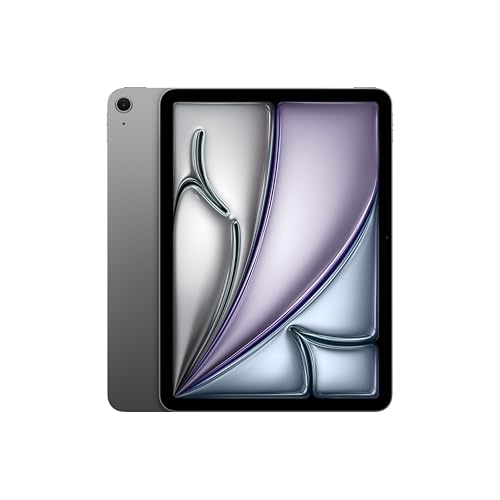
The 13-inch iPad Air (M4) is 11.05 inches (280.6 mm) tall and 8.46 inches (214.9 mm) wide. A small clamp won't hold it. You need the extended version for 10-13 inch tablets, which fits the iPad Air and Pro. According to Windows Central, this larger model has the same features as the standard version.
Fun fact: according to an Engadget writer, a clamp that expands to fit a 13-inch iPad turns it into a handheld that makes the Switch 2 look noticeably smaller.
One limitation applies to all clamp controllers. According to Tom's Guide, they have no rumble or haptics on iOS and iPadOS. If you want vibration in racing games, choose a Bluetooth gamepad.
Our advice: if you mostly play at home, get a Bluetooth gamepad. Choose a clamp controller only if you often play on the go, and match it to the size of your iPad.
We picked the products below based on how they connect to the iPad (Bluetooth or USB-C).
Controllers for iPad we recommend

1. Sony DualSense wireless controller
Bluetooth and USB-C · PS5 gamepad · rechargeable battery
The PlayStation 5 gamepad, which also connects over Bluetooth to a computer, phone and tablet. You charge it with a USB-C cable.

2. Xbox Wireless Controller
Bluetooth · AA batteries · also works with a computer
The standard Xbox pad, which connects to your phone and tablet over Bluetooth. The phone sits next to it on a stand, and you use the same pad with your console and computer too.
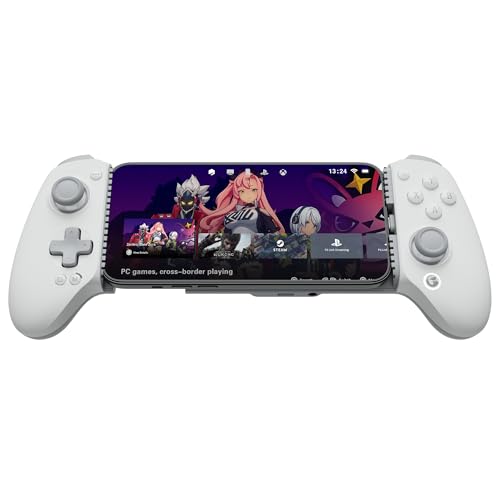
3. GameSir G8 Plus MFi (USB-C)
USB-C · MFi certified · extendable
The USB-C version of the G8 Plus with a movable connector and Apple MFi certification according to the manufacturer. It has Hall sticks and pass-through charging.

4. 8BitDo Ultimate 2 Wireless
Bluetooth and 2.4 GHz · TMR sticks · charging dock
An 8BitDo gamepad with TMR sticks and a charging dock. In the description, the manufacturer lists Windows, Apple, SteamOS and Android.
Pairing, button settings, and Game Mode
You pair a Bluetooth gamepad in your iPad's Bluetooth settings. Put the gamepad in pairing mode, wait for it to show up in the list, and tap its name.
Some controllers connect on their own when you plug them in with a USB cable that carries both data and charge. A charge-only cable won't work here, so if nothing happens, swap the cable.
You can change the button layout in Settings, then General, then Game Controller. It helps when a game uses a different mapping than you're used to.
Game Mode doubles the Bluetooth sampling rate, which cuts latency for controllers and headphones. It requires iPadOS 18 and a supported game. If you play with a Bluetooth gamepad and wireless headphones, you'll notice it most.
Charging, cases, and weight
Bluetooth gamepads have their own power. Some run on AA batteries, others have a rechargeable battery charged over USB-C, and some come with a charging dock where the gamepad rests after a session. Pick whichever suits you better: swapping batteries or docking it.
According to Tom's Guide, clamp-on controllers have pass-through charging, which means you can charge the iPad while you play. For a longer trip, bring a power bank.
Before you buy, check whether the tablet fits in the clamp with its case on. A thin case can be awkward, and a thick one usually has to come off. If you don't want to strip the iPad every time, ask the seller about case compatibility.
Keep weight in mind for longer sessions. A tablet with a clamp-on controller is heavier than a bare iPad, and holding it for an hour tires your wrists. For long sessions at home, a Bluetooth gamepad and a stand are more comfortable.
Fun fact: according to TechRadar, a newer MFi-certified clamp-on controller has a span a full 30 mm larger than the previous model from the same maker.
Frequently asked questions about iPad controllers
Does an Xbox or PlayStation controller work with an iPad?
Yes, both connect to an iPad over Bluetooth. You pair them in Bluetooth settings after putting the controller in pairing mode. You can then change the button layout in the Game Controller section.
Which controller fits the iPad mini A20 Pro?
Any Bluetooth gamepad works. If you prefer a clamp-on controller, choose a smaller version with a span of about 125-215 mm and MFi certification for the iPad mini 6 and newer. The iPad mini with the A20 Pro is 195.3 mm tall.
Does a USB-C clamp-on controller fit a 13-inch iPad?
Yes, but only the expandable version made for 10 to 13-inch tablets. A smaller clamp won't fit a 13-inch iPad Air or Pro. Before you buy, also check whether the tablet fits with its case on.
Do I need to charge the controller?
It depends on the type. A Bluetooth gamepad uses AA batteries or a rechargeable battery charged over USB-C. A USB-C clamp-on controller has pass-through charging, so you can charge the iPad while you play.
Does Game Mode work on an iPad?
Yes, if you have iPadOS 18 and a supported game. The mode doubles the Bluetooth sampling rate, so your gamepad and headphones respond faster. Games without support won't benefit.
Sources
- Apple Support: Connect a wireless game controller to your Apple device - manufacturer page (support.apple.com)
- Apple Support: Use Game Mode - manufacturer page (support.apple.com)
- Apple Support: iPad mini (A20 Pro) Tech Specs - manufacturer page (support.apple.com)
- Apple Support: iPad Air 13-inch (M4) Tech Specs - manufacturer page (support.apple.com)
- Engadget: Razer's new Kishi V3 controllers can fit up to a 13-inch iPad - industry article (engadget.com)
- Tom's Guide: Razer Kishi V3 Pro XL iPad controller review - industry article (tomsguide.com)
- Windows Central: Razer Kishi V3 Pro review - industry article (windowscentral.com)
- TechRadar: GameSir G8+ MFi review - industry article (techradar.com)
- Irish Examiner: GameSir G8 Plus MFi review - industry article (irishexaminer.com)

Leave a comment
This site is protected by hCaptcha and the hCaptcha Privacy Policy and Terms of Service apply.