









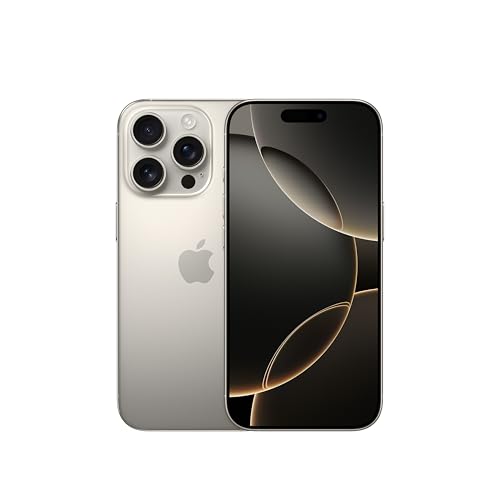
Got the newer model? Read: Which charger for Apple iPhone 17 Pro - protocols, watts and full speed
Updated: 14.10.2026
As an Amazon Associate I earn from qualifying purchases.
Quick answer: Which charger for Apple iPhone 16 Pro? The best choice is Apple 35W Dual USB-C Port Power Adapter 35 W - about 100% of the maximum charging speed (phone: max 30 W). A regular USB-PD charger also delivers full power.

Which charger for Apple iPhone 16 Pro? Finding the right power adapter
If you are deciding which charger for Apple iPhone 16 Pro to buy, you do not need an official Apple brick. Any quality USB-C wall adapter supporting the open USB Power Delivery (USB PD) standard will deliver optimal performance. The phone accepts a maximum power intake of around 30W, so choosing an adapter rated at 30W or higher gives you the fastest possible charging speed.
Apple includes a 1-meter USB-C cable in the box, but leaves out the wall plug itself. If you upgraded from an older phone or simply want an extra charger for your desk or travel bag, you only need to match a few basic specifications to get the most out of your device.
Fun fact: The USB-C port on the iPhone 16 Pro supports USB 3 data transfer rates up to 10 Gbps, and the entire phone weighs exactly 199 grams.
Specs and charging
The key Apple iPhone 16 Pro specs that matter when choosing a charger:
- Wired charging: 30 W (USB Power Delivery)
- On a standard USB PD charger: ~30 W
- Wireless charging: 25 W

Can you use a charger you already own at home?
Before purchasing a new adapter, inspect the chargers you already have tucked away in drawers. Look at the small print on the back or bottom of the plug to check its output wattage and supported standards.
- Standard 20W Apple adapter: If you have the 20W plug from a previous phone, it works perfectly for wired charging. It will reach roughly 50% battery in about 30 minutes, though it falls slightly short of the phone's 30W wired ceiling.
- USB-C laptop charger (45W, 65W or higher): You can safely use a USB-C laptop brick. The phone communicates with the adapter via USB Power Delivery and draws only its maximum requirement of roughly 30W.
- Standard USB PD adapter without PPS: Unlike some Android devices that require Programmable Power Supply (PPS) for maximum speeds, the iPhone 16 Pro achieves its full ~30W over standard USB PD fixed voltages.
- Older USB-A square plug: Basic chargers that use rectangular USB-A ports lack fast-charging protocols entirely. They will feed only 5W to 10W, resulting in very sluggish charging times.

Real-world charging speed: what to expect in daily use
According to Apple, a compatible 20W or higher power adapter charges the iPhone 16 Pro up to 50% in roughly 30 minutes using the included USB-C cable. If you plug into a 30W adapter, the phone takes full advantage of its wired ceiling during the initial charging phase.
Wireless charging has also received a noticeable boost. When connected to a 30W or higher power adapter, the updated MagSafe charger provides up to 25W of wireless power, reaching up to 50% in approximately 30 minutes. In practice, a quick morning charge while getting ready provides plenty of runtime to enjoy the device's battery life, rated for up to 27 hours of video playback.
Fun fact: To achieve the full 25W wireless charging speed on the new MagSafe charger, Apple requires a power brick rated at 30W or higher.
Selecting the right model: our top recommendations
If you prefer an original accessory that can power two items at once, the Apple 35W Dual USB-C Port Power Adapter supplies the full ~30W to the phone while maintaining an extra port. For those seeking the most affordable path to full speed, the Google 45W USB-C Charger hits the maximum ~30W limit effortlessly. Another solid single-port alternative is the Samsung 45W Power Adapter EP-T4511, which reliably provides full power.
If you want a single compact solution for travel, multi-port models like the INIU 65W 3-Port Charger or the UGREEN Nexode 65W are ideal. Both adapters deliver the phone's full 30W capacity while reserving enough wattage to charge a companion tablet or laptop at the same time.
| Charger | Power | Estimated speed |
|---|---|---|
| Apple 35W Dual USB-C Port Power Adapter | 35 W | 100% |
| Google 45W USB-C Charger | 45 W | 100% |
| Samsung 45W Power Adapter EP-T4511 | 45 W | 100% |
| INIU 65W 3-Port Charger | 65 W | 100% |
| UGREEN Nexode 65W | 65 W | 100% |

1. Apple 35W Dual USB-C Port Power Adapter (35W)
Original Apple charger · 2 ports - several devices at once
35W charger. With the Apple iPhone 16 Pro it charges at up to about 30 W via USB PD (100% of the phone's maximum power, estimate based on specs and protocols).

2. Google 45W USB-C Charger (45W GaN)
Cheapest at full speed
45W GaN charger. With the Apple iPhone 16 Pro it charges at up to about 30 W via USB PD (100% of the phone's maximum power, estimate based on specs and protocols).

3. Samsung 45W Power Adapter EP-T4511 (45W)
45W charger. With the Apple iPhone 16 Pro it charges at up to about 30 W via USB PD (100% of the phone's maximum power, estimate based on specs and protocols).

4. INIU 65W 3-Port Charger (65W GaN)
3 ports - several devices at once · Enough power for a USB-C laptop
65W GaN charger. With the Apple iPhone 16 Pro it charges at up to about 30 W via USB PD (100% of the phone's maximum power, estimate based on specs and protocols).

5. UGREEN Nexode 65W (65W GaN)
3 ports - several devices at once · Enough power for a USB-C laptop
65W GaN charger. With the Apple iPhone 16 Pro it charges at up to about 30 W via USB PD (100% of the phone's maximum power, estimate based on specs and protocols).
Power delivery pitfalls that could slow down your phone
The most common pitfall involves wireless accessories. While a 20W adapter is sufficient for fast wired charging, using that same 20W adapter with a MagSafe puck will prevent it from reaching its top 25W speed. You need a 30W or higher adapter to unlock full wireless speed.
Another mistake is using generic legacy plugs without USB Power Delivery. Any brick that lacks USB PD will fall back to legacy 5V charging, limiting power transfer to around 5W to 10W. Lastly, do not waste money buying an ultra-high-wattage brick specifically for this phone. Plugging into a 100W or 140W adapter is entirely safe, but the iPhone 16 Pro will not draw more than approximately 30W.
Answers to common questions about charging iPhone 16 Pro
Which charger for Apple iPhone 16 Pro gives the best balance of speed and versatility?
A 30W or 35W USB Power Delivery adapter is the ideal choice. It unlocks the phone's maximum wired charging rate of around 30W and also provides the power needed for 25W MagSafe wireless charging.
Does the iPhone 16 Pro come with a charger in the box?
No, the phone does not come with a wall plug. Apple includes a 1-meter USB-C charging cable in the retail box, but the wall adapter must be bought separately or reused from your existing gear.
Can I safely charge the iPhone 16 Pro with a 65W laptop adapter?
Yes, it is completely safe. USB Power Delivery technology ensures the phone controls the power flow, so it will draw only the roughly 30W it requires while leaving the rest unused.
How fast does wireless charging work on this model?
The iPhone 16 Pro supports up to 25W wireless charging via MagSafe. According to Apple, this delivers up to 50% battery in about 30 minutes, provided you plug the MagSafe charger into a 30W or higher power adapter.
Does using a charger without PPS reduce wired charging speed?
No. The iPhone 16 Pro relies on standard USB Power Delivery fixed voltage profiles and reaches its full ~30W speed on regular USB PD chargers even without PPS support.
Chargers for the other models in this series
- Which charger for iPhone 16? GaN and MagSafe technology
- Which charger for the iPhone 16e? Best options and tips
- Which charger for Apple iPhone 16 Pro Max - how many watts and which protocol
Sources
- Apple iPhone 16 Pro - support.apple.com - official manufacturer specifications (support.apple.com)
- Apple iPhone 16 Pro - gsmarena.com - industry article (gsmarena.com)
- Apple iPhone 16 Pro - chargerlab.com - industry article (chargerlab.com)
- Apple iPhone 16 Pro - 9to5mac.com - industry article (9to5mac.com)
- Apple iPhone 16 Pro - gsmarena.com - industry article (gsmarena.com)


Leave a comment
This site is protected by hCaptcha and the hCaptcha Privacy Policy and Terms of Service apply.