









As an Amazon Associate I earn from qualifying purchases.
Quick answer: our top pick is Apple Magic Keyboard for iPad Air (Apple original · trackpad · 11 and 13 inch).
Which keyboard for iPad Air M4? Key selection rules
Which keyboard for iPad Air M4 works best? If you are looking for a keyboard with a trackpad, the best choice is the Apple Magic Keyboard for iPad Air in your tablet's size or the Logitech Combo Touch. The great news is that keyboards designed for earlier Air M2 and Air M3 generations also fit the M4 model, according to Apple.
When you open the box with your new tablet, you will find the iPad Air, a 1-meter USB-C cable, and a 20 W power adapter. A keyboard is not included, making it a separate purchase, as tech reviewers often point out. The iPad Air M4 itself is considered a device for most users, so choosing comfortable keys is crucial for everyday work comfort.
When choosing an accessory, you do not have to limit yourself to products labeled exclusively for the M4 version. Apple lists the Magic Keyboard for iPad Air as compatible with the M2, M3, and M4, while Logitech and ESR list the same generations in their descriptions.
Fun fact: The exact same Apple Magic Keyboard fits three generations of iPad Air without any design changes: versions with M2, M3, and M4 chips.
Tablet size and generation labels in stores
The primary consideration when buying is the screen size, as the iPad Air M4 comes in two variants: 11-inch and 13-inch. Keep in mind that a keyboard designed for the 11-inch format will not fit the 13-inch version, and vice versa. The case size must match the iPad size.
When browsing online offers, you might notice that the Apple keyboard is sometimes described as a model for iPad Air M3. There is no need to worry, because according to official Apple data, it is the exact same product that fits the iPad Air M2, M3, and M4.
Be careful with accessories designed for other device lineups. Magic Keyboard for iPad Pro models, created for Pro tablets with M4 and M5 chips, do not fit the iPad Air M4. If you are unsure which tablet you are holding, Apple recommends checking it in the system: go to Settings, select General, go to About, and check the Model Name field.
It is also worth noting that Apple produces the Magic Keyboard Folio exclusively for the base 10th generation iPad and the iPad with the A16 chip. The manufacturer does not offer a dedicated keyboard for the iPad mini at all.
Apple, Logitech, or cheaper alternatives: what to choose for iPad Air M4?
When choosing a keyboard case, you decide between a model with a Smart Connector and wirelessly connected accessories. The Smart Connector and the magnetic connector are located on the back of the iPad Air M4 body, next to the USB-C port with DisplayPort support.
The original Apple Magic Keyboard for iPad Air relies on a refined design where the tablet floats magnetically above the keys.
The competing Logitech Combo Touch offers features that Apple lacks. It consists of a detachable, backlit keyboard, a large trackpad, and a kickstand that allows you to position the screen at various angles. Like the Apple product, the Combo Touch connects via the Smart Connector, meaning no battery charging and no need for manual pairing.
An alternative comes in the form of Bluetooth keyboards, such as the Logitech Flip Folio with wireless connectivity, which allows you to conveniently fold the keyboard behind the tablet screen. On the market, you will also find more affordable designs from other brands, such as ESR cases with a detachable keyboard and trackpad, where the manufacturer lists compatibility with M2-M4 chips and specific model numbers in their descriptions.
Fun fact: The Logitech Flip Folio keyboard of the same size fits both the iPad Air with M2, M3, and M4 chips, as well as the iPad Pro M4 and M5.
Check out the overview below of recommended keyboards tailored for the iPad Air M4 that will make typing and everyday work easier.
Recommended keyboards for iPad Air M4
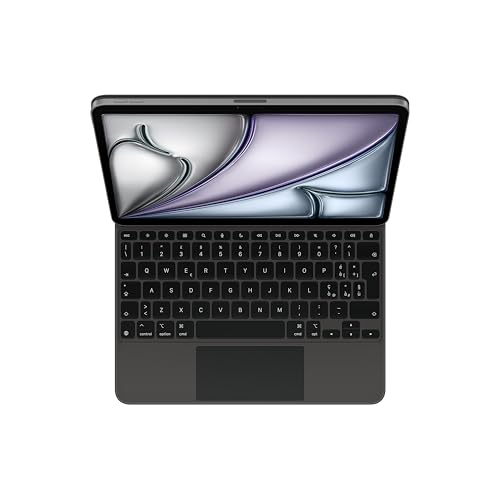
1. Apple Magic Keyboard for iPad Air
Apple original · trackpad · 11 and 13 inch
Apple's keyboard with trackpad for the iPad Air. Apple lists it for the 11- and 13-inch Air with M2, M3 and M4. Amazon listings sometimes call it the Air M3 keyboard; it is the same model.
See Apple Magic Keyboard for iPad Air (11-inch) on Amazon → · 13-inch version →

2. Logitech Combo Touch for iPad Air
Smart Connector · backlit · trackpad · kickstand
A case with a detachable backlit keyboard, trackpad and kickstand. It connects through the Smart Connector, with no pairing or charging. Logitech's listing names the iPad Air M2, M3 and M4.
See Logitech Combo Touch for iPad Air (11-inch) on Amazon → · 13-inch version →

3. Logitech Flip Folio
Bluetooth · keyboard folds behind the screen · Air and Pro
A case with a Bluetooth keyboard that folds behind the screen. Logitech's listing names the iPad Pro M4 and M5 and the iPad Air M2, M3 and M4 of the same size, so one case covers both lines.
See Logitech Flip Folio (11-inch) on Amazon → · 13-inch version →

4. ESR keyboard case for iPad Air
Detachable keyboard · trackpad · 11 and 13 inch
A cheaper alternative with a detachable keyboard and trackpad. ESR's listings name the iPad Air M2, M3 and M4 and give the model numbers it fits.
See ESR keyboard case for iPad Air (11-inch) on Amazon → · 13-inch version →
Keyboard layout and language versions in listings
Before purchasing, you must check the physical key layout of the chosen model. Tablet keyboards are produced in many regional variations, and each differs in the symbols and letters printed on the keys.
In retail listings, you will find, among others, the German QWERTZ layout, the French AZERTY layout, or the Italian version. The English layout is also common, available in US or international variants, as well as the British UK layout with a different key arrangement.
In stores, each language version is usually a separate product listing. Always check the full title and the specifications in the description to make sure what lettering will appear on the keys of your new case.
Questions and answers about iPad Air M4 keyboards
Does the Magic Keyboard from iPad Air M2 or M3 fit the Air M4?
Yes, the same Apple Magic Keyboard for iPad Air fits Air tablets with M2, M3, and M4 processors. Apple lists it for all three generations, so you do not need to buy a new accessory if you are upgrading from an M2 or M3 generation tablet to an M4 in the same size.
Does the iPad Pro keyboard fit the iPad Air M4?
No, the Magic Keyboard for iPad Pro does not fit the iPad Air M4. The model designed for the Pro line works exclusively with 11-inch and 13-inch iPad Pro tablets equipped with M4 and M5 processors. For the iPad Air, you must choose a keyboard labeled as Magic Keyboard for iPad Air.
Does the keyboard for the 11-inch Air fit the 13-inch Air?
No, a keyboard made for the 11-inch version will not fit the 13-inch tablet and vice versa. The case size must strictly match the size of your iPad Air M4. Before purchasing, check the screen size in your device's specifications.
Does the Logitech Combo Touch for iPad Air need to be charged?
No, the Logitech Combo Touch case does not require charging or battery replacement. The keyboard connects to the iPad via the Smart Connector on the tablet casing. The accessory draws power directly from the iPad and does not require Bluetooth pairing.
Which key layout should you choose?
The choice depends on which key markings you prefer while typing. Versions with German QWERTZ, French AZERTY, Italian, and English US or UK layouts are available for sale. Before purchasing, check the listing title to make sure which language variant you are ordering.
Sources
- Apple: Find the keyboard that works with your iPad - manufacturer page (apple.com)
- Apple: iPad Air - Technical Specifications - manufacturer page (apple.com)
- Tom's Guide: Apple iPad Air M4 review - industry article (tomsguide.com)
- TechRadar: I tested the iPad Air with M4 - industry article (techradar.com)
- Cult of Mac: Logitech Combo Touch vs. Apple Magic Keyboard - industry article (cultofmac.com)
- Hoxton Macs: iPad Keyboard Compatibility Guide - industry article (hoxtonmacs.co.uk)

Leave a comment
This site is protected by hCaptcha and the hCaptcha Privacy Policy and Terms of Service apply.