








As an Amazon Associate I earn from qualifying purchases.
Quick answer: our top pick is MEKO 3-in-1 universal stylus (3 tips · passive · universal).
Best stylus for iPhone 18 Pro? Short answer: a passive, capacitive one
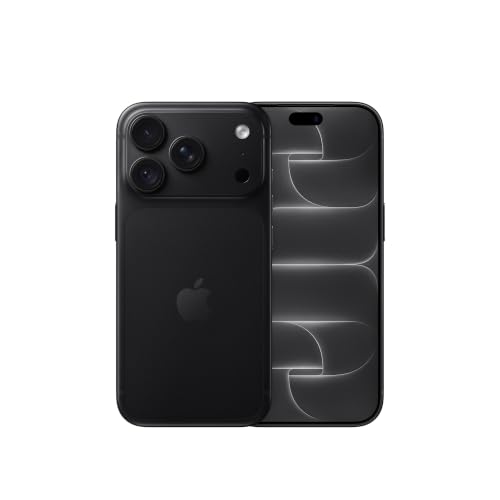
For the iPhone 18 Pro, buy a passive capacitive stylus and skip the Apple Pencil. A passive stylus works like your finger, because the screen responds to its touch, so there's no pairing and no charging.
The iPhone 18 Pro and 18 Pro Max were announced on September 9, 2026. Neither is on Apple's Apple Pencil compatibility list. The same type of stylus fits both models.
What is it good for? Signing your name, quick notes and tapping small items on the screen. It won't work for drawing with shading, as we explain below.
What Apple's compatibility list says and how the iPhone Duo differs
According to Apple's compatibility page, Apple Pencil Pro works only with selected iPad Pro, Air and mini models. There are no iPhones on that list. SimplyMac puts it plainly: Apple Pencil is designed for iPads and doesn't work with iPhones.
There is one exception, the foldable iPhone Duo. It's the only iPhone on the Apple Pencil list, and it supports only the Apple Pencil (USB-C), after a system update. No other Apple stylus will work with it.
According to 9to5Mac, the stylus works on both screens there. It's useful for marking up PDFs and images, sketching and handwritten notes. We have a separate article about a stylus for the iPhone Duo.
Fun fact: stylus support on the iPhone Duo arrived in iOS 27.2, just a few days after the phone reached users.
For the iPhone 18 Pro, we picked passive capacitive styluses that work on the touchscreen like a finger and need no pairing.
Styluses for iPhone 18 Pro we recommend

1. MEKO 3-in-1 universal stylus
3 tips · passive · universal
Passive stylus with three interchangeable tips: disc, rubber and fiber. Works on touchscreens without pairing.
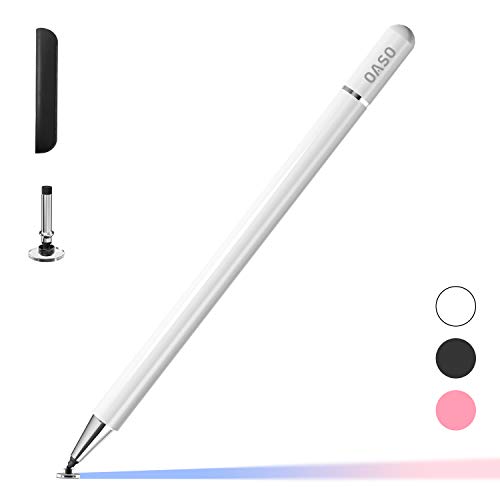
2. OASO universal capacitive stylus
passive · universal · no pairing
Universal capacitive stylus that works like a finger on any touchscreen. It needs no charging and no pairing.
Which tip for what
Passive stylus tips are usually rubber or fiber, and many models also come with a disc tip. Some styluses have replaceable tips, so you can try each one and see which feels best in your hand.
- Rubber: closest to the feel of a fingertip. Works well for tapping, typing and scrolling.
- Fiber: usually glides more smoothly over the glass, so it's more comfortable for writing and signing.
- Disc: useful when you need to hit a specific spot, such as a small field in a form.
At home, at a desk or on the couch, a stylus is enough for signatures, quick notes and selecting text. It helps if it comes with a few tips to choose from.
When you travel, it matters more that the stylus is always ready. A passive one has no battery, so it won't die on a train or at the airport. According to Bustle, it's also enough for scrolling and browsing pages.
In short: for the iPhone 18 Pro, pick a passive stylus with a rubber, fiber or disc tip, ideally with a few interchangeable ones, and treat it like a more precise finger.
What a passive stylus can't do
A typical passive stylus for iPhone has no pressure sensitivity, palm rejection or buttons. Your line will have the same thickness no matter how hard you press. Shading and smooth transitions between thin and thick strokes are out.
Without palm rejection, the phone may react to your wrist touching the screen. When writing, keep your hand slightly raised above the display. Without buttons, you can only switch tools on the screen, not from the stylus.
According to iGeeksBlog, this kind of stylus makes sense when you just want more precision than a finger and won't use it heavily. If you plan to draw a lot, an iPad with Apple Pencil is the more sensible choice.
Active styluses with a battery do respond to pressure, but that's a different category. Before buying, check the product description for exactly what the manufacturer claims.
Fun fact: according to a Bloomberg report cited by MacRumors, Apple prototyped a shorter stylus for a foldable iPhone, attached magnetically to the side of the device. Releasing it was unlikely, though.
Frequently asked questions about a stylus for iPhone 18 Pro
Does Apple Pencil work with iPhone 18 Pro?
No. iPhone 18 Pro is not on the Apple Pencil compatibility list, and the Pencil itself is designed for iPads. For an iPhone, buy a regular passive stylus.
Does a passive stylus need charging or pairing?
No. A passive capacitive stylus has no battery or wireless connection, because the screen responds to its touch the same way it does to a finger. You take it out and write.
Does a stylus for iPhone 18 Pro detect pressure?
Popular passive models don't, so the line always has the same thickness. SimplyMac says some third-party styluses do offer pressure sensitivity. If you need it, look for it in the product description.
Does iPhone Duo support Apple Pencil?
Yes, but only that one iPhone and only the Apple Pencil (USB-C) model, after a system update. Other iPhones, including the 18 Pro, don't support Apple Pencil.
Will the same stylus work with iPhone 18 Pro Max?
Yes. A passive capacitive stylus works like a finger on any touchscreen, so one model fits both the 18 Pro and 18 Pro Max.
Sources
- Apple Support: Apple Pencil compatibility - manufacturer page (support.apple.com)
- 9to5Mac: iPhone Duo just got two new features in iOS 27.2 - industry article (9to5mac.com)
- MacRumors: Foldable iPhone Duo to Come With Apple Pencil Support - industry article (macrumors.com)
- iGeeksBlog: Best iPhone stylus - industry article (igeeksblog.com)
- Bustle: Best styluses for iPhones - industry article (bustle.com)
- SimplyMac: Best Stylus Pens for iPhone - industry article (simplymac.com)

Leave a comment
This site is protected by hCaptcha and the hCaptcha Privacy Policy and Terms of Service apply.