









As an Amazon Associate I earn from qualifying purchases.
Quick answer: our top pick is Logitech MX Anywhere 3S for Mac (compact · Bluetooth · up to 70 days · works on glass).
Best mouse for MacBook Air M5?
For your bag, the compact Logitech MX Anywhere 3S for Mac is the best pick. It connects via Bluetooth and has a battery life of up to 70 days. It works equally well with the MacBook Air M5 and the M4.
If you like the gestures you know from the trackpad, get the Apple Magic Mouse. Macworld considers it the best for gestures, because you can scroll both vertically and horizontally, and you launch Mission Control with two fingers.
If you want to spend as little as possible, the Logitech M240 Silent is enough. It is a simple Bluetooth mouse with silent clicks, powered by a single AA battery. For occasional work in a café or on a train, it is more than enough.
Separate articles cover a monitor and a docking station for the MacBook Air M5, so here we focus only on the mouse.

Bluetooth or USB receiver: what works with two ports
The MacBook Air with M5 and with M4 has MagSafe 3, two Thunderbolt 4 (USB-C) ports and a headphone jack on its sides. Neither has a USB-A port. A mouse with a small USB-A receiver therefore needs an adapter or a hub.
With only two ports, this matters. The receiver takes up one of them, and you have to keep the other free for a drive, a flash drive or a monitor. Fortunately, charging is handled by MagSafe, so the power adapter does not block any ports.
According to Tom's Hardware, most of the ports are on the left side: MagSafe and two Thunderbolt 4. Only the headphone jack is left on the right.
That is why a Bluetooth mouse, without a receiver, is the most convenient. For this article we picked models that connect exactly this way, and we based our choice on manufacturer descriptions and on Macworld reviews.

Mice we recommend for MacBook Air M5 and M4
1. Logitech MX Anywhere 3S for Mac
compact · Bluetooth · up to 70 days · works on glass
A small mouse for the laptop bag. According to Macworld, it even works on glass, the battery lasts up to 70 days, and the mouse pairs with three Apple devices. The for Mac version connects via Bluetooth.
2. Apple Magic Mouse (USB-C)
Multi-Touch gestures · Bluetooth · USB-C · lightweight
The Apple mouse with a touch surface that supports the gestures you know from the trackpad. Macworld rates it the best for gestures. The battery lasts about a month, but the charging port is on the bottom.

3. Logitech M240 Silent Bluetooth
Bluetooth · quiet clicks · AA battery · compact
A simple, affordable Bluetooth mouse that suits the character of the MacBook Neo. It connects without a receiver, so both USB-C ports stay free. It has quiet clicks and runs on a single AA battery.
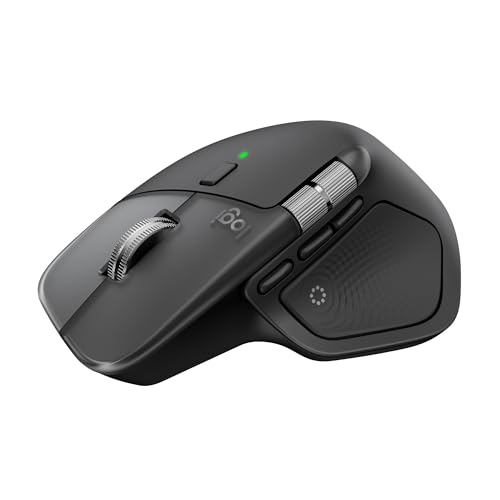
4. Logitech MX Master 4 for Mac
haptics · Bluetooth · up to 70 days · USB-C
A large mouse for long desk sessions, shaped for the right hand. Macworld rates it the best for productivity. The for Mac version connects via Bluetooth without a receiver, so it won't take up a port on the Neo.
Bluetooth is not just about saving ports. The MacBook Air with M5 has the Apple N1 chip with Bluetooth 6 and Wi-Fi 7, so on the laptop side you don't have to worry about connectivity.
Fun fact: The MacBook Air M5 has the same body shape that Apple showed with the M2 model in 2022 (according to Tom's Hardware).
Magic Mouse or Logitech: gestures, shape, charging, battery
The Magic Mouse has a touch-sensitive surface and works very naturally with macOS. If you often scroll and switch views on the trackpad, you can do the same on the Apple mouse without having to change your habits.
It also has drawbacks. The charging port is on the bottom, so you can't use it while it charges. The battery lasts about a month, and Macworld notes that the mouse is less comfortable for large hands.
The Logitech MX Anywhere 3S for Mac focuses on portability. It is compact, charges quickly, and the battery lasts up to 70 days. It pairs with three devices, so you can switch it from a MacBook to an iPad or another Apple computer with one button.
Fun fact: The MX Anywhere 3S for Mac works even on a glass desktop (Macworld). With a glass-top desk you don't need a mouse pad.
For long work sessions at a desk, the Logitech MX Master 4 for Mac is a better choice, and according to Macworld it is the best for productivity. It has a haptic panel under the thumb, a battery that lasts about 70 days, and connects via Bluetooth without a receiver. However, it is only for right-handed users, and its large body doesn't suit a slim bag.
For everyday use in a backpack, the lightweight Logitech M240 Silent and Pebble Mouse 2 M350s are also good options. Both connect via Bluetooth, have quiet clicks, and run on an AA battery. With an AA battery, replacing it takes a moment, but you can't charge it from a wall outlet.
Mouse or Force Touch trackpad: when a mouse comes in handy
The Force Touch trackpad in the MacBook Air supports Multi-Touch gestures and is enough for most tasks. For typing, browsing the web, and quick notes, you don't need a mouse.
It starts to be useful during longer work. With spreadsheets, photo editing, or selecting long passages of text, a mouse is more precise and tires your hand less than a trackpad.
It is also worth having when the laptop is on a stand or next to an external monitor. The trackpad is then far away, while the mouse sits right where your hand is.
The choice comes down to how you work. For mobility, pick the MX Anywhere 3S for Mac or the lightweight M240 Silent. For gestures, go for the Magic Mouse, and for full days at a desk, the MX Master 4 for Mac.
Most common questions about mice for the MacBook Air
Which mouse for the MacBook Air M5?
For a bag, the compact Logitech MX Anywhere 3S for Mac is best. For gestures, choose the Apple Magic Mouse, and for a tight budget, the Logitech M240 Silent. All of them connect via Bluetooth without a receiver.
Does a mouse with a USB receiver work with the MacBook Air M4?
Yes, but only if you have a USB-A to USB-C adapter or a hub. The MacBook Air M4 has two Thunderbolt 4 ports, so the receiver will take up one of them. A Bluetooth mouse is more convenient.
Does the Magic Mouse work with the MacBook Air?
Yes, it is an Apple mouse and connects to the MacBook Air via Bluetooth. Keep in mind that its charging port is on the bottom, so you can't use it while it charges. The battery lasts about a month.
Does the MacBook Air M5 have a USB-A port?
No. It has MagSafe 3, two Thunderbolt 4 (USB-C) ports, and a headphone jack. You can connect older USB-A accessories via an adapter or a hub.
Mouse or trackpad on the MacBook Air?
For everyday tasks, the Force Touch trackpad with Multi-Touch gestures is enough. A mouse will come in handy for longer work, selecting, and precise editing, as well as when the laptop is on a stand or next to a monitor.
Sources
- Apple: MacBook Air technical specifications - manufacturer page (apple.com)
- Apple: MacBook Air (13-inch, M4, 2025) tech specs - manufacturer page (support.apple.com)
- Tom's Hardware: Apple MacBook Air (13-inch, M5) review - industry article (tomshardware.com)
- Macworld: Best mouse for MacBook and Mac - industry article (macworld.com)
- Macworld: Logitech MX Master 4 review - industry article (macworld.com)
- iMore: Best Magic Mouse alternatives - industry article (imore.com)


Leave a comment
This site is protected by hCaptcha and the hCaptcha Privacy Policy and Terms of Service apply.