








As an Amazon Associate I earn from qualifying purchases.
Quick answer: our top pick is SanDisk Ultra 256 GB (256 GB · UHS-I · A1, U1 · up to 150 MB/s).
Best microSD card for Samsung Galaxy A17? A SanDisk Ultra 256 or 512 GB is enough
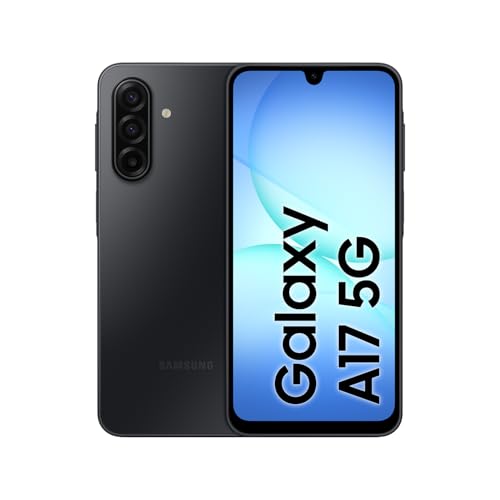
For the Galaxy A17, get a SanDisk Ultra 256 GB or 512 GB card. The phone supports microSD cards up to 2 TB, so you have plenty of room to grow, and for photos, music and downloaded videos you don't need a fast card.
In the US, Samsung sells the Galaxy A17 5G with 128 GB of storage and lists microSD cards up to 2 TB. Most people don't need nearly that much.
If you're not sure which capacity to choose, 256 GB is a sensible minimum. 512 GB makes sense if you keep a lot of videos on your phone or want peace of mind for the next few years. Engadget notes six years of updates, so the phone will serve you for a long time, and it's worth buying storage with room to spare.

SIM and microSD: how the US tray works
The US Galaxy A17 5G takes one physical SIM plus an eSIM, according to Samsung US. The microSD card goes in the larger opening of the same SIM tray, so you can keep two lines and a card: the second line runs on the eSIM.
Engadget points out that the microSD slot shares the SIM tray, and more expensive phones often no longer have one. Models sold outside the US list a hybrid tray (SIM 1 + Hybrid), where the card takes the place of a second physical SIM. The US model has only one physical SIM, so the card does not compete with a second one.
Before you buy a card, check how much space you actually have. Samsung UK lists about 107 GB free on the 128 GB version, and Fonearena measured 103.8 GB on its unit. The system and preinstalled apps take the rest, so a US unit may show a slightly different number.
Below we've gathered microSD cards matched to the Galaxy A17: popular SanDisk Ultra capacities, the Samsung EVO Select, and the faster SanDisk Extreme card, in case you record a lot of video.

Recommended microSD cards for Samsung Galaxy A17
1. SanDisk Ultra 256 GB
256 GB · UHS-I · A1, U1 · up to 150 MB/s
SanDisk Ultra 256 GB with A1 rating, one of the best-selling microSD cards on Amazon.
2. SanDisk Ultra 512 GB
512 GB · UHS-I · A1, U1 · up to 150 MB/s
The best-selling microSD card on Amazon, more affordable than the Extreme series. Rated A1 and U1, so it works for games and files, but not for cameras requiring V30.

3. SanDisk Extreme 256 GB
256 GB · UHS-I · A2, U3, V30 · up to 190 MB/s
One of the best-selling microSD cards. It features a V30 rating for 4K video recording and an A2 rating for apps and games.

4. SanDisk Ultra 1 TB
1 TB · UHS-I · A1, U1 · up to 150 MB/s
1 TB SanDisk Ultra with A1 rating and read speeds up to 150 MB/s. One of the most affordable 1 TB cards from a well-known brand.
A1 or A2 V30: which to choose for the Galaxy A17
The Galaxy A17 records video at a maximum of Full HD 1920 x 1080 at 30 frames per second. Fonearena notes that the processor could handle 4K, but the phone does not offer it. That is why the V30 class, designed for demanding video, is not needed for the phone alone.
Capacity matters more. For photos, music and movies downloaded for a trip, a UHS-I card with the A1 class is enough, such as the SanDisk Ultra. These are the most commonly bought cards, and the Ultra series is cheaper than the Extreme.
An A2 V30 card, for example the SanDisk Extreme, is useful in two situations. The first is a lot of recorded video. The second is moving the card to a camera or camcorder that requires the V30 class. If the card is going to stay in the phone, overpaying for the Extreme usually makes no sense.
There is also no reason to buy a card with a larger capacity than you need just because the phone will accept 2 TB. For most users, 256 or 512 GB does the job.
How to insert the card and what to keep on it
Turn off the phone and use the ejector tool from the box to pull out the SIM tray on the side. Place the microSD card in the larger opening of the tray and leave your SIM card where it is. Put the tray back in and turn the phone on.
It is worth formatting a new card in the phone. This way the system prepares it for itself and you avoid read problems. Remember that formatting erases everything on the card, so do it before copying files.
The phone manufacturer does not say whether apps can be moved to the card. So treat it primarily as a place for photos, videos and music. Leave apps and system data in the phone's memory.
A good idea is to set the camera to save photos and videos to the card, and to keep the series and playlists downloaded for a trip on it as well. That way the internal memory is left for the system and apps.
Fun fact: in the Galaxy A17, the fingerprint reader is in the power button, not under the screen. This is according to Engadget.
Frequently asked questions about the microSD card in the Galaxy A17
What is the maximum microSD card for the Galaxy A17?
The phone supports microSD cards up to 2 TB. Samsung US states this for the Galaxy A17 5G, and BGR lists the same limit. In practice, 256 or 512 GB is enough for most people.
Can the Galaxy A17 have two SIM cards and a microSD card?
Two lines and a card, yes. The US model takes one physical SIM plus an eSIM, and the microSD card goes in the larger opening of the same tray (Samsung US). Models sold outside the US have a hybrid tray, where the card takes the place of a second physical SIM.
Does the Galaxy A17 need an A2 V30 card?
Not for the phone alone. It records at a maximum of Full HD at 30 frames per second, so a UHS-I card with the A1 class is enough. A2 V30 makes sense when you record a lot of video or move the card to a camera or camcorder.
How much free space does the Galaxy A17 128 GB have?
Samsung UK lists about 107 GB free, and Fonearena reports 103.8 GB on its unit. The system and preinstalled apps take the rest, so a US unit may show a slightly different number.
Does a microSD card fit the Galaxy A17 4G and 5G?
Yes. In the US, Samsung sells the Galaxy A17 5G, and it takes microSD cards up to 2 TB. The 4G version is sold in other markets and also has a card slot.
Sources
- Samsung UK: Galaxy A17 5G - manufacturer page (samsung.com)
- Samsung Deutschland: Galaxy A17 5G - manufacturer page (samsung.com)
- Engadget: Samsung Galaxy A17 5G review - industry article (engadget.com)
- Fonearena: Samsung Galaxy A17 5G review - industry article (fonearena.com)
- BGR: Android phones that still have a microSD card slot in 2026 - industry article (bgr.com)
- Samsung US: Set up your new Galaxy A17 5G - manufacturer page (samsung.com)

Leave a comment
This site is protected by hCaptcha and the hCaptcha Privacy Policy and Terms of Service apply.