









As an Amazon Associate I earn from qualifying purchases.
Quick answer: our top pick is Lexar CFexpress Type B Silver 256 GB (CFexpress Type B · 256 GB · up to 1750 MB/s).
Best Memory Card for Canon EOS R6 Mark III? Short answer
For video and long bursts, buy a CFexpress Type B card, and for the second slot a fast SD UHS-II card in the V90 class. This combination fits both slots in the camera and gives you the most freedom when recording.
The camera is sold without a card, so you need to buy one right away. CFexpress Type A cards do not fit this camera.
Below we explain how the slots work, how to split the work between two cards, and what capacity to choose.

What slots does the R6 Mark III have and why Type B, not Type A
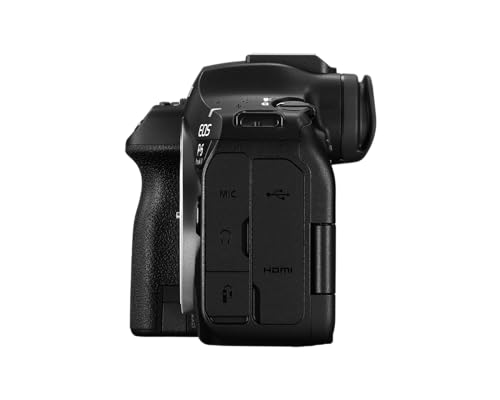
According to Canon Asia, the camera has two slots. One accepts SD, SDHC and SDXC cards compatible with UHS-II, and the other accepts CFexpress Type B cards.
CFexpress comes in several formats and they are easy to confuse. Type A is smaller and will not fit this slot, while Type B has a larger housing and is the only card you can insert into the CFexpress slot in the R6 Mark III. When buying, check that the packaging says exactly "Type B".
An SD card goes only into the SD slot, and a CFexpress card only into its own. They cannot be swapped, so plan what goes on which card.
We have chosen cards that fit these slots: three Lexar Professional CFexpress Type B models, the SanDisk Extreme PRO CFexpress Type B card and the fast SanDisk Extreme PRO UHS-II V90 SD card.
Memory cards for the Canon EOS R6 Mark III we recommend

1. Lexar CFexpress Type B Silver 256 GB
CFexpress Type B · 256 GB · up to 1750 MB/s
Popular CFexpress Type B card from Lexar. Fits the CFexpress slot in the R6 Mark III. A sensible starting point for photos and 4K video.

2. Lexar CFexpress Type B GOLD 256 GB
CFexpress Type B · 256 GB · GOLD series
The higher Lexar GOLD series in CFexpress Type B format. A good pick if you shoot a lot and want the manufacturer's higher-end cards.

3. Lexar CFexpress 4.0 Type B 512 GB
CFexpress 4.0 Type B · 512 GB · up to 3600 MB/s
A new-generation CFexpress 4.0 card with 512 GB of capacity. With 7K RAW files, more capacity means swapping cards less often on set.

4. SanDisk Extreme PRO CFexpress Type B
CFexpress Type B · SanDisk Extreme PRO
CFexpress Type B card from SanDisk's Extreme PRO series. The other big brand next to Lexar, if you want cards from two manufacturers.

5. SanDisk Extreme PRO SD UHS-II V90 128 GB
SD UHS-II · V90 · second slot
A fast SD card for the second slot. Canon states that you can record 2K proxies or 4K files to it in parallel with 7K RAW on the CFexpress card.

7K RAW video and SD proxies: how to split the work between cards
The sensor has 32.5 MP. According to Canon UK, the camera records 7K RAW video at up to 60 fps, Open Gate at up to 30 fps and 4K UHD at up to 120 fps. OWC adds that 7K at 60p is 12-bit Canon RAW Light.
Send heavy footage to the CFexpress card. Canon Asia states that heavy footage goes to CFexpress, while lighter files with the same timecode are written to the SD card in parallel.
This matters in practice when editing. Proxies with a timecode matching the original let you edit the film on a weaker computer and then swap in the full RAW files.
Fun fact: The R6 Mark III can record 7K RAW to a CFexpress card and lightweight 2K proxies to an SD card at the same time.
The second slot has other uses too. The SD card can take a backup copy of the footage, or photos while video is being recorded to CFexpress.
For the write speed a specific video mode requires, check the Canon manual. The thresholds depend on the chosen format and frame rate.
What capacity to choose and whether CFexpress 4.0 is worth it
7K RAW files take up a lot of space, so capacity matters more here than with photos. A 256 GB card, such as the Lexar Professional CFexpress Type B Silver or GOLD, is a reasonable starting point for photos and 4K video.
If you plan to shoot 7K RAW often, consider 512 GB. The Lexar Professional CFexpress 4.0 Type B in this capacity means swapping cards less often on set.
The manufacturer lists a read speed of up to 3600 MB/s for it, and up to 1750 MB/s for the Lexar Silver. These are claims about the cards, not the camera, so don't treat them as a guarantee of faster performance in the R6 Mark III. The real limits come from the camera itself and the recording mode.
It is worth buying cards from two manufacturers, for example Lexar and SanDisk. The SanDisk Extreme PRO CFexpress Type B is sold in the USA as a 4.0 version, so check the exact model designation in the listing.
Fun fact: according to OWC, the camera shoots up to 40 photos per second with the electronic shutter and up to 12 fps with the mechanical one. With bursts like these, a fast CFexpress card really matters.
For the second slot, an SD UHS-II V90 card is enough, for example 128 GB. It holds proxies and photos, and Canon states that you can write 2K proxies or 4K files to it in parallel with 7K RAW.
Frequently asked questions about cards for the R6 Mark III
Which memory card for the Canon EOS R6 Mark III?
For video and photo bursts, a CFexpress Type B card in the CFexpress slot. For the second slot, a fast SD UHS-II V90 card, for proxies, a backup copy or photos.
Does the Canon R6 Mark III have a CFexpress slot?
Yes. The camera has two slots: one CFexpress Type B and one UHS-II compatible SD. This is confirmed by Canon Asia and Backscatter.
Does CFexpress Type A fit the R6 Mark III?
No. The slot accepts only CFexpress Type B cards. Type A cards have a different format and do not fit this camera.
Which card for 7K RAW video in the R6 Mark III?
A CFexpress Type B card. 7K RAW is written to it, and you can send lightweight proxies to the SD card in parallel. For the required write speed for individual modes, check the Canon manual.
Does the Canon R6 Mark III come with a card?
No. The camera is sold without a memory card, so you need to buy one separately. It is best to buy a CFexpress Type B card and an SD UHS-II card right away.
Sources
- Canon UK: EOS R6 Mark III - manufacturer page (canon.co.uk)
- Canon Asia: EOS R6 Mark III specifications - manufacturer page (asia.canon)
- OWC: Canon EOS R6 Mark III packs more resolution and faster storage support - industry article (owc.com)
- Backscatter: Canon EOS R6 III - industry article (backscatter.com)


Leave a comment
This site is protected by hCaptcha and the hCaptcha Privacy Policy and Terms of Service apply.