









As an Amazon Associate I earn from qualifying purchases.
Quick answer: our top pick is 65W charger for Dell laptops, 4.5 mm (65 W · 19.5 V · 3.34 A · 4.5 mm barrel plug with center pin).
Best charger for Dell 15? Short answer: 65 W with a round 4.5 mm plug
Many people assume that if a laptop has a USB-C port, any USB-C charger will charge it. The Dell 15 (DC15250) doesn't work that way. It has a single DC-in jack for a round plug, and whether the USB-C port can charge depends on the version. The safest bet is a 65 W adapter with a round 4.5 mm plug.
The Dell 15 replaces the Inspiron 15 3520 and 3530, so this guide also helps if you're shopping for an Inspiron 15 adapter. Below, we cover what to check on the label and when a USB-C charger makes sense at all.
Plug, voltage and center pin: what to check on the label
According to Dell's manual, the 65 W adapter has a plug with a 4.50 mm outer diameter and a 2.90 mm inner diameter. Dell lists the same size for the older Inspiron 15 3521, so the plug from the Inspiron 15 3521 has the same size; the adapter's wattage still needs to be checked.
The adapter label will show 19.5 V or 20 V and 3.34 A or 3.25 A. Both pairs match Dell's specification, so don't look for the exact same numbers as on your old adapter. What matters is that the output is 65 W.
Dell's round plug has a pin in the center, so a replacement without one won't work. If the laptop doesn't respond to a new adapter, look inside the plug and check that the pin isn't bent or damaged. iFixit recommends this check.
Fun fact: the 65 W adapter for this laptop weighs at most 0.29 kg and is 108 mm long.
Below you'll find an adapter with a round plug and 65 W USB-C chargers, which only work with the Power Delivery version.
Chargers for Dell 15 we recommend

1. 65W charger for Dell laptops, 4.5 mm
65 W · 19.5 V · 3.34 A · 4.5 mm barrel plug with center pin
65 W replacement adapter with a 4.5 mm barrel plug and center pin, listed by the manufacturer for Dell Inspiron and Vostro laptops. Rated 19.5 V and 3.34 A.
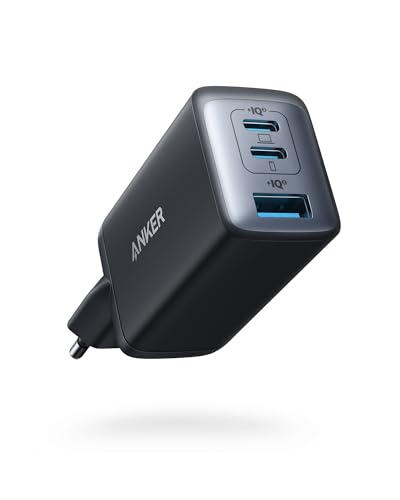
2. Anker Nano 65W USB-C
65 W · 3 ports · GaN
Anker charger with up to 65 W of power, one of the most popular picks. Three ports for a laptop, phone and headphones.

3. UGREEN Nexode 65W USB-C
65 W from one port · 3 ports · GaN
Compact GaN charger with up to 65 W from a single USB-C port, according to UGREEN. Charges a laptop over USB-C Power Delivery, plus your phone.
When USB-C can charge the Dell 15, and when it can't
Dell offers this laptop with one of two USB-C port options: data only, or with DisplayPort and Power Delivery. The port's features depend on the configuration chosen at purchase. In the Vivid Repairs review, the unit they tested had a data-only port, so charging over USB-C wasn't possible.
The LapZenLab review adds that the proprietary barrel connector means no support for universal USB-C PD chargers and power banks. If your version doesn't have PD, no USB-C charger can replace the barrel-plug adapter. You can check your port type in the manual or on Dell's website, using the model number.
Here's how it plays out in two situations. At home, the barrel-plug adapter is enough, and it stays at your desk or on the couch. When traveling, you can take the same adapter or, on the PD version only, a single 65 W USB-C charger for your laptop, phone and earbuds.
A multi-device charger with several ports takes up less room in your backpack than separate adapters. If you have the data-only version, it won't charge the laptop, though it will still charge your phone.
Fun fact: the laptop supports Express Charge, so a short 30-minute top-up gives you a decent amount of battery life.
Our advice: if you're not sure which USB-C port your laptop has, buy a 65 W adapter with a barrel plug and center pin. Choose a USB-C charger only if Dell confirms Power Delivery for your configuration.
Unrecognized adapter message and too little power
When the BIOS shows the adapter as Unknown or with the wrong wattage, the laptop may charge slowly or not at all. In practice, you'll see a battery that barely gains any charge even though the cable is plugged in.
Dell also lists too little power as one of the causes when Windows doesn't recognize the adapter. The manufacturer's recommendation is a Dell-approved adapter with a wattage that matches the laptop's requirements. For the Dell 15, that means 65 W, no less.
Before you decide the adapter is faulty, do these three things:
- check that the center pin in the plug isn't bent,
- compare the wattage on the label with the laptop's requirements,
- shut down the computer and plug the adapter in again.
If the message keeps coming back, the next step is an adapter with confirmed Dell compatibility.
Questions about the Dell 15 adapter
What plug does the Dell 15 charger have?
A round plug with a 4.5 mm diameter and a pin in the center. The laptop has one DC-in jack for this standard plug.
How many watts does the Dell 15 need?
It needs a 65 W adapter. A weaker one may be flagged as incorrect, and then the laptop charges slowly or not at all.
Does the Dell 15 charge over USB-C?
It depends on the version. One has a data-only port, the other supports Power Delivery and DisplayPort. Check your configuration in the manual or on Dell's website before you buy a USB-C charger.
Why doesn't my Dell recognize the adapter?
The most common reasons are too little power, an adapter that doesn't meet the laptop's requirements, or a bent pin in the plug. In that case, the BIOS may show Unknown and limit charging.
Does the Inspiron 15 charger fit the Dell 15?
The plug is often the same: Dell lists a 4.50 mm and 2.90 mm size for the Inspiron 15 3521. Before you use it, also check that the adapter is rated at 65 W.
Sources
- Dell: Dell 15 DC15250 Owner's Manual, power adapter - manufacturer page (dell.com)
- Dell: Dell 15 DC15250 Owner's Manual, external ports and slots - manufacturer page (dell.com)
- Dell: Inspiron 15 3521 Setup and Specifications, power adapter - manufacturer page (dell.com)
- Dell: How to Troubleshoot AC Adapter Issues on a Dell Laptop - manufacturer page (dell.com)
- Vivid Repairs: Dell 15 DC15250 review - industry article (vividrepairs.co.uk)
- LapZenLab: Dell 15 Laptop DC15250 review - industry article (lapzenlab.com)
- iFixit: Dell Laptop Not Charging troubleshooting - industry article (ifixit.com)

Leave a comment
This site is protected by hCaptcha and the hCaptcha Privacy Policy and Terms of Service apply.