








As an Amazon Associate I earn from qualifying purchases.
Quick answer: our top pick is THIRDREALITY Zigbee Smart Plug (Zigbee · 15 A · energy monitoring · extends the network).
Best Zigbee smart plug for Home Assistant? Start with the coordinator and energy monitoring
A common myth goes like this: buy a Zigbee plug, add it to Home Assistant, done. It doesn't work that way. Zigbee devices connect to Home Assistant through an adapter called a Zigbee coordinator, and the plug won't work without one.
If you want to measure power use, look for a Zigbee plug with energy monitoring. You plug it in between the device and the wall outlet, so you can measure the consumption of a single appliance, such as a washing machine, a fridge or a computer.
Two situations look a bit different. At home, where Home Assistant and a coordinator are already running, all you need is the plug and adding it to your network. On the road, for example in a vacation cabin, a plug with no coordinator nearby won't show you anything. It needs its own coordinator there, or it stays a regular plug.
What you need besides the plug and what a Zigbee router does
Besides the plug, you need three things: a Zigbee coordinator, the ZHA or Zigbee2MQTT integration, and a working Home Assistant. If you don't have a coordinator yet, the ZHA documentation recommends the Home Assistant Connect ZBT-2. We cover the Zigbee stick for Home Assistant in a separate article.
A mains-powered Zigbee plug acts as a router in the network. It passes along the signal from other devices, so it improves the range of battery-powered sensors. If you have a sensor in a far-off room that keeps dropping its connection, a plug placed halfway between often fixes it.
The layout of the network helps with range too. The more mains-powered devices you spread around your home, the denser the mesh, and the less you depend on a single coordinator.
We picked the products below based on the manufacturers' descriptions. They are Zigbee plugs with energy monitoring, and most of them also strengthen the network. Not every model is available in every country, so in the store you will see the ones your market supports.
Our advice: if you mostly want to track power use, pick a plug with energy monitoring and a load limit that fits your most powerful appliance.
Zigbee smart plugs for Home Assistant we recommend

1. THIRDREALITY Zigbee Smart Plug
Zigbee · 15 A · energy monitoring · extends the network
Zigbee plug with energy monitoring and a load of up to 15 A. It also works as a Zigbee network repeater.

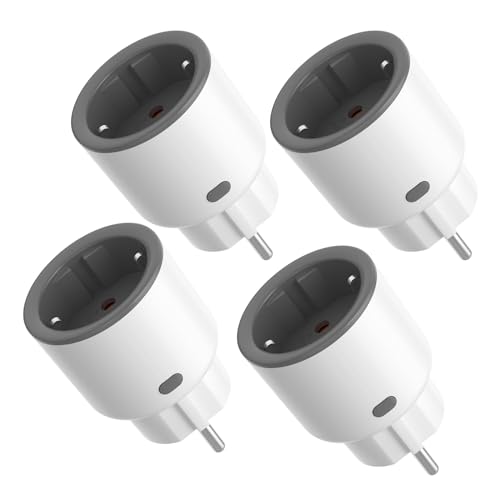
2. THIRDREALITY Smart Plug Gen3 (4-pack)
Zigbee · 15 A · energy monitoring · 4-pack
Four newer-generation plugs with accurate energy monitoring and a Zigbee repeater.

3. Innr Zigbee Smart Plug with energy monitor
Zigbee · energy monitoring · extends the network
Innr plug with energy monitoring that also works with the Hue bridge. It extends the Zigbee network.
Energy dashboard and reporting settings
The Energy dashboard in Home Assistant works well with smart plugs that measure power use. It shows consumption for individual devices, because the plug measures the energy flowing through whatever you connect to it. For a whole house, you need a different kind of meter.
A good plug exposes several readings at once. For example, one model in Zigbee2MQTT shows energy, voltage, current and power, plus energy for yesterday, today and the current month. That way you can see what your dryer costs you this month without any fiddling.
Your choice of integration matters here. CNX Software's test showed that when you pair a plug through ZHA, not all entities are available, while Zigbee2MQTT gives you a fuller set of options. If you care about fine-tuning reporting, Zigbee2MQTT leaves you more room.
It's also worth digging into the settings. The description of one plug in Zigbee2MQTT says that, left unchanged, the instantaneous power reading can lag by a minute or more. Setting the power change threshold to 1 W speeds up reporting, so the real-time chart stops falling behind.
Fun fact: Green Power device support was added to Home Assistant in version 2026.11.0. It lets battery-free switches send messages through nearby Zigbee routers.
Wi-Fi interference, load and plug type
Zigbee runs on channels 11-26 in the 2.4 GHz band, the same band Wi-Fi uses. If your network starts dropping devices, first set a fixed Wi-Fi channel on your router. Only then consider changing the Zigbee channel.
Check the load limit before you buy. It depends on the plug version made for a given country. Check the seller's listing and compare it with the power draw of your most powerful appliance.
Also pay attention to the plug type. It has to fit the outlets in your wall, so choose the version made for the US market.
Fun fact: the rule that mains-powered devices act as routers has an exception: relays with no neutral wire connected. Zigbee2MQTT says so explicitly, so don't count a relay like that in your wall as a signal booster.
Frequently asked questions about Zigbee plugs in Home Assistant
Does a Zigbee plug work with Home Assistant without a coordinator?
No. Plug makers such as SONOFF state plainly that their plugs work with Home Assistant but require a Zigbee coordinator. Without one, the plug has no way to connect to the system.
Does a Zigbee plug boost the network?
Yes, if it's mains-powered and has a router function. It passes the signal along, so it helps battery-powered sensors that sit far from the coordinator. The product description usually tells you whether the plug plays this role.
ZHA or Zigbee2MQTT for a plug with energy monitoring?
Either will work, but they differ in the number of settings. In ZHA, some entities may not be visible, while Zigbee2MQTT exposes more of them. If you want to fine-tune power reporting, Zigbee2MQTT is the more convenient choice.
What load can a Zigbee plug handle?
It depends on the model and the country version, so check the seller's listing. Compare the rating with the power draw of the device you want to plug in.
Does Zigbee interfere with Wi-Fi?
Both standards share the 2.4 GHz band, so they can get in each other's way. If you notice dropped connections, first set a fixed Wi-Fi channel on your router. Leave changing the Zigbee channel for later.
Sources
- Home Assistant: Zigbee Home Automation (ZHA) - manufacturer page (home-assistant.io)
- Home Assistant: Integrating individual device energy usage - manufacturer page (home-assistant.io)
- SONOFF: Smart plugs with energy monitoring for Home Assistant guide - manufacturer page (sonoff.tech)
- Zigbee2MQTT: Third Reality 3RSP02064Z - industry article (zigbee2mqtt.io)
- Zigbee2MQTT: SONOFF S60ZBTPF - industry article (zigbee2mqtt.io)
- Zigbee2MQTT: Improve network range and stability - industry article (zigbee2mqtt.io)
- CNX Software: SONOFF iPlug S60 Zigbee smart plug review with eWeLink and Home Assistant - industry article (cnx-software.com)

Leave a comment
This site is protected by hCaptcha and the hCaptcha Privacy Policy and Terms of Service apply.