


Got a different model? Read: Which charger for Google Pixel 10 - how many watts and which protocol
As an Amazon Associate I earn from qualifying purchases.
Quick answer: the Pixel 10a charges at up to 30 W, but only from a USB-C charger with PPS. With Google's 45 W charger, Google quotes about 50% in 30 minutes. In GSMArena's test the phone reached 52% after 30 minutes and 100% after 1 hour 29 minutes. There is no charger in the box.
The Pixel 10a is a great phone, but there is one catch: there is usually no charger in the box. So you might be wondering which charger for Google Pixel 10a to choose, and if you want to charge quickly and hassle-free, you need to pick the right power adapter. The Pixel 10a uses USB‑C and charges best with USB Power Delivery chargers. If you want maximum charging speed and stable performance, look for PPS support as well. In practice, 65W chargers with multiple ports are the most convenient, as they charge your phone quickly and easily handle the rest of your devices too.

How to choose - charger for Pixel 10a?
There are 4 main things to consider: power, PD/PPS, ports, and cable.
Power (W)
The Pixel 10a charges at up to 30 W via USB PD PPS, so a 30 W charger with PPS is sufficient; 45 W provides some extra headroom. If you want a single charger that also works for your laptop, go for 65W. If you frequently charge a laptop + phone + accessories all at once, aim for 100W.
USB Power Delivery (PD)
This is essential. Without PD, your phone will still charge, but often much slower and less reliably.
PPS
PPS
PPS (Programmable Power Supply) helps charge faster and more consistently because the charger adjusts its parameters dynamically in real time. If you see "PD + PPS" in the specs, that is a good sign.
Original Google charger or third-party?
The Pixel 10a isn't fussy. The Google logo matters less than two things: the charger must support USB Power Delivery with PPS and deliver at least 30 W. The Samsung 45W, the UGREEN Nexode 65W and the Anker models on our list do both, and they charge the 10a as fast as the original.
The original has one advantage: Google quotes its charging times with exactly that charger, so you know what to expect. A cheap charger labelled "fast charging" but without PPS will charge the Pixel noticeably slower, even if the box says 40 or 60 W. Look for "PPS" in the spec sheet.
Number of ports
If you only charge your phone by your bedside, 1 USB‑C port is enough. If you also regularly charge headphones, a smartwatch, a power bank, or a tablet, go for 3-4 ports, as it is simply much more convenient.
Which cable for the Pixel 10a?
The box includes a 1 m USB-C to USB-C cable. It is plenty for the 10a's 30 W: you don't need a 5 A cable with an E-Marker chip. That only matters if the same charger also powers a laptop above 60 W.
A second cable is still handy for the office or the car. A cheap pack such as the Anker 333 USB-C (90 cm, 2-pack) does the job. See Anker 333 USB-C on Amazon →
Fun fact: the bundled cable only transfers data at USB 2.0 speed, even though the Pixel 10a's port supports USB 3.2 (according to Google's spec sheet). It makes no difference for charging, but you'll notice it when copying large videos to a computer.

| Charger | Power | Estimated speed |
|---|---|---|
| Google 45W USB-C Charger | 45 W | 100% |
| Samsung 45W Power Adapter EP-T4511 | 45 W | 100% |
| UGREEN Nexode 65W | 65 W | 100% |
| Anker 735 (Nano II 65W) | 65 W | 100% |
| Samsung 65W Power Adapter Trio EP-T6530 | 65 W | 100% |

1. Google 45W USB-C Charger (45W GaN)
Original Google charger · Cheapest at full speed
45W GaN charger. With the Google Pixel 10a it charges at up to about 30 W via USB PD PPS (100% of the phone's maximum power, estimate based on specs and protocols).

2. Samsung 45W Power Adapter EP-T4511 (45W)
45W charger. With the Google Pixel 10a it charges at up to about 30 W via USB PD PPS (100% of the phone's maximum power, estimate based on specs and protocols).

3. UGREEN Nexode 65W (65W GaN)
3 ports - several devices at once · Enough power for a USB-C laptop
65W GaN charger. With the Google Pixel 10a it charges at up to about 30 W via USB PD PPS (100% of the phone's maximum power, estimate based on specs and protocols).
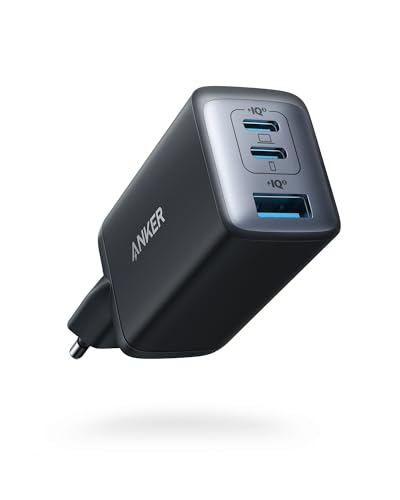
4. Anker 735 (Nano II 65W) (65W GaN)
3 ports - several devices at once · Enough power for a USB-C laptop
65W GaN charger. With the Google Pixel 10a it charges at up to about 30 W via USB PD PPS (100% of the phone's maximum power, estimate based on specs and protocols).

5. Samsung 65W Power Adapter Trio EP-T6530 (65W)
2 ports - several devices at once · Enough power for a USB-C laptop
65W charger. With the Google Pixel 10a it charges at up to about 30 W via USB PD PPS (100% of the phone's maximum power, estimate based on specs and protocols).
FAQ
Does the Pixel 10a come with a charger?
Most often no, which is why it is best to pick a compatible USB‑C charger right away.
Is a 65W charger too powerful for the Pixel 10a?
No. The phone will only draw as much power as it needs. 65W simply gives you extra headroom.
Is PPS required?
Not strictly required, but if you want the best possible speed and charging stability, it is definitely worth having.
Can I charge the Pixel 10a with a USB‑C laptop charger?
Yes, as long as it supports USB‑C Power Delivery. It usually works very well.
Do multi-port chargers slow down charging?
They can if you charge multiple devices at the same time, because the total power is split between them. When charging only the phone, you usually will not notice any difference.
How long does the Pixel 10a take to charge?
About an hour and a half with a PPS charger of at least 30 W. GSMArena measured 29% after 15 minutes, 52% after 30 minutes and 100% after 1 hour 29 minutes. The last few percent are the slowest. To protect the battery, you can cap charging at 80% in the settings or turn on adaptive charging.
Does the Pixel 10a support wireless charging?
Yes. The Pixel 10a supports Qi wireless charging at up to 10 W, which it reaches on Qi EPP certified chargers. That is much slower than a cable, so a wireless charger makes most sense overnight or on a desk.

Chargers for the other models in this series
- Which charger for Google Pixel 10 - how many watts and which protocol
- Which charger for Google Pixel 10 Pro - ranking of compatible chargers
- Which charger for Google Pixel 10 Pro XL - how many watts and which protocol
Sources
- Google Pixel 10a - store.google.com - official manufacturer specifications (store.google.com)
- Google Pixel 10a - gsmarena.com - industry article (gsmarena.com)
- Google Pixel 10a - en.wikipedia.org - industry article (en.wikipedia.org)
- Google Pixel 10a - gsmarena.com - industry article (gsmarena.com)
- Google Pixel 10a - gsmarena.com - industry article (gsmarena.com)


Leave a comment
This site is protected by hCaptcha and the hCaptcha Privacy Policy and Terms of Service apply.