









Updated: 27.09.2026
As an Amazon Associate I earn from qualifying purchases.
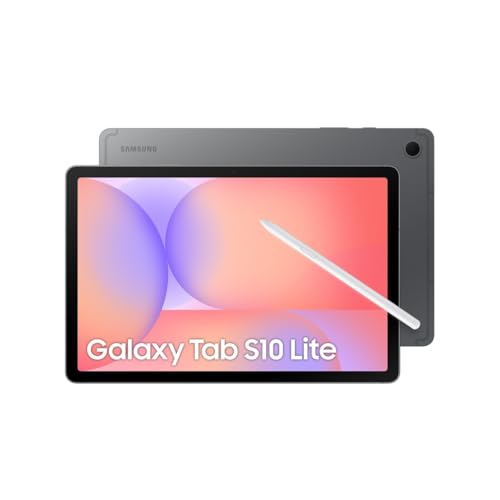
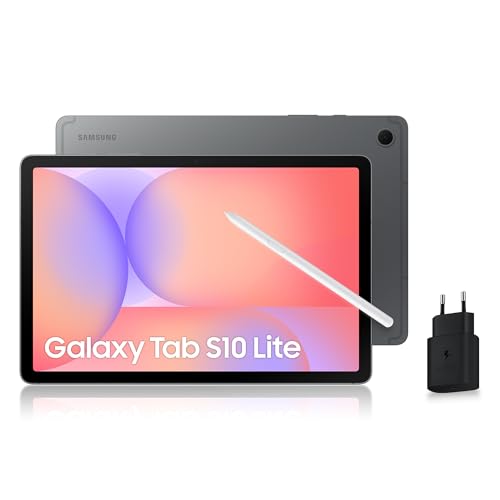
Quick answer: Which charger for Samsung Galaxy Tab S10 Lite? The best choice is Samsung 25W Power Adapter EP-T2510 25 W - about 99% of the maximum charging speed (tablet: max 25 W).
Which charger for Samsung Galaxy Tab S10 Lite? Quick practical guide
Picture sitting in a lecture hall or working through back-to-back meetings, taking handwritten notes, only to watch the battery indicator dip into the red halfway through the afternoon. When you finally catch a short break, you need every minute plugged into a wall outlet to deliver meaningful power.
If you are wondering which charger for Samsung Galaxy Tab S10 Lite to add to your bag, the key figure to remember is 25W. The tablet caps its charging input at 25W and relies on the USB Power Delivery (USB PD) standard with PPS (Programmable Power Supply) - a protocol that adjusts voltage and current dynamically for efficient charging.
Inside the box, Samsung provides a USB-C data cable and the S Pen, but no wall charger. To get full charging speed right away, you will need an adapter that supports 25W USB PD PPS.
Specs and charging
The key Samsung Galaxy Tab S10 Lite specs that matter when choosing a charger:
- Battery: 8000 mAh
- Wired charging: 25 W (Super Fast Charging)

Can you use the charger you already have at home?
Before buying a brand-new plug, check the adapters you already own. Many modern chargers can power this tablet without any issues:
- A modern phone charger (20W to 25W): If your phone adapter supports USB PD with PPS, it will charge this tablet at or near full speed. If it only supports standard USB PD without PPS, charging will still work, just at a slower rate.
- A USB-C laptop power brick (45W, 65W, or higher): You can safely use your laptop charger. The tablet automatically communicates with the adapter and draws only the power it can handle, topping out at 25W.
- An older USB-A wall plug: Chargers with the classic rectangular USB-A port deliver much lower wattage. They will charge the tablet very slowly, making them practical mainly for overnight charging.
To verify what you have, inspect the small specifications text printed on your adapter. Look for "PD" or "PPS" ratings and check that the output reaches at least 25W.

Real-world charging speed: What to expect day to day
Because the tablet tops out at 25W, you do not need an oversized charging brick to get optimal turnaround times. Independent testing from GSMArena and Parka Blogs indicates that a full charge from near empty takes around 120 minutes (about 2 hours) when using a compatible 25W PPS adapter.
In everyday use, a quick 30-minute top-up during a study break gives you plenty of runtime to finish your afternoon sessions or watch media on your commute home. Leaving it plugged in while you get ready in the morning easily adds hours of note-taking capability.
Keep in mind that buying a 45W charger will not shorten this two-hour charge time. The tablet hardware sets a ceiling at 25W, so extra wattage above that threshold is simply not utilized by this device.
Which power adapter fits your setup best?
For the simplest and most cost-effective solution, the Samsung 25W Power Adapter EP-T2510 delivers around 24.8W with this tablet (99% of its real-world maximum) in a compact, single-port format. If you prefer original Samsung gear with extra overhead for other devices down the road, the Samsung 45W Power Adapter EP-T4511 also reaches the full 25W speed on this tablet.
The Google 45W USB-C Charger is another reliable alternative that hits the maximum 25W intake without hassle. If you travel often or carry multiple gadgets in one backpack, multi-port options like the UGREEN Nexode 65W or the Anker 735 (Nano II 65W) are worth considering. Both provide three charging ports, push the tablet to its full 25W potential, and deliver enough total wattage to charge a laptop and your tablet simultaneously.
| Charger | Power | Estimated speed |
|---|---|---|
| Samsung 25W Power Adapter EP-T2510 | 25 W | 99% |
| Samsung 45W Power Adapter EP-T4511 | 45 W | 100% |
| Google 45W USB-C Charger | 45 W | 100% |
| UGREEN Nexode 65W | 65 W | 100% |
| Anker 735 (Nano II 65W) | 65 W | 100% |

1. Samsung 25W Power Adapter EP-T2510 (25W GaN)
Original Samsung charger · Cheapest at full speed · Compact, single port
25W GaN charger. With the Samsung Galaxy Tab S10 Lite it charges at up to about 24.8 W via USB PD PPS (99% of the tablet's maximum power, estimate based on specs and protocols).

2. Samsung 45W Power Adapter EP-T4511 (45W)
Original Samsung charger
45W charger. With the Samsung Galaxy Tab S10 Lite it charges at up to about 25 W via USB PD PPS (100% of the tablet's maximum power, estimate based on specs and protocols).

3. Google 45W USB-C Charger (45W GaN)
45W GaN charger. With the Samsung Galaxy Tab S10 Lite it charges at up to about 25 W via USB PD PPS (100% of the tablet's maximum power, estimate based on specs and protocols).

4. UGREEN Nexode 65W (65W GaN)
3 ports - several devices at once · Enough power for a USB-C laptop
65W GaN charger. With the Samsung Galaxy Tab S10 Lite it charges at up to about 25 W via USB PD PPS (100% of the tablet's maximum power, estimate based on specs and protocols).
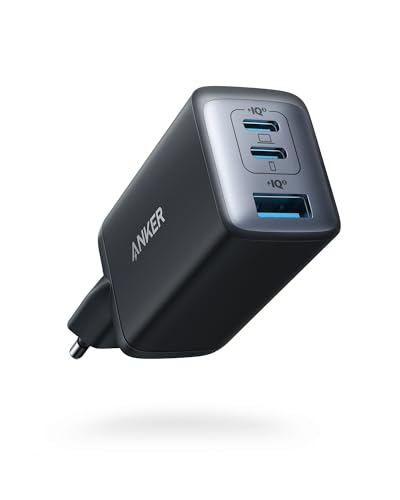
5. Anker 735 (Nano II 65W) (65W GaN)
3 ports - several devices at once · Enough power for a USB-C laptop
65W GaN charger. With the Samsung Galaxy Tab S10 Lite it charges at up to about 25 W via USB PD PPS (100% of the tablet's maximum power, estimate based on specs and protocols).
Common charging pitfalls to watch out for
While powering this tablet is relatively straightforward, a few technical details can lead to unexpected slowdowns:
- Paying extra for 45W purely for speed: A 45W adapter will not charge this tablet any faster than a 25W adapter. Invest in higher wattage only if you want to power a laptop or another high-demand device with the same plug.
- Missing PPS support: Generic USB PD adapters that lack PPS support will still charge the tablet, but charging will be noticeably slower than the maximum 25W capability.
- Multi-port power splitting: When plugging a phone or accessories into a multi-port charger alongside your tablet, the adapter splits its available wattage across active ports. Make sure the port connected to the tablet still delivers at least 25W during shared use.
Frequently asked questions about charging the Samsung Galaxy Tab S10 Lite
Which charger for Samsung Galaxy Tab S10 Lite delivers maximum speed?
Any charger supporting the USB PD standard with PPS and an output of at least 25W will charge the tablet at its full speed. The original Samsung 25W Power Adapter EP-T2510 is the most direct and affordable match, reaching around 24.8W in real-world use.
Does the Galaxy Tab S10 Lite come with a charger in the box?
No, Samsung does not include a wall adapter in the box. You will find a USB-C data cable and the S Pen stylus alongside the tablet, but the wall plug must be purchased separately or reused from another device.
Can a 45W or 65W charger damage the tablet battery?
No, using a higher-wattage USB-C charger is completely safe. Modern USB Power Delivery devices communicate with the power brick, meaning the tablet will only pull its maximum supported 25W regardless of how powerful the adapter is.
How long does it take to fully charge the tablet?
With a compatible 25W PPS charger, taking the battery from zero to 100% takes approximately 120 minutes (around 2 hours). Using a 45W charger will not make the process any faster due to the tablet hardware limit.
Does the included S Pen require its own charger?
The Galaxy Tab S10 Lite includes the S Pen in the box, and it does not require a separate charger. It works without an internal battery for writing and sketching, so you never have to plug it in to use it.
Sources
- Samsung Galaxy Tab S10 Lite - samsung.com - official manufacturer specifications (samsung.com)
- Samsung Galaxy Tab S10 Lite - gsmarena.com - industry article (gsmarena.com)
- Samsung Galaxy Tab S10 Lite - m.gsmarena.com - industry article (m.gsmarena.com)
- Samsung Galaxy Tab S10 Lite - parkablogs.com - industry article (parkablogs.com)

Leave a comment
This site is protected by hCaptcha and the hCaptcha Privacy Policy and Terms of Service apply.