









Updated: 09.10.2026
As an Amazon Associate I earn from qualifying purchases.
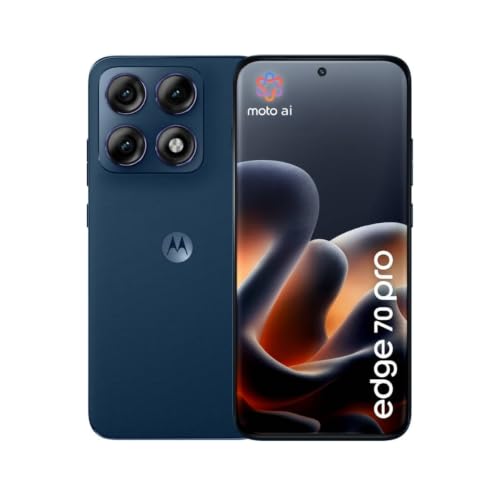
Quick answer: Which charger for Motorola Edge 70 Pro? The best choice is Baseus Enerfill 100W 100 W - about 100% of the maximum charging speed (phone: max 90 W). A regular USB-PD charger also delivers full power.

Which charger for Motorola Edge 70 Pro? Reaching the full 90W without original accessories
If you just unboxed your new phone, you are probably wondering which charger for Motorola Edge 70 Pro will actually deliver top speeds. The good news is that Motorola does not lock its 90W TurboPower behind proprietary hardware. A solid universal wall adapter supporting USB Power Delivery (USB PD) or USB PD PPS will get you the full 90W.
Depending on where you bought the handset, the box contents differ. European retail sets ship with a USB-C cable but no charging brick at all, whereas buyers in India find a 90W brick included. If your box arrived without one, this guide will help you pick the right adapter or figure out if your existing gear can handle the job.
Fun fact: One variant of this device features a real wood rear finish certified by the FSC, paired with a massive 6500 mAh silicon-carbon battery tucked into a chassis only about 7.2 mm thick.
Specs and charging
The key Motorola Edge 70 Pro specs that matter when choosing a charger:
- Battery: 6500 mAh
- Wired charging: 90 W (TurboPower 90 W (USB PD 3.0 + PPS))
- On a standard USB PD charger: ~90 W
- Wireless charging: 15 W (TurboPower bezprzewodowo 15 W)
- Reverse charging: 5 W

Can you use the charger sitting in your drawer?
Before spending extra money, check the small print on the plugs you already own. Here is what you can expect when connecting your Edge 70 Pro to common power sources:
- Standard USB-C laptop power bricks (65W to 100W PD): You are in luck. Standard USB PD without PPS delivers up to 90W on this phone, so a capable laptop brick will charge it near or at maximum speed.
- Modern 30W to 100W USB PD PPS chargers: Reaching full charging speed requires a quality USB PD 3.0 PPS charger of around 90-100W and a 5A cable; a PPS charger with lower amperage will deliver less than 90W.
- Compact 20W phone plugs (like basic iPhone adapters): These work safely via standard USB PD profiles, but they will cap output at their rated 20W limit.
- Old USB-A wall warts: Any legacy plug lacking fast charging protocols will drop speeds to a basic 5W to 10W trickle.

Real-world timing: How fast does the 6500 mAh battery fill up?
Real-world testing by GSMArena shows that charging moves fast, even with this phone's hefty battery. Plugging in for just 15 minutes over breakfast gets you to 40%, which easily covers several hours of typical use.
A half-hour top-up reaches 73%, making it effortless to get through a busy day on short notice. Going from zero to a complete 100% takes exactly 49 minutes.
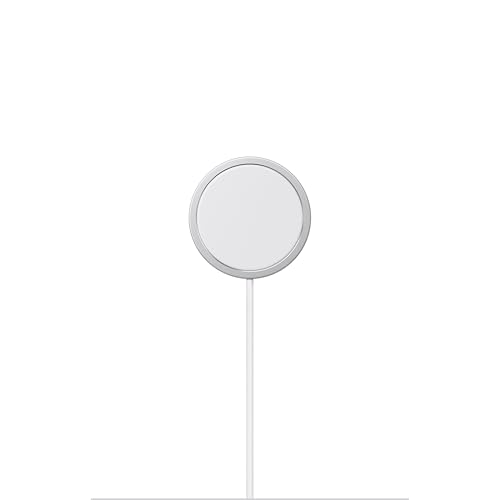
The device also offers 15W wireless charging when you prefer a desk stand, plus 5W reverse power sharing (both wired and wireless) to revive accessories like earbuds in a pinch.
Selecting the right replacement plug for everyday carry
If your drawer has nothing suitable, picking a third-party charger is straightforward because standard USB PD is fully supported. Baseus Enerfill 100W delivers the full 90W when charging the phone on its own, though connecting a laptop or other gear will split the available power across ports. If you carry several devices, Baseus Enerfill 140W offers four ports to charge your laptop and phone from a single plug, with total wattage shared among active connections.
Another excellent desktop companion is UGREEN Nexode 100W, which splits power across four outputs. If you prefer real-time power readouts, Anker Nano 100W (3 Ports, Smart Display) shows active output directly on its screen, while Anker Charger 140W 4-Port PD 3.1 (A2697) delivers top-tier wattage for charging a full mobile setup from a single outlet.
| Charger | Power | Estimated speed |
|---|---|---|
| Baseus Enerfill 100W | 100 W | 100% |
| Baseus Enerfill 140W | 140 W | 100% |
| UGREEN Nexode 100W | 100 W | 100% |
| Anker Nano 100W (3 Ports, Smart Display) | 100 W | 100% |
| Anker Charger 140W 4-Port PD 3.1 (A2697) | 140 W | 100% |

1. Baseus Enerfill 100W (100W GaN)
Cheapest at full speed · 3 ports - several devices at once · Enough power for a USB-C laptop
100W GaN charger. With the Motorola Edge 70 Pro it charges at up to about 90 W via USB PD (100% of the phone's maximum power, estimate based on specs and protocols).

2. Baseus Enerfill 140W (140W GaN)
4 ports - several devices at once · Enough power for a USB-C laptop
140W GaN charger. With the Motorola Edge 70 Pro it charges at up to about 90 W via USB PD (100% of the phone's maximum power, estimate based on specs and protocols).
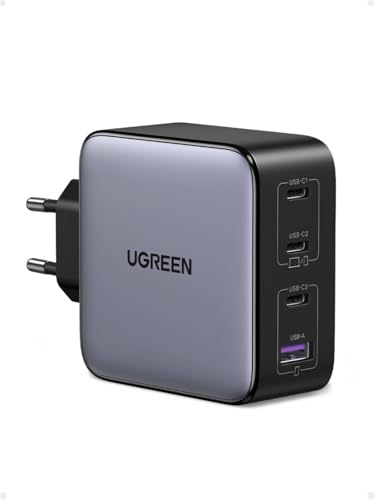
3. UGREEN Nexode 100W (100W GaN)
4 ports - several devices at once · Enough power for a USB-C laptop
100W GaN charger. With the Motorola Edge 70 Pro it charges at up to about 90 W via USB PD (100% of the phone's maximum power, estimate based on specs and protocols).

4. Anker Nano 100W (3 Ports, Smart Display) (100W GaN)
3 ports - several devices at once · Enough power for a USB-C laptop
100W GaN charger. With the Motorola Edge 70 Pro it charges at up to about 90 W via USB PD (100% of the phone's maximum power, estimate based on specs and protocols).

5. Anker Charger 140W 4-Port PD 3.1 (A2697) (140W GaN)
4 ports - several devices at once · Enough power for a USB-C laptop
140W GaN charger. With the Motorola Edge 70 Pro it charges at up to about 90 W via USB PD (100% of the phone's maximum power, estimate based on specs and protocols).
Potential pitfalls: Where you might lose charging speed
The biggest trap involves current limits on both adapters and cables. Reaching the peak 90W requires higher amperage, so any output above 60W strictly requires a 5A-rated USB-C cable. If you grab an older or standard 3A cable, charging automatically throttles to 60W regardless of your wall adapter's size.
Charger specifications matter just as much. Reaching full speed requires a capable USB PD 3.0 PPS charger of around 90-100W and a 5A cable; an adapter with lower amperage will deliver less than 90W. Lastly, proprietary fast chargers from other smartphone brands that do not support universal USB PD will drop to slower basic charging rates.
Motorola Edge 70 Pro charging guide: Common questions
Which charger for Motorola Edge 70 Pro provides the fastest speeds?
Any quality USB PD 3.0 or USB PD PPS charger rated at 90W to 100W or higher will deliver the phone's maximum speed. You do not need an original Motorola TurboPower unit, as standard USB PD protocols reach full 90W performance.
Is there a wall charger included in the packaging?
It depends on your region. In the European Union, the retail box contains only a USB-C cable and no charging adapter. However, in other markets like India, a 90W power brick is included in the box.
How long does it take to fully charge the battery?
According to GSMArena testing, the phone charges to 40% in 15 minutes, hits 73% in 30 minutes, and reaches 100% in 49 minutes.
Can I safely charge this phone with a USB-C laptop adapter?
Yes, standard USB-C laptop power bricks utilizing USB Power Delivery work seamlessly. The phone negotiates its power draw directly and will pull up to 90W from a compatible laptop adapter without issues.
Does Motorola Edge 70 Pro support wireless power transfer?
Yes, it supports standard wireless charging at up to 15W. Additionally, it features 5W reverse power sharing, allowing you to charge other devices wirelessly or via a cable.
Sources
- Motorola Edge 70 Pro - motorola.com - official manufacturer specifications (motorola.com)
- Motorola Edge 70 Pro - gsmarena.com - industry article (gsmarena.com)
- Motorola Edge 70 Pro - mezha.ua - industry article (mezha.ua)
- Motorola Edge 70 Pro - tbreak.com - industry article (tbreak.com)
- Motorola Edge 70 Pro - euronics.ee - industry article (euronics.ee)

Leave a comment
This site is protected by hCaptcha and the hCaptcha Privacy Policy and Terms of Service apply.