









As an Amazon Associate I earn from qualifying purchases.
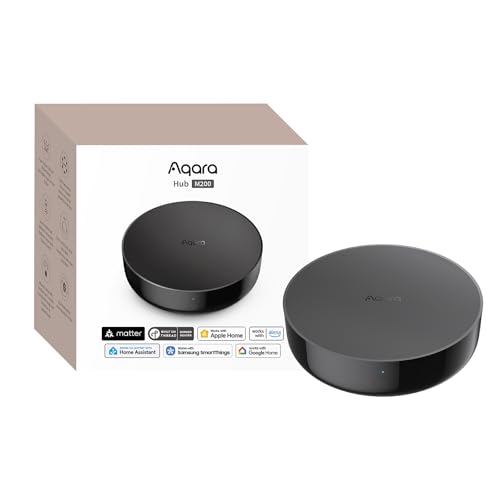
Quick answer: our top pick is Aqara Hub M200 (40 Zigbee + 40 Thread · PoE · IR · Matter).
Which Aqara hub to buy? Quick decision for a start
For most people, the Aqara M200 will be the best choice. If you are just starting your smart home journey and only need to connect a dozen or so sensors, the more affordable M100 model is more than enough. On the other hand, the Aqara M3 is hardware designed for large installations where hub clustering matters.
Keep in mind that Aqara Zigbee sensors strictly require a hub from this brand. Temperature, door opening, or presence sensors will not connect directly to your phone or third-party apps. The hub receives their signal and passes it on to your home network.
The choice of a specific model mainly depends on the planned number of devices, the power supply method, and whether you need an Ethernet network cable.
Fun fact: The smallest hub, the Aqara M100, measures just 108 x 30 x 8 mm and is powered directly from a USB-A port.
Comparison of M100, M200, and M3 capabilities
Each of these three models targets different installation needs. They differ in device limits, ports, radio band support, and additional features.
- Aqara M100: supports up to 20 Zigbee devices and 20 Thread devices. You power it with 5 V and 0.5 A directly from a USB-A port. It connects to the network via 2.4 GHz Wi-Fi (802.11 b/g/n/ax standard), offers Bluetooth 5.2, and allows you to run local automations.
- Aqara M200: supports up to 40 Aqara Zigbee devices and 40 Thread devices. It features built-in dual-band 2.4 and 5 GHz Wi-Fi with WPA3 security, a 90 dB speaker, and a 360-degree IR transmitter operating at 38 kHz. You can power it via a 48 V PoE network cable or a USB-C port (5 V, 2 A, power adapter sold separately). On the casing, you will find RJ45 PoE, USB-A, and USB-C ports.
- Aqara M3: a flagship hub for advanced installations, powered via 48 V PoE or a 5 V 2 A port. It is equipped with 2.4 and 5 GHz Wi-Fi connectivity, as well as Zigbee, Thread, and Bluetooth 5.1 modules. According to Mighty Gadget, it is the choice for those who want hub clusters and locally running automations.
Fun fact: The older Aqara M2 model supports up to 128 Zigbee devices, which is more than the newer M200. This is because the M200 splits its capacity between Zigbee and Thread.
Matter and Thread gateway in everyday use
According to Aqara, the M100 and M200 function as a Thread border router, Thread network router, and Matter bridge. For the M200, Aqara lists compatibility with Apple Home, Google Home, Alexa, SmartThings, and Home Assistant, so sensors paired with the hub reach these systems.
The Aqara M200 serves as a Matter controller for over 50 device types and an advanced Matter bridge. Its built-in infrared transmitter can integrate one traditional air conditioner into the Matter ecosystem. If, on the other hand, you choose Matter devices that communicate over Thread, remember that they require a controller, such as the M3 model configured in the Aqara Home environment.
We selected these three models to make it easy to match the hardware to the scale of your home setup.
Recommended Aqara hubs

1. Aqara Hub M200
40 Zigbee + 40 Thread · PoE · IR · Matter
The middle option: up to 40 Aqara Zigbee and 40 Thread devices, Matter controller and bridge, Thread border router, 360° IR, speaker and PoE or USB-C power.

2. Aqara Hub M100
Cheapest · USB-A · 20 Zigbee + 20 Thread
A tiny USB-A hub with 2.4 GHz Wi-Fi, Thread border router and Matter bridge, limited to 20 Zigbee and 20 Thread devices per Mighty Gadget.

3. Aqara Hub M3
The most powerful · PoE · local automations
Aqara's flagship hub with PoE and dual-band Wi-Fi, aimed at bigger setups with hub clusters and local automations.
When is one hub enough, and when should you buy another?
One hub is enough as long as you stay within its device limit. The M200 supports up to 40 Zigbee devices and 40 Thread devices.
Buying a second hub becomes necessary in two situations: when you reach the device limit. In that case, the M3 hub works great, as it can create clusters with other Aqara gateways.
Also, pay attention to power and placement. You can connect the M200 and M3 hubs with an Ethernet cable with PoE, and Mighty Gadget specifically praises the M200 when connected via PoE. If you choose the M200 model and want to control air conditioning via IR, place it in the same room, in direct line of sight of the air conditioner receiver.
Questions and answers about Aqara hubs
Do Aqara sensors work without a hub?
No, Aqara Zigbee sensors require a dedicated hub to work. The gateway mediates communication and forwards readings to the app on your phone and to smart home systems. Without a hub, the sensors will not send any notifications.
How many devices does the Aqara M200 support?
The Aqara M200 supports up to 40 Aqara Zigbee devices and 40 devices running on the Thread standard. In total, you can assign 80 compatible accessories to it.
What is the difference between the Aqara M100 and M200?
The Aqara M100 is a miniature hub that plugs directly into a USB-A port, supports a maximum of 20 Zigbee and 20 Thread devices, and uses only 2.4 GHz Wi-Fi. The M200 model has twice the device capacity, an RJ45 network port with PoE support, 2.4 and 5 GHz Wi-Fi, a built-in 90 dB speaker, and a 360-degree infrared transmitter.
Does the Aqara hub work with Apple Home?
Yes. Aqara lists compatibility for the M200 with Apple Home, as well as with Google Home, Alexa, SmartThings, and Home Assistant. The hub acts as a Matter bridge, so connected Zigbee sensors appear in these systems.
Is the Aqara hub a Thread border router?
Yes. According to Aqara, the M100 and M200 act as a Thread border router and Thread network repeater, while the M3 is a controller for Matter over Thread devices.
Sources
- Aqara: Hub M200 - manufacturer page (aqara.com)
- Aqara: Hub M100 specifications - manufacturer page (aqara.com)
- Aqara: Hub M3 specifications - manufacturer page (aqara.com)
- Mighty Gadget: Aqara Smart Hub M200 review vs M3 and M2 - industry article (mightygadget.com)
- SmartHomeCompared: Aqara Hub M100 vs M200 - industry article (smarthomecompared.com)
- Home Assistant: Matter integration - industry article (home-assistant.io)

Leave a comment
This site is protected by hCaptcha and the hCaptcha Privacy Policy and Terms of Service apply.