









As an Amazon Associate I earn from qualifying purchases.
Quick answer: our top pick is Samsung 45W EP-T4511 (45 W · USB-C PD + PPS · Samsung original).
Why is my Samsung charging slowly? Most common causes
A Samsung phone usually charges slowly due to a power adapter without PPS support, a damaged cable, or fast charging being disabled in the phone settings. Other common causes include dirt in the USB-C port, excessive battery temperature, and active battery protection features.
If you see a slow charging notification on the screen, start by checking the charger. A standard USB PD charger without PPS will not trigger Super Fast Charging, limiting the phone's charging power to around 15 W.
The next step is checking the condition of the cable and the port itself. A bit of dust in the USB-C port or a worn-out plug is enough to prevent a stable connection. Charging also slows down when the phone gets hot, for example while gaming or using navigation.
Charger and cable: why standard USB-C does not provide full power
For a Samsung smartphone to charge fast, the charger must support the USB Power Delivery standard with PPS (Programmable Power Supply) technology. A standard USB PD adapter without PPS will limit charging for most models to just around 15 W. This is why a powerful laptop charging brick might charge your phone much slower than expected.
Different Samsung models have different power requirements. Galaxy S25, S26, and the A16-A27 series phones accept a maximum of 25 W. Meanwhile, Galaxy A36, A37, A56, A57, as well as S25 FE, S26 FE, and S26+ can charge at up to 45 W. The top-tier Galaxy S26 Ultra can draw up to 60 W.
Pay attention to the cable itself as well, since Samsung does not include a charger in the box and you will only find a USB-C cable inside. Smartphones such as Galaxy A36, A56, S25 FE, and S26 FE draw 45 W at around 4.5 A. In their case, you need a PPS charger supporting around 5 A and a 5 A capable cable. A standard 3 A cable will cut down the charging speed.
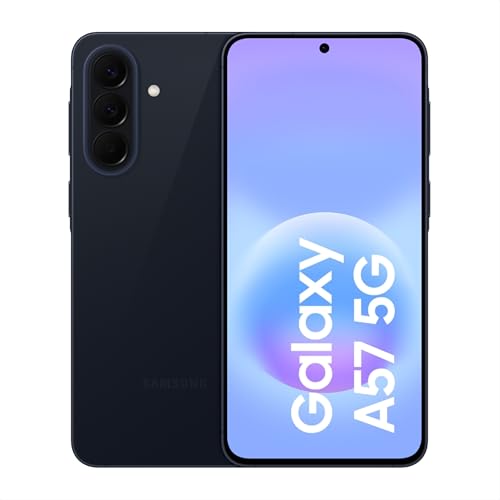
Fun fact: Galaxy A57 charges at the same 45 W power as the more expensive Galaxy S26+, while the base Galaxy S26 reaches a maximum of only 25 W.
Fun fact: Galaxy A57 reaches the full 45 W even with a standard 3 A cable because it charges at a higher voltage than Galaxy A56, which strictly requires a 5 A cable for the same power.
We selected the power adapters and cables below based on their compatibility with Samsung charging standards.
Chargers and a cable that bring back fast charging on a Samsung

1. Samsung 45W EP-T4511
45 W · USB-C PD + PPS · Samsung original
Samsung's own charger with Super Fast Charging 2.0. Every Galaxy up to 45 W charges at full speed from it, the 25 W models too, so one charger covers several phones at home.

2. Samsung 25W EP-T2510
25 W · USB-C PD + PPS · Samsung original
Samsung's cheapest original charger with PPS. It covers the 25 W models such as the Galaxy S25, S26 and A16 to A27. A 45 W phone charges at 25 W from it, slower, but without the slow charging warning.

3. UGREEN Nexode 65W
65 W · 2 x USB-C + USB-A · PPS up to 4.5 A
Three ports and PPS up to 4.5 A, so 45 W phones with PPS get full power. The second port charges earbuds or a watch at the same time. A good pick for a home with phones from different brands.
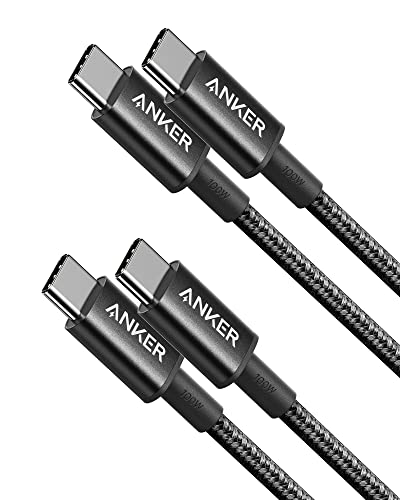
4. Anker 333 USB-C / USB-C 100 W, 90 cm (2x)
USB 2.0 · 480 Mbps · 100 W
A cheap charging cable: 100 W is enough even for a laptop, but data only moves at USB 2.0 speed. Fine for a phone and charger, not for an SSD.
System settings and battery behavior
Before buying new accessories, check the settings on your phone. Go to Settings, then the Battery section, select Charging settings, and make sure that the Fast charging option is enabled. Importantly, you cannot change these settings while charging is in progress, so disconnect the cable from your phone first.
The second factor affecting the charging process is the Battery protection feature. You will find it directly in the Battery menu. If enabled, it can stop charging earlier or limit the maximum charge level to extend battery lifespan.
The battery does not charge at the same speed all the time. GSMArena testing for Galaxy A57 with a Samsung 45 W charger shows that the phone charges from 1% to 35% in 15 minutes, reaching 64% after 30 minutes. It takes 69 minutes to reach 100% because charging slows down toward the end and the final percentages take longer.
Port, temperature, and moisture: when to visit a service center
Debris in the phone's port is a very common cause of slow charging. According to Samsung's recommendations, turn off the phone before cleaning and inspect the inside of the USB-C port using a flashlight. Gently remove dirt such as dust and lint without using metal objects and strictly without liquids.
Pay attention to moisture in the port, which immediately blocks fast charging. In that case, dry the phone thoroughly before plugging it in again. Also remember to push the cable firmly in, as a loose plug will prevent the negotiation of higher power parameters.
High temperature is another enemy of efficient charging. Playing demanding games or running GPS navigation while charging heats up the phone significantly. In such situations, the smartphone automatically slows down the process or stops it altogether. If you cool down the device, clean the port, and test another charger with a cable, but the issue persists, a visit to a service center will be necessary.
Frequently asked questions about Samsung charging
Why does Samsung show a slow charging message?
This message appears when the connected charger does not support the PPS standard and the phone has to reduce power draw to around 15 W. Another common cause is a damaged cable, a dirty USB-C port, or a loose plug. The phone may also limit power due to excessive device temperature.
Will any USB-C charger enable super fast charging?
No, a USB-C port on a power adapter alone does not guarantee fast charging with a Samsung phone. You will only get full power if the charger supports the USB Power Delivery protocol with the PPS extension. Standard USB PD chargers without this feature will charge your phone at a significantly lower speed.
Do I need a 5 A cable for Samsung?
A 5 A cable is required for models reaching 45 W at 4.5 A, such as Galaxy A36, A56, S25 FE, and S26 FE. If you have a 25 W model or a Galaxy A37 or A57, you will also achieve full speed using a standard 3 A cable. It is worth checking your model's specifications before purchasing a new cable.
Can fast charging be turned off accidentally?
Yes, it is a standard toggle in settings, so it can be disabled just like any other option, even by accident. When your Samsung charges slowly, check it first. You will find this option in Settings, under the Battery section and the Charging settings submenu. Remember that you can only turn it on when the cable is unplugged from the port.
When does slow charging indicate a battery issue?
A hardware problem can be suspected when the phone charges slowly despite using a working charger with PPS, a good cable, and after cleaning the port. If you have ruled out limitations caused by temperature and battery protection features, and the smartphone still does not speed up, the fault may lie in the port itself or a degraded battery. In this case, it is best to take the device to an authorized service center.
Guides for specific models
- Which charger for Samsung Galaxy A? Every model compared
- Which charger for Samsung Galaxy S and Z? Every model compared
- Which charger for Samsung Galaxy A57 5G - compatibility test and power
- Which charger for the Samsung A56 5G? We’ll tell you which charger is best for the Samsung A56 5G
- Which charger for Samsung Galaxy A37 5G - how many watts and which protocol
- Which charger for Samsung S26? Let's find out!
- Which charger for Samsung Galaxy S26 Ultra - protocols, watts and full speed
- Which charger for the Samsung Galaxy S25? 25 W with PPS and the best options
Sources
- Samsung: Galaxy device may appear to be charging slowly or not charging at all - manufacturer page (samsung.com)
- Samsung UK: What to do if your Samsung phone is not charging - manufacturer page (samsung.com)
- GSMArena: Samsung Galaxy A57 review, charging speed - industry article (gsmarena.com)
- SamMobile: Galaxy A56 and A36 support 45W super fast charging - industry article (sammobile.com)
- GSMArena: Samsung Galaxy S26 review, charging speed - industry article (gsmarena.com)

Leave a comment
This site is protected by hCaptcha and the hCaptcha Privacy Policy and Terms of Service apply.