










As an Amazon Associate I earn from qualifying purchases.
Quick answer: our top pick is Apple Watch Magnetic Fast Charger to USB-C (1 m, 2026) (Apple original · up to 10 W · USB-C · 1 m).
See Apple Watch Magnetic Fast Charger to USB-C (1 m, 2026) on Amazon →
Which charger for Apple Watch Ultra 4?
For the fastest charging, you need the new Apple cable marked A3277, which comes in the box with the watch, and a USB-C power adapter with Power Delivery support rated at 10 W or higher. Apple measures official times with its own 20 W power brick (model A2305), making it the most reliable choice for a wall outlet.
Included with the Ultra 4 are the watch, a strap, and a 1-meter cable with a USB-C connector, but the manufacturer does not include a power adapter. If you have a working USB-C phone or tablet charger at home rated anywhere from 18 W up to 140 W, you can safely use it, as the watch will draw the appropriate power automatically.
What the new A3277 cable offers and how fast charging works
Previous magnetic cables delivered a maximum of 5 W, while the new A3277 model can deliver up to 10 W of power. This difference is huge for quick top-ups during the day, when every minute before heading out counts.
Just 15 minutes on the charger gives you up to 18 hours of normal watch use. For comparison, plugging the same watch into an older cable for 15 minutes provides only 12 hours of battery life. If you only need power for the night, a 5-minute charge is enough for 10 hours of sleep tracking.
The Ultra 4 battery provides 50 hours of typical use, up to 84 hours in Low Power Mode, and up to 45 hours of training in Max Extended Workout mode. Charging from zero to 80 percent takes about 45 minutes, while a full charge takes around 75 minutes.
Fun fact: Fully charging the watch from zero to 100 percent takes about 75 minutes on the Ultra 4, exactly the same as on the older Ultra 3. The new technology only speeds up short top-ups during the first 15 minutes or so.
Old cables, docking stations, and Qi chargers
If you have cables from Ultra 1, 2, or 3 models in a drawer, or even the oldest cables with a USB-A plug, you can still use them. The watch will charge, but more slowly, as these chargers cap the power at the traditional 5 W.
Pay attention to multi-device desk charging stations. Third-party accessories, such as the Belkin UltraCharge 3-in-1 station or the compact RUXELY charger, do not have the new A3277 module built in, so they will charge the Ultra 4 at the standard rate of up to 5 W.
Also keep in mind that standard Qi wireless phone chargers will not charge an Apple Watch at all. Although the mechanism is based on Qi technology, Apple did not submit it for compliance testing, and the watch software rejects chargers other than those designed specifically for Apple Watch.
Fun fact: To get an 18-hour top-up in 15 minutes, you need both the new-generation watch and the A3277 cable. Older models, such as the Ultra 3 or Series 11, will get the exact same battery life after 15 minutes of charging on the new cable as they would on the old one.
Below are the new Apple cable, the power adapter Apple uses to measure charging times, and accessories for home and on the go.
Recommended chargers for Apple Watch Ultra 4
1. Apple Watch Magnetic Fast Charger to USB-C (1 m, 2026)
Apple original · up to 10 W · USB-C · 1 m
The 2026 version of the cable, the same one that comes with the Series 12 and Ultra 4 (A3277 printed on the USB-C plug). Only this cable lets those two watches charge at up to 10 W.
See Apple Watch Magnetic Fast Charger to USB-C (1 m, 2026) on Amazon →

2. Apple 20W USB-C Power Adapter
20 W · USB-C PD · Apple original
Apple measures its watch fast-charging times with this adapter (model A2305). It has power to spare, since the watch draws far less, and it fast charges an iPhone too.

3. RUXELY 5W magnetic Apple Watch charger
5 W · USB-C and Lightning input · 17 g
A tiny puck with no cable of its own: plug it into the USB-C or Lightning cable you already carry. Its listing names the Apple Watch 12. It delivers 5 W, the pace of the older charger, and the maker quotes 1.5-2 hours to full.

4. Belkin UltraCharge 3-in-1 Qi2 25W
iPhone + Apple Watch + AirPods · 45 W adapter included
A stand for iPhone, watch and earbuds with a fast-charging Apple Watch module: Belkin quotes 0-80% in 30 minutes for the Series 10. The 45 W power adapter is in the box, so there is nothing else to buy.
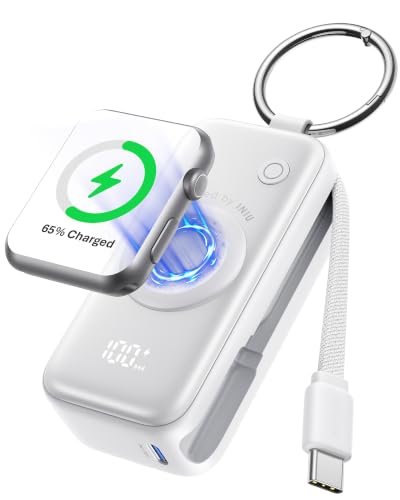
5. INIU 5000mAh Apple Watch power bank
5000 mAh · watch charger · USB-C cable · 20 W
A keychain power bank with a built-in Apple Watch charger and a USB-C cable for your phone. INIU says it takes a Series 11 from 20 to 60% in 30 minutes and charges a phone at up to 20 W.
Charging the watch outdoors and on the go
When you head into the mountains or go camping, a standard one-meter cable can be unwieldy. A great solution for your backpack is a compact powerbank with a built-in puck, such as the INIU 5000 mAh, or a miniature RUXELY adapter that attaches to a standard phone cable.
If you want the full 10 W speed away from a wall outlet, bring the original A3277 cable and plug it into a powerbank with a USB-C port that supports Power Delivery. You can identify the new cable by the A3277 model number on the USB-C connector.
Pay attention to the ambient temperature, as fast charging may slow down or stop entirely when the watch is too cold or overheated. Using the device while it is charging, downloading updates, or streaming music wirelessly also extends the charging time.
If you drain the battery completely to zero, a red lightning bolt will appear on the screen, indicating there is not enough power to boot the system. Once placed on the charger puck, the lightning bolt will be enclosed in a circle, and the watch may take up to 30 minutes of charging before the display turns on for good.
Frequently Asked Questions
Which charger provides full charging speed for Apple Watch Ultra 4?
Full speed is provided exclusively by the original Apple Magnetic Fast Charger cable marked A3277, which comes in the box with the watch. You need to connect it to a USB-C Power Delivery power adapter with a minimum of 10 W, for example, the Apple 20 W adapter model A2305.
Will an Apple Watch Ultra 3 cable charge the Ultra 4 just as fast?
No, the older cable charges at a maximum of 5 W instead of 10 W. In 15 minutes, it will charge the battery for about 12 hours of battery life instead of 18 hours.
Can the Apple Watch Ultra 4 be charged from a powerbank?
Yes. With the A3277 cable connected to a powerbank with USB-C Power Delivery of 10 W or higher, the watch charges at full speed. Pocket-sized powerbanks with a built-in charger for Apple Watch do not feature the A3277 cable, so they charge it at the older speed.
How long does it take to fully charge the Apple Watch Ultra 4?
Charging from zero to 80 percent takes about 45 minutes using a fast charger. A full charge to 100 percent takes about 75 minutes.
Will a more powerful adapter, e.g. 30 W, charge the Ultra 4 faster?
No, connecting a 30 W, 65 W, or even 140 W charger will not speed up the process. The watch and the A3277 cable draw a maximum of up to 10 W, so a more powerful adapter will simply provide extra power headroom.
Sources
- Apple: Apple Watch Ultra 4 - Technical Specifications - manufacturer page (apple.com)
- Apple Support: About fast charge on Apple Watch - manufacturer page (support.apple.com)
- Apple Support: If your Apple Watch won't turn on or won't charge - manufacturer page (support.apple.com)
- MacRumors: Here's Why a New Apple Watch Charging Puck Was Just Released - industry article (macrumors.com)
- DC Rainmaker: Apple Watch Ultra 4 In-Depth Review - industry article (dcrainmaker.com)
- the5krunner: Galaxy Watch vs Apple Watch Charging Speed - industry article (the5krunner.com)
- iDropNews: Apple Watch Series 12 Fast Charging: What to Buy - industry article (idropnews.com)

Leave a comment
This site is protected by hCaptcha and the hCaptcha Privacy Policy and Terms of Service apply.