








As an Amazon Associate I earn from qualifying purchases.
Quick answer: our top pick is Kindle Scribe Pen (new model) (Amazon original · new shape · no charging).
Best stylus for Kindle Scribe? The short answer
If you have the 2025 Kindle Scribe, get the new Amazon stylus with the ergonomic shape. For the older Scribe models, from 2022 and 2024, the older Premium stylus with an eraser and a shortcut button is the right fit.
Neither of them needs charging. The new stylus attaches to the e-reader with a magnet, so it's harder to lose in a backpack or on a desk.
If you prefer a pencil-like grip, there is also a third-party EMR stylus. We cover those below.

Which stylus for which Scribe
Start with which Scribe you have. The third generation went on sale on December 10, 2025. It has an 11-inch screen with 300 ppi and weighs 400 g without a case and stylus (TechRadar).
The new lineup includes a model with a front light, a version without a front light, and the color Scribe Colorsoft (Notebookcheck). Each of them comes with a magnetic stylus in the box. If you lose it, you can buy the same one separately.
The older Premium stylus has two things the new one lacks: an eraser on the end and a shortcut button. Amazon describes it as a stylus for the 2022 and 2024 Scribe. With the 2025 Scribe, don't assume it will work. Check compatibility in the product description.
For owners of an older Scribe, the choice depends on your habits. If you often edit your notes, the eraser saves time. If a comfortable grip for long writing sessions matters more to you, look at the shape of the stylus.
Fun fact: the third-generation Scribe screen grew from 10.2 to 11 inches, and the e-reader is only 5.4 mm thick (TechRadar).
Below, we show styluses picked by one criterion: they fit the Scribe screen, or the manufacturer explicitly names it.

Kindle Scribe styluses we recommend
1. Kindle Scribe Pen (new model)
Amazon original · new shape · no charging
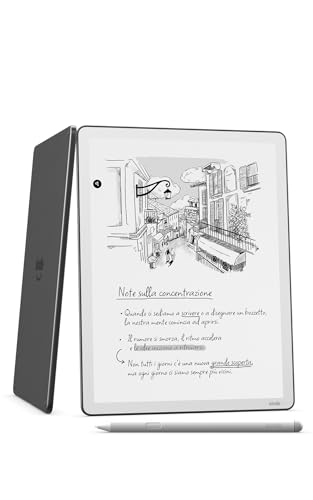
The new Amazon pen with an ergonomic shape, shown together with the third-generation Kindle Scribe. It has no battery, so you never have to charge it.
2. Kindle Scribe Premium Pen
Amazon original · eraser · shortcut button
Premium Pen with an eraser on the end and a shortcut button. Amazon describes it as a pen for the 2022 and 2024 Kindle Scribe, so with the new Scribe, check compatibility in the listing.
3. STAEDTLER Noris digital jumbo (EMR)
EMR · no battery · pencil-thick
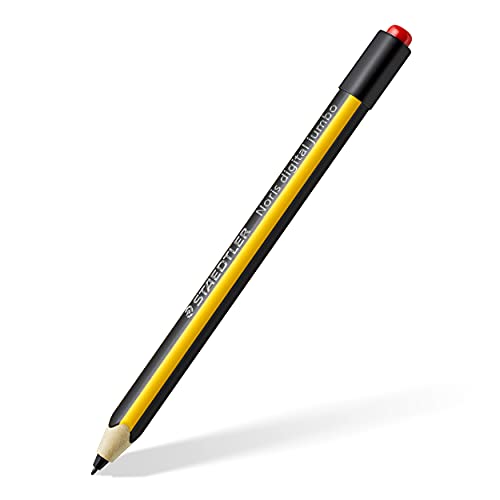
EMR pen shaped like a thick pencil. It works without a battery on EMR screens, and the manufacturer lists the Kindle Scribe in the description. For anyone who prefers the grip of a pencil.
Third-party EMR styluses and no charging
The Scribe screen uses EMR technology, so some third-party EMR styluses also write on it. One example is the STAEDTLER Noris digital jumbo, a thick, pencil-shaped stylus whose description from the manufacturer mentions the Kindle Scribe.
This kind of stylus works without a battery on EMR screens. So you choose it based on grip and weight in your hand, not on power. It's a good option if the standard stylus feels too thin to you.
Keep in mind that a third-party stylus has no magnet to attach it to the reader, unless its description says otherwise. If you carry the reader in a bag, a case with a stylus holder will come in handy.
Fun fact: Kindle Scribe styluses have no battery, so you never charge them (Yahoo Tech).
If you're looking for a power adapter for the reader itself, we cover it in a separate article about the Kindle charger.
When to replace the stylus tip
Stylus tips wear down as you write on the screen. The manufacturer designed them to be replaceable, so you don't have to buy a new stylus when only the tip wears out.
Replace it when it's visibly worn or when writing no longer feels right to you. It will wear out sooner for someone who takes notes every day than for a person who only occasionally jots something in the margin.
Tips for the Amazon stylus and for a third-party stylus may differ. Buy the replacements listed in the description of your specific stylus.
Frequently asked questions about the Kindle Scribe stylus
Which stylus for Kindle Scribe?
For the 2025 Scribe, choose the new Amazon stylus, and for older models, the Premium Pen with an eraser and a shortcut button. You can also consider a third-party EMR stylus if you prefer a different grip.
Do you need to charge the Kindle Scribe stylus?
No. Both the Amazon stylus and third-party EMR styluses work without charging. The new stylus also attaches to the reader magnetically.
Does the Premium Pen fit the 2025 Kindle Scribe?
Amazon describes it as a stylus for the 2022 and 2024 Scribe. It's not certain for the 2025 model, so check compatibility in the product description before buying. If you buy a new Scribe, the stylus is already included.
Do other EMR styluses work with the Kindle Scribe?
Some do, because the Scribe screen uses EMR technology. One example is the STAEDTLER Noris digital jumbo. Before you buy another stylus, look for a mention of the Kindle Scribe in its description.
How do you replace the Kindle Scribe stylus tip?
Tips wear down, but they can be replaced. The replacement method depends on the specific stylus, so check the manufacturer's instructions or the description of the replacement tips. Buy tips designed for your model.
Sources
- Amazon: New Amazon Kindle Scribe lineup - manufacturer page (aboutamazon.com)
- TechRadar: Amazon Kindle Scribe (2025) review - industry article (techradar.com)
- Engadget: Amazon adds the Kindle Scribe Colorsoft and Scribe 3 - industry article (engadget.com)
- Notebookcheck: Amazon unveils Kindle Scribe 3rd Generation - industry article (notebookcheck.net)
- The Gadgeteer: Next-gen Kindle Scribe lineup goes on sale December 10 - industry article (the-gadgeteer.com)
- Yahoo Tech: Amazon Kindle Scribe gets its biggest upgrade - industry article (tech.yahoo.com)

Leave a comment
This site is protected by hCaptcha and the hCaptcha Privacy Policy and Terms of Service apply.