








As an Amazon Associate I earn from qualifying purchases.
Quick answer: our top pick is SanDisk Extreme Portable SSD (USB-C · NVMe · water and dust resistant).
Best SSD for iPhone 18 Pro? Short answer
Get a portable SSD with USB 3.2 Gen 2 (10 Gb/s), formatted as exFAT, and connect it with a good 10 Gb/s USB-C cable. This setup meets Apple's requirements for recording ProRes to an external drive, on both the iPhone 18 Pro and the 17 Pro.
An interface faster than 10 Gb/s gives you nothing, because the iPhone's port doesn't run any faster for this use. So it doesn't pay to spend extra on expensive Thunderbolt or USB4 drives. Choose a solid enclosure and a reliable USB 3.2 Gen 2 standard instead.
What Apple requires from the drive and cable
Apple specifies concrete write speed thresholds. For ProRes 4K at 60 fps, the drive must write at least 220 MB/s, and for 4K at 120 fps at least 440 MB/s. Most portable 10 Gb/s SSDs have plenty of headroom above these numbers, but always check the manufacturer's stated speeds.
Besides speed, there are three more conditions:
- exFAT file system,
- no password encryption,
- power draw of up to 4.5 W.
A drive with hardware encryption enabled or with software that locks access will simply be rejected by the phone. If you buy a used drive, remove the password before your first recording.
The cable is a common weak point. For ProRes RAW and ProRes 4K at 120 fps, Apple requires a USB-C cable rated USB 3.2 Gen 2 (10 Gb/s) or better. A basic charging cable, like the ones included with phones, can be slower and can ruin the whole setup. It's best to use the cable included with the drive, as long as it is marked 10 Gb/s.
Below you'll find portable drives chosen for these requirements: a 10 Gb/s interface and speed headroom above Apple's thresholds.
Best SSDs for Recording on iPhone 18 Pro and 17 Pro
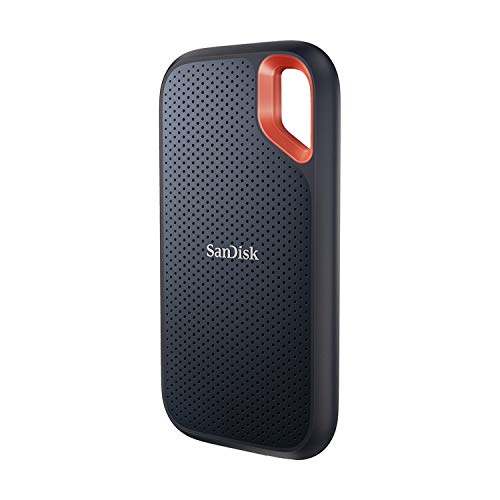
1. SanDisk Extreme Portable SSD
USB-C · NVMe · water and dust resistant
A portable NVMe drive in a rubberized case with a carabiner loop. It has a USB-C connector and speed to spare over Apple's requirements for ProRes. It handles recording out in the field well.
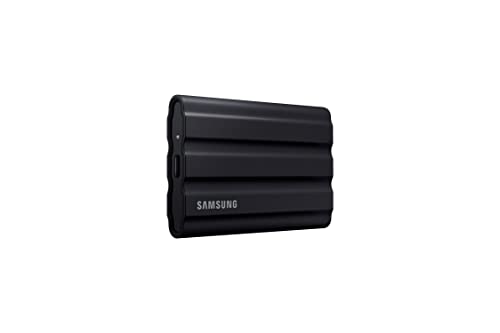
2. Samsung T7 Shield
USB 3.2 Gen 2 · up to 1050 MB/s · IP65
The T7 version in a rubberized case that resists dust and water per IP65. Same speed as the regular T7, so it has headroom over Apple's requirements for ProRes 4K 120 fps.
iPhone 18 Pro vs 17 Pro: what changed
The rules for the drive are the same. The iPhone 17 Pro, 16 Pro, and 15 Pro record ProRes directly to an external USB-C drive, and the 220 and 440 MB/s thresholds apply to these models just as they do to the newer ones. Recording to an external drive in Final Cut Camera requires an iPhone 15 Pro or newer.
The new feature in the iPhone 18 Pro is Pro Video Storage. It is a reserved portion of the phone's storage that lets ProRes recordings run smoothly. On the iPhone 18 Pro and 18 Pro Max, ProRes won't turn on until you reserve the space.
In practice, when you first set up an 18 Pro, you need to give up part of its storage for this purpose. On the 17 Pro, you don't do anything like that. The reservation doesn't replace the drive, which is still needed for the heaviest formats.
Fun fact: ProRes 4K 120 fps can only be recorded to an external drive, not to the phone's storage. This applies to the iPhone 16 Pro, 17 Pro, and 18 Pro.
How to record to a drive step by step
Start with formatting. Before recording, format the drive as exFAT, preferably on a computer. Factory formatting varies, and the wrong file system is the most common reason an iPhone doesn't see a drive.
After that, just a few steps are needed:
- connect the drive to the iPhone with a 10 Gb/s USB-C cable,
- open the Camera app (or Final Cut Camera),
- turn on ProRes and choose the resolution and frame rate,
- on the iPhone 18 Pro, first reserve space in Pro Video Storage.
The Camera app supports recording to an external drive once the drive is connected over USB-C. Before an important shoot, make a short test recording and play it back from the drive.
When buying, look at sustained write speed, not the peak speed printed on the packaging. ProRes recording takes a long time, and the drive has to keep up the whole time. If the drive is too slow, the iPhone will show a message that recording is too slow, and you could lose a shot.
That's why it's worth choosing a drive with headroom above 440 MB/s, even if you only record 4K at 60 fps. A drive that heats up will slow down, and the extra headroom gives you a margin. For field work, a dust- and water-resistant enclosure and a way to attach the drive to a cage or strap are also useful.
Fun fact: The iPhone 18 Pro won't turn on ProRes without reserving space in Pro Video Storage. An external drive alone doesn't replace this step.
Frequently asked questions about SSDs for iPhone
Which SSD for iPhone 18 Pro?
A portable SSD with USB 3.2 Gen 2 (10 Gb/s), formatted as exFAT, unencrypted, and drawing up to 4.5 W. Pair it with a 10 Gb/s USB-C cable. Choose a model with write speed headroom above 440 MB/s.
Does the iPhone 18 Pro record to an external drive?
Yes, once you connect the drive over USB-C, you record in the Camera app. Before using ProRes for the first time, though, you need to reserve part of the phone's storage for Pro Video Storage. Without it, ProRes won't turn on.
What drive speed is needed for ProRes 4K 120 fps?
Apple requires a write speed of at least 440 MB/s. For 4K 60 fps, 220 MB/s is enough. What matters is sustained write speed, not peak, so leave yourself some headroom.
Which file system should I set on a drive for iPhone?
exFAT. The drive also can't be password-encrypted. Format it before recording, preferably on a computer.
Will an SSD from the iPhone 17 Pro work with the iPhone 18 Pro?
Yes, if it meets the same requirements: exFAT, no encryption, power draw up to 4.5 W, and adequate write speed. The difference is in the phone, because the 18 Pro also requires reserving space in Pro Video Storage.
Sources
- Apple: About Apple ProRes on iPhone - manufacturer page (support.apple.com)
- Apple: Record video in Final Cut Camera - manufacturer page (support.apple.com)
- iThinkDifferent: How to set up Pro Video Storage on iPhone 18 Pro - industry article (ithinkdiff.com)
- PC Tech Magazine: How fast does an external SSD need to be for iPhone ProRes - industry article (pctechmag.com)
- EveryMac: iPhone camera record to external storage - industry article (everymac.com)



Leave a comment
This site is protected by hCaptcha and the hCaptcha Privacy Policy and Terms of Service apply.