









As an Amazon Associate I earn from qualifying purchases.
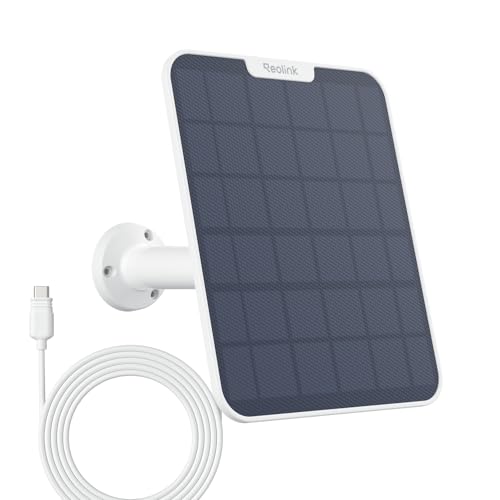
Quick answer: our top pick is Reolink Solar Panel 2S (6 W, with battery) (6 W + battery · nearly all Reolink battery cameras).
Best solar panel for Reolink cameras? Choosing the right wattage
A standard 3 W panel is enough to power most older battery-powered Reolink cameras. Newer, more advanced models require a more powerful 6 W panel, and for the Altas Go PT camera, the manufacturer recommends the 12 W version. The most important thing is matching the wattage to the specific model and ensuring the physical charging port is compatible.
In general, all battery-operated Reolink cameras can work with solar panels of the same brand. However, devices with higher power consumption require a stronger power source to maintain continuous operation. The panel is installed according to the instructions in the Reolink app.
Recommended panel wattage for popular camera models
Reolink has created a clear compatibility list that makes it easy to choose the right panel for your camera. This way, you know exactly what performance your device needs for stable operation.
The manufacturer's recommendations are as follows:
- Solar Panel (3 W) is compatible with the following cameras: Argus 2, Argus 2E, Argus 2E Plus, Argus 3, Argus 3K, Argus 3 Plus, Argus Pro, Argus PT 2K, PT Pro, Reolink Go, Go PT, Keen Ranger PT, Duo 4G, Argus 3E, Argus 3 Pro, Argus Eco, Eco Pro, Argus PT, PT Lite, Go Plus, Go PT Plus, and Go PT S Lite.
- Solar Panel 2 (6 W) is compatible with the following cameras: Argus Eco Ultra, Argus 3 Ultra, Argus 4, Argus 4 Pro, Argus PT Ultra, Argus Track, Altas, Altas PT Ultra, Go Ultra, Go PT Ultra, Trackmix (battery), Trackmix LTE, Duo 2 LTE, Duo 2 (battery), and Go Ranger PT.
- Solar Panel 3 (12 W) is recommended directly for the Altas Go PT camera.
In the case of the Argus 4 Pro camera, the dedicated solar panel ensures continuous battery power. According to reviews, this can eliminate manual battery recharging.
USB-C port, micro-USB, and compatibility limitations
Reolink cameras use two connection standards: the older micro-USB and the newer USB-C. If the port on your camera does not match the plug of the purchased panel, you can easily use a USB to Type-C cable.
It is worth remembering that not every device of this brand can be connected to a solar cell. Compatibility with solar panels does not cover first-generation Reolink Argus models, Keen, and the Doorbell (Battery) video doorbell.
You cannot connect solar panels to PoE network devices or cameras requiring power from a permanent DC power supply either. They are designed exclusively for battery-powered models.
Fun fact: Reolink cameras powered by PoE or a traditional power adapter do not work with solar panels, even if they feature a built-in USB port.
We have prepared a list of recommended Reolink solar panels, selecting them based on the manufacturer's official compatibility list and popular home surveillance applications.
Recommended solar panels for Reolink

1. Reolink Solar Panel 2S (6 W, with battery)
6 W + battery · nearly all Reolink battery cameras
A panel with a built-in battery that gives the camera an energy reserve. Reolink says the Solar Panel 2S works with all its battery cameras except the Argus, Keen and Doorbell (Battery).

2. Reolink Solar Panel 6 W (micro-USB)
6 W · micro-USB · for older cameras
The micro-USB version for older cameras with that port, such as the Argus 2 and Argus 3 series. Reolink stresses that the panel must match the camera's port.

3. Reolink Solar Panel 2 (5.8 W)
Solar Panel 2 · 5.8 W
The Solar Panel 2 that Reolink lists for Argus 4, Argus PT Ultra and Argus 3 Ultra.
A more powerful panel and the 2S model with its own battery
If your camera is installed in a shaded area, you can opt for a panel with higher wattage than recommended. A more powerful panel improves charging performance, which is especially useful in low sunlight conditions.
The 6 W Solar Panel 2S features a built-in battery that provides backup power for the camera.
The Solar Panel 2S model works with all battery-powered Reolink cameras, with the exception of the first version of Reolink Argus, the Keen camera, and Doorbell (Battery).
Fun fact: Reolink itself advises choosing a higher-wattage panel than recommended if the camera receives little sunlight at the installation site.
Questions and answers about Reolink solar panels
Which solar panel for Reolink Argus 4 Pro?
For the Reolink Argus 4 Pro camera, the manufacturer recommends a 6 W solar panel, such as Solar Panel 2. A device connected to this panel receives a continuous power supply, practically eliminating the need to manually recharge the battery. Panel installation is carried out directly following the steps outlined in the Reolink app.
Does a 6 W panel work with an older Reolink camera?
Yes, essentially all battery-powered Reolink cameras are compatible with the brand's panels, provided the charging connector matches. Using a more powerful 6 W panel with a camera that requires 3 W will improve charging efficiency in weaker sunlight. You only need to consider an adapter cable if the camera port differs from the panel connector.
Does the Reolink solar panel fit the Reolink doorbell?
No, Reolink's official compatibility list does not include the Doorbell (Battery). Check with Reolink for the power supply options for your specific doorbell model. First-generation Reolink Argus models and the Keen camera are also incompatible with solar panels.
What to do if the panel connector does not fit the camera?
If the charging port on the camera has a different format than the plug on the cable coming from the panel, use a USB to Type-C cable. Such an adapter allows you to connect devices from different generations. This way, you can, for example, connect a newer panel to a camera equipped with a micro-USB port.
Does the solar panel charge a Reolink camera in winter?
Yes, the solar panel also charges the battery in winter, as long as it receives sunlight. Since sunlight can be weaker during the colder months, a good solution is to install a more powerful panel or the Solar Panel 2S model with a built-in battery. This ensures better efficiency and helps maintain power levels during worse weather.
See also
- Best microSD card for Reolink camera - capacity limit per model and Home Hub
- Best solar panel for Ring, Blink and eufy cameras - compatibility by model
Sources
- Reolink: Which cameras can work with Reolink Solar Panel - manufacturer page (support.reolink.com)
- Reolink: How to charge Reolink battery-powered cameras - manufacturer page (support.reolink.com)
- Gearbrain: Reolink Argus 4 Pro review - industry article (gearbrain.com)
- CGMagazine: Reolink Argus 4 Pro review - industry article (cgmagonline.com)
- Android Central: Reolink Argus 4 Pro - industry article (androidcentral.com)

Leave a comment
This site is protected by hCaptcha and the hCaptcha Privacy Policy and Terms of Service apply.