







As an Amazon Associate I earn from qualifying purchases.
Quick answer: our top pick is Jackery SolarSaga 200W (200 W · Voc 22 V · Jackery original).
Which solar panel for the Jackery Explorer 1000 v2? The simplest choice: SolarSaga 200W
It's best to take two SolarSaga 200W panels, one for each port. Together they fill the station's entire solar input, which is 400 W.
If you care about lower weight and a smaller expense, the 100 W panels from Jackery's list will be enough. They charge more slowly, but they are easier to carry.
| Panel | Explorer 1000 v2 | Notes |
|---|---|---|
| Jackery SolarSaga 200W | yes | 1 per port, 2 = full 400 W |
| Jackery SolarSaga 100W Air | yes | 2 per port only via Jackery connector |
| Jackery SolarSaga 100 Prime | yes | 2 per port only via Jackery connector |
| SOKIOVOLA 200 W | yes | Voc 21.6 V, DC8020 adapter included |
Sources: Jackery (Explorer 1000 v2 page, solar panel guide), SOKIOVOLA listing. Input: 2 x DC8020, 12-60 V, 400 W max combined.
Find your panel in the table and check how many units one port can handle. Keep in mind that the station has two ports, so the numbers in the table apply to each of them separately.

How the solar input works in the Explorer 1000 v2
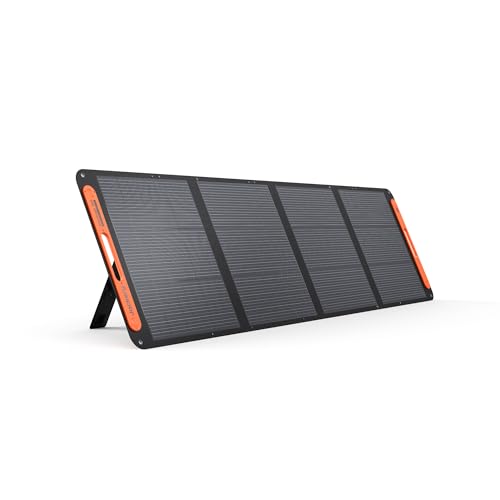
The station has two DC8020 (8 mm) inputs. Each one accepts current depending on the panel voltage: up to 8 A at 12-16 V, and up to 10.5 A at 16-60 V.
Both ports together can draw up to 21 A, which gives 400 W. This is the ceiling for the whole input, so adding more panels than needed to reach 400 W will not speed up charging.
Jackery provides a list of panels compatible with the station: SolarSaga 100W, SolarSaga 100 Prime, SolarSaga 100 Air, SolarSaga 100 Light and SolarSaga 200W. If you want peace of mind, choose from this list.
To each DC8020 port you connect one 200 W panel or one 100 W panel. Two ports mean two 200 W panels in total, which is the full setup.
Fun fact: two 100 W panels can be connected to a single port, but only through a separate Jackery Solar Panel Connector adapter. Without it, each panel needs its own port.
We chose the products below to show three sensible options: a set of 200 W panels, lighter 100 W panels, and an alternative from another brand.
Recommended solar panels for the Jackery Explorer 1000 v2
1. Jackery SolarSaga 200W
200 W · Voc 22 V · Jackery original
Jackery's 200 W panel from the official Explorer 1000 v2 compatibility list. One panel per DC8020 port, two fill the full 400 W input.
2. Jackery SolarSaga 100W Air
100 W · lightweight · Jackery original
A light 100 W panel from the compatibility list. Two of them on one port need Jackery's Solar Panel Connector.

3. Jackery SolarSaga 100 Prime
100 W · bifacial · for fixed mounting
A bifacial 100 W panel for fixed mounting, for example on a camper roof. It is also on the Explorer 1000 v2 compatibility list.
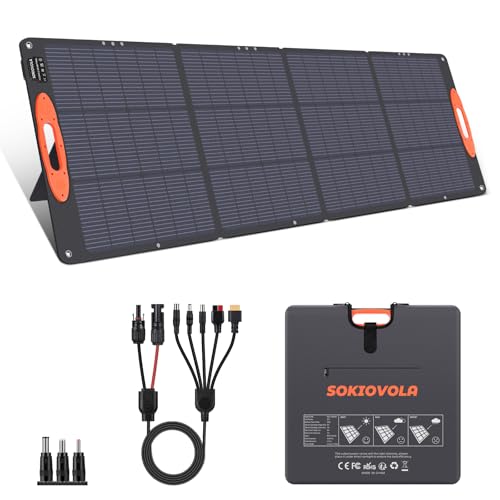
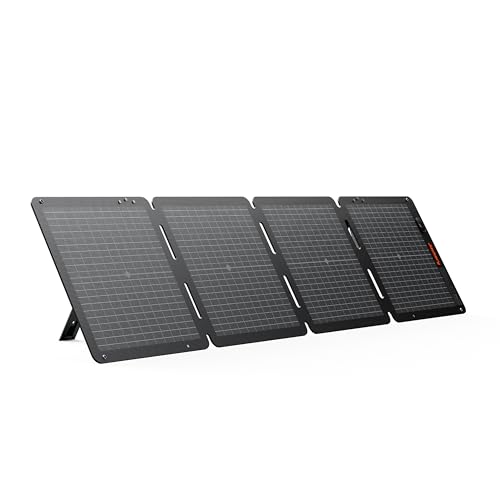
4. SOKIOVOLA 200W Portable Solar Panel
200 W · Voc 21.6 V · XT60 and DC8020 adapters included
A third-party panel with a 5-in-1 cable that includes XT60 and DC8020 ends. Its 21.6 V open-circuit voltage sits inside the input range of the EcoFlow DELTA 3 and the Jackery Explorer 1000 v2.
Two panels on one port and mixing models
Two 100 W panels on one port is a good solution when you want to leave the second port free. For this you need the Jackery Solar Panel Connector mentioned earlier, and nothing else can replace it.
Be careful when combining different panels. Jackery warns that mixing different models or using an odd number of panels can result in uneven voltages and damage the power station.
In practice, stick to a simple rule: use identical panels for a single connection. Don't add an older 100 W panel to a new model just because it's sitting in your garage.
If you have two ports and two identical 200 W panels, you don't need to worry about anything. This is the safest setup.
A panel from another brand: what to check before buying
A panel that isn't on Jackery's list may work, but then the responsibility for choosing it is yours. Start with the open-circuit voltage, because it must fall within the station's input range of 12-60 V. Above 16 V, the station accepts more current (up to 10.5 A instead of 8 A).
For comparison, the SolarSaga 200W has an open-circuit voltage of 22 V and a maximum power point voltage of 18 V. A panel from another brand with similar values should fit within the range without any problem.
The second point is the connector. The station has DC8020, while most panels come with MC4, so you need an adapter or a cable with the right plug.
An example is the SOKIOVOLA 200 W. The panel has an MC4 output and an open-circuit voltage of 21.6 V, and the set includes a 5-in-1 cable with a DC8020 plug, described as compatible with the Explorer 1000 v2.
What do the reviews say? They concern the station itself, not panels from other brands. TechRadar praises its quiet operation and points out the lack of water resistance as a downside. The Drive gives it 9/10 and recommends the bundle with a 200 W panel. T3 tested the version with a 100 W panel.
The conclusion is this: the station gets good reviews, but a bundle with a panel from another brand is your own choice. Watch the voltage and don't connect panels with different parameters.
Most common questions about panels for the Explorer 1000 v2
How many panels can be connected to the Jackery Explorer 1000 v2?
The station has two DC8020 ports, and each takes one 200 W panel or one 100 W panel. That's a maximum of 400 W in total. You can connect 100 W panels two per port, but only through the Jackery Solar Panel Connector.
Can you connect two 100 W panels to one port?
Yes, but only through the Jackery Solar Panel Connector. Without it, each panel needs its own port. Use two identical panels for this.
Will a panel from another brand work with the Jackery 1000 v2?
It may work if its open-circuit voltage falls within the 12-60 V input range and you have the right DC8020 plug. However, such panels are not on Jackery's compatibility list. An example is the SOKIOVOLA 200 W with a 5-in-1 cable and an open-circuit voltage of 21.6 V.
Can you mix different Jackery panels?
It's better not to. Jackery warns that mixing different models or using an odd number of panels can result in uneven voltages and damage the station. Use identical panels for a single connection.
What connector does the Jackery Explorer 1000 v2 have?
The station has two DC8020 (8 mm) inputs. At 12-16 V they accept up to 8 A, and at 16-60 V up to 10.5 A. Both ports together can draw up to 21 A, which means 400 W.
Sources
- Jackery: Explorer 1000 v2 - manufacturer page (jackery.com)
- Jackery: Solar panels complete guide - manufacturer page (jackery.com)
- TechRadar: Jackery Explorer 1000 v2 review - industry article (techradar.com)
- T3: Jackery Explorer 1000 v2 review - industry article (t3.com)
- The Drive: Jackery Explorer 1000 v2 hands-on review - industry article (thedrive.com)

Leave a comment
This site is protected by hCaptcha and the hCaptcha Privacy Policy and Terms of Service apply.