








As an Amazon Associate I earn from qualifying purchases.
Quick answer: our top pick is Logitech M196 Bluetooth wireless mouse (Bluetooth · quiet clicks · compact · 12-month battery).
Best mouse for Galaxy Tab A11+? A Bluetooth one, so the only USB-C port stays free
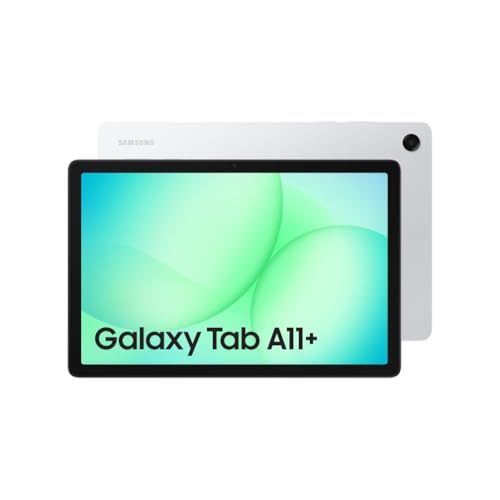
The Galaxy Tab A11+ has one USB-C port, and it's also the port you charge through. A Bluetooth mouse leaves it free, so that's the one to get.
A wired mouse can work too, but it takes up the port. If you often type and select text in a keyboard case, you'll notice that quickly when the battery runs low.
What the tablet gives you to work with
Samsung lists Bluetooth 5.3 for the tablet, so any current Bluetooth mouse pairs without an adapter. The USB-C port is USB 2.0, not the faster USB 3. For a mouse that makes no difference, but it's why an adapter won't speed anything up.
DeX is built into the tablet, so you don't need anything extra to switch to a desktop-style layout. Samsung says you can control DeX with the touchscreen, an S Pen, a USB or Bluetooth mouse, and a keyboard or keyboard case.
Fun fact: Samsung removed the three pogo pins that the older Tab A9+ used for its keyboard.
A short example shows why the port matters. Say you're writing at a desk with a wired mouse on an OTG adapter and the tablet drops low. To charge it, you have to unplug the mouse. With a Bluetooth mouse, you plug in the charger and keep working.
We picked mice that connect over Bluetooth, from small ones that fit in a bag to a full-size one for longer sessions. Choose by hand size and by what bothers you most: click noise, battery changes, or switching between devices.
Our pick: a compact Bluetooth mouse with no receiver, quiet clicks and a battery that lasts up to 12 months.
Mice for the Galaxy Tab A11+ we recommend
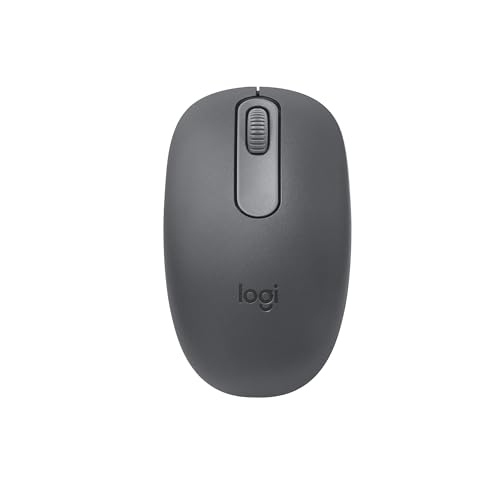
1. Logitech M196 Bluetooth wireless mouse
Bluetooth · quiet clicks · compact · 12-month battery
A small ambidextrous mouse for a Galaxy Tab A11+ (Bluetooth 5.3) that pairs without a receiver, so the tablet's only USB-C port stays free for charging. It runs up to 12 months on the included AA battery and has quiet clicks. Its 3 buttons can't be customized.

2. Logitech M240 Silent Bluetooth wireless mouse
Bluetooth · silent clicks · compact · 18-month battery
A good fit if you use the tablet in quiet places, since Logitech says it cuts click sound by 90%. It connects over Bluetooth with no dongle, leaving the USB-C port free for charging, and it's rated for up to 18 months on a battery. Its 3 buttons can't be customized.
See Logitech M240 Silent Bluetooth wireless mouse on Amazon →

3. Logitech Signature M650 wireless mouse
Bluetooth · multi-device · SmartWheel · 24-month battery
A fuller-size mouse for longer sessions, with a SmartWheel that switches between line-by-line and fast scrolling on long web pages. It's listed as multi-device and rated by Logitech for up to 24 months on the battery. It suits small to medium hands, and side buttons are customized with Logi Options+ on Windows and macOS, so don't count on remapping them from the tablet.

4. Logitech Pebble Mouse 2 M350s Bluetooth wireless mouse
Bluetooth · 3 devices · quiet clicks · slim
A slim, lightweight mouse that stores easily with the tablet, and Logitech says its Silent Touch Technology removes 90% of click noise. It pairs with up to 3 Bluetooth devices, and an Easy-Switch button changes between them. Battery life is up to 2 years, but customizing the middle button requires the separate Logi Options+ app.
See Logitech Pebble Mouse 2 M350s Bluetooth wireless mouse on Amazon →
How to connect the mouse
For Bluetooth, put the mouse in pairing mode first. Then open Settings, tap Connections, then Bluetooth, and pick the mouse from the list. A pointer appears on screen as soon as it connects, because Android has one built in.
A wired USB mouse needs an OTG adapter for the USB-C port. That works for everyday use, but the port is then busy, and you'd need to unplug the mouse to charge.
One thing to keep apart: Samsung says that when you use DeX over a DeX cable, wired keyboards and mice don't work. Wireless ones pair over Bluetooth. So a wired mouse through OTG and a DeX cable are two different cases.
If you also want to type more comfortably, we have a separate article on keyboards for the Galaxy Tab A11+.
Using the mouse in DeX
With a mouse, DeX feels much closer to a laptop. You click and drag to select text, right-click in apps that support it, and keep your hands on the keyboard case instead of reaching for the screen.
You'll find the keyboard, mouse and trackpad options in Settings, in the Samsung DeX menu. That's where Samsung puts the input settings for DeX.
The tablet does have limits. Reviewers at MyNextTablet say it quickly reaches its performance limits with many apps open in DeX. They also recommend a Bluetooth keyboard and mouse if you want to do serious work in DeX.
A mouse makes the tablet easier to use, but it won't turn it into a computer. Plan on a few apps at a time: a browser, a document and a messaging app is a realistic mix.
Fun fact: Samsung notes that some gestures don't work when you control DeX with a trackpad, such as pinch-to-zoom with two fingers. A mouse doesn't try to copy those gestures at all.
Mouse questions, answered
Can you connect a Bluetooth mouse to the Galaxy Tab A11+?
Yes. The tablet has Bluetooth 5.3, and Samsung lists Bluetooth mice among the supported inputs. No receiver or adapter is needed, and the USB-C port stays free for charging.
Does a wired USB mouse work with the Galaxy Tab A11+ through an OTG adapter?
Yes, you connect it to the USB-C port with an OTG adapter, and the pointer shows up on screen. The downside is that the port is occupied while you use it. With a DeX cable, Samsung says wired mice don't work.
Does the Galaxy Tab A11+ have DeX, and does it work with a mouse?
Yes, DeX is built into the tablet. A USB or Bluetooth mouse works there, alongside touch, the S Pen and a keyboard. You'll find the mouse options in Settings, in the Samsung DeX menu.
How do you pair a Bluetooth mouse with the Galaxy Tab A11+?
Turn on pairing mode on the mouse, then go to Settings, Connections, Bluetooth on the tablet. Select the mouse when it appears. Once paired, you'll see the pointer right away.
Will a mouse replace the trackpad in a keyboard case for the Galaxy Tab A11+?
A mouse is a separate input that works next to the case, so it doesn't have to replace anything. Many people find it easier for selecting text precisely. Samsung supports a keyboard case and a mouse together in DeX.
Sources
- Samsung UK: Galaxy Tab A11+ WiFi 11" Tablet, specifications - manufacturer page (samsung.com)
- Samsung Support: Use Samsung DeX on your Galaxy tablet - manufacturer page (samsung.com)
- Samsung Support: Use a keyboard and mouse with Samsung DeX - manufacturer page (samsung.com)
- GSMArena: Samsung Galaxy Tab A11+ specifications - industry article (gsmarena.com)
- MyNextTablet: Samsung Galaxy Tab A11+ review - industry article (mynexttablet.com)
- MakeUseOf: How to connect and use a mouse on Android - industry article (makeuseof.com)
- Asurion: How to set up Samsung DeX on a Galaxy Tab - industry article (asurion.com)


Leave a comment
This site is protected by hCaptcha and the hCaptcha Privacy Policy and Terms of Service apply.