








As an Amazon Associate I earn from qualifying purchases.
Quick answer: our top pick is SanDisk Extreme 256 GB (256 GB · UHS-I · A2, U3, V30 · up to 190 MB/s).
Best microSD card for Insta360 Ace Pro 2? The simple answer: UHS-I V30, up to 1 TB
For the Ace Pro 2, buy a UHS-I microSD card rated V30 or higher, with a capacity of up to 1 TB. The least risky choice is a card from the list that Insta360 publishes, or one of the brand's own cards.
The card is formatted as exFAT. The manufacturer advises against UHS-II and UHS-III cards, as well as cards larger than 1 TB, as we explain below.
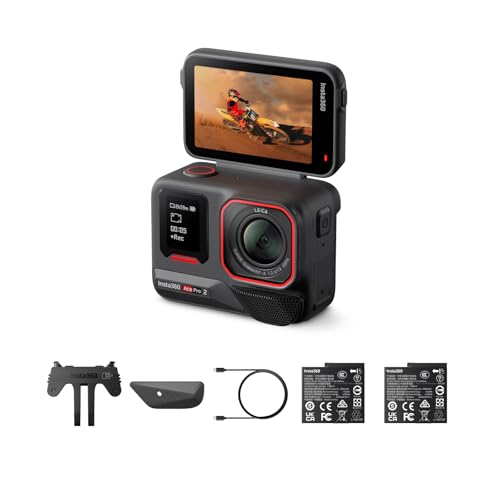
Fun fact: The Ace Pro 2 has no built-in storage, and the bundles don't include a card, as TechRadar reports. Without your own card the camera can't record anything, so you need to buy a card separately.
When you order the camera, add a card to the same cart. Otherwise you'll start your first trip by hunting for a store.


Why UHS-I rather than UHS-II, and why V30 is enough
The Ace Pro 2 records at bitrates of up to 180 Mb/s. The V30 class means a sustained write speed of at least 30 MB/s, or 240 Mb/s. That leaves a comfortable margin, so a faster class such as V60 or V90 won't give you anything extra.
Write speed is one thing, and the interface standard is another. The camera's slot is UHS-I and has limits that a more expensive card can't get around.
Fun fact: A UHS-II card won't give you higher speed in the Ace Pro 2, because the slot doesn't read its additional row of pins (information from Lexar). So you pay for something the camera can't use.
Worse, according to Lexar, such a card may interrupt recording or corrupt files in this slot. That's why Insta360 advises against UHS-II and UHS-III.
Below we've collected UHS-I cards with the V30 rating, chosen according to the camera manufacturer's recommendations. They include cards from its list and Insta360-branded cards, as well as one card from outside the list with the same ratings.

Recommended microSD Cards for Insta360 Ace Pro 2
1. SanDisk Extreme 256 GB
256 GB · UHS-I · A2, U3, V30 · up to 190 MB/s
One of the best-selling microSD cards. It features a V30 rating for 4K video recording and an A2 rating for apps and games.
2. Insta360 PRO 256 GB
256 GB · UHS-I · V30, A2 · up to 90 MB/s
An Insta360-branded card: the camera maker lists its own cards as recommended. UHS-I and V30, exactly what the camera asks for, without the UHS-II standard Insta360 advises against. 256 GB is a good buffer for 4K and 8K footage.

3. Lexar Professional SILVER PLUS 256 GB
256 GB · UHS-I · A2, U3, V30 · up to 205 MB/s
A Lexar card with read speeds up to 205 MB/s, A2, and V30 ratings. One of the bestsellers among microSD cards.
What capacity for whom
The baseline is simple: one minute of footage at a high bitrate of 120 Mb/s is about 900 MB. At 180 Mb/s the file grows faster, so leave some headroom.
- Short trips and test shoots: 32 or 64 GB is enough if you transfer the footage to a computer after each day.
- Weekends and vacations: 128 or 256 GB is a sensible middle ground.
- Long recordings and trips without a computer: buy a 512 GB or 1 TB card, but keep in mind that 1 TB is the upper limit.
For longer recordings, the camera splits the footage into files every 29 minutes 59 seconds. Don't look for a fault in this, it's meant to work that way. When editing, you simply stitch several consecutive files together.
A big card has one more drawback: all your footage ends up in one place. If the card gets damaged, you lose everything at once, so copy important recordings as you go.
exFAT, formatting, and no file recovery
Insta360 recommends the exFAT file system. New cards usually come with it already from the factory. Even so, it's worth formatting the card in the camera itself, because that gives it the layout the camera expects.
Also format in the camera a card that was previously used in a phone, camera, or reader. Do it only after you've copied off everything you want to keep.
Deleted files can't be recovered, as Insta360 states outright. Deleting a recording or formatting the card is therefore a decision with no undo.
Build a simple habit: first a copy to a drive or the cloud, then a check that the files open, and only then clear the card.
FAQ - the most common questions about cards for the Ace Pro 2
Which microSD card for the Insta360 Ace Pro 2?
A UHS-I microSD card rated V30 or higher, formatted as exFAT, with a capacity of up to 1 TB. The easiest way to choose one is from Insta360's list or among the brand's own cards.
Does the Insta360 Ace Pro 2 have built-in storage?
No, the camera has no built-in storage. No card comes in the bundles either, so you buy one separately. Without it, the Ace Pro 2 can't record any footage.
Will a UHS-II card work in the Ace Pro 2?
Insta360 advises against UHS-II cards. A UHS-I slot doesn't read their extra row of pins, so they give no speed advantage. According to Lexar, they may interrupt recording or corrupt files.
What is the largest card that fits the Ace Pro 2?
The largest recommended capacity is 1 TB. Insta360 advises against cards larger than 1 TB. Such a card must be UHS-I and rated V30 or higher.
Which cards does Insta360 recommend for the Ace Pro 2?
Insta360 publishes a list of cards in capacities from 32 GB to 1 TB, mostly rated V30 and UHS-I. It includes the SanDisk Extreme and Extreme Pro series and the Lexar 1066x SILVER. It also recommends its own cards from its store.
Sources
- Insta360: Ace Series memory card FAQ (Ace Pro 2) - manufacturer page (onlinemanual.insta360.com)
- Insta360 Blog: Ace Pro 2 FAQ - manufacturer page (insta360.com)
- TechRadar: Insta360 Ace Pro 2 review - industry article (techradar.com)
- Tom's Guide: Insta360 Ace Pro 2 review - industry article (tomsguide.com)
- Lexar: Best microSD cards for action cameras and drones - industry article (americas.lexar.com)

Leave a comment
This site is protected by hCaptcha and the hCaptcha Privacy Policy and Terms of Service apply.