








As an Amazon Associate I earn from qualifying purchases.
Quick answer: our top pick is Creality Space Pi X4 Lite (4 spools) (4 spools · up to 75 °C · two chambers).
Best filament dryer for Snapmaker U1? 2 or 4 spools
A spool of PLA, PETG or TPU needs about 6 hours in a dryer, according to Snapmaker's guide. That's one evening before a print. Buy a separate dryer for 2 or 4 spools. If you print nylon, look for a model that goes up to 185 °F (85 °C).
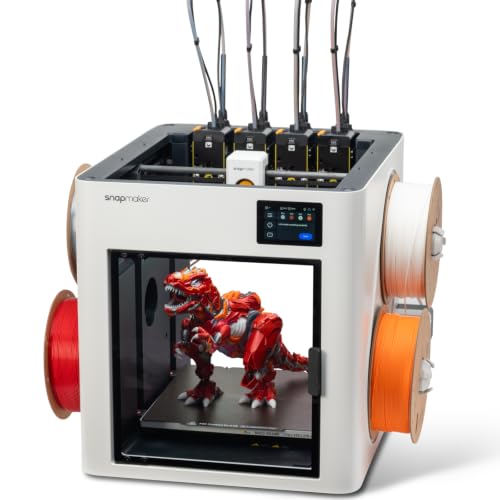
The U1 doesn't dry filament by itself. As 3Dnatives reports, the four spool holders (two on each side) are exposed, and the printer has no built-in drying chamber. So the dryer is a separate unit that sits next to the printer.
At home, where the printer stays in one place, a two-spool dryer is enough if you dry before printing and mostly keep an eye on TPU or PETG. A four-spool model saves time when all four toolheads work on one print. On the road, when you take the printer with you, dry your spools before you leave and you won't need to haul tubes or extra gear.
Drying before printing or printing straight from the dryer
The simplest way is to dry the spool, take it out and put it on the holder. No tubes, no drag, and automatic loading works. Snapmaker notes that TPU should always be dried before printing.
Printing straight from the dryer is more convenient with materials that absorb moisture quickly, but it takes some care. The filament has to leave through the tube in a gentle curve. According to Snapmaker's FAQ, a third-party dryer can work, but high drag in a tight path will interrupt automatic loading, and you'll have to load by hand.
3DWithUs points out that long PTFE tubes increase tension on the filament, so watch the feeding resistance. When buying, a model with tube ports is useful. Also, don't plan to print from four separate dryers at once. For the SnapDryer, Snapmaker recommends placing just one dryer beside the printer so the tube bends less.
We picked dryers for two and four spools.
If you're buying only one: get a four-spool model, like our top pick, the Creality Space Pi X4 Lite. You can dry a full set for one print. It only goes up to 167 °F (75 °C), so it won't handle nylon. If you print nylon, choose a four-spool version that reaches 185 °F (85 °C).
Filament dryers for the Snapmaker U1 we recommend

1. Creality Space Pi X4 Lite (4 spools)
4 spools · up to 75 °C · two chambers
Lite version for four spools, with two independent chambers and a range of up to 75 °C.

2. Creality Space Pi X4 (4 spools)
4 spools · up to 85 °C · two chambers
A four-spool dryer with two separately controlled chambers. Creality lists up to 85 °C, so it can handle nylon too.

3. SUNLU FilaDryer S4 (4 spools)
4 spools · up to 70 °C · 3 fans
A dryer for four spools at once with three fans. SUNLU lists a maximum of 70 °C and automatic humidity control.

4. Creality Space Pi Plus (2 spools)
2 spools · 360° heating · touchscreen
A two-spool dryer with a fan and ready-made presets for popular materials.
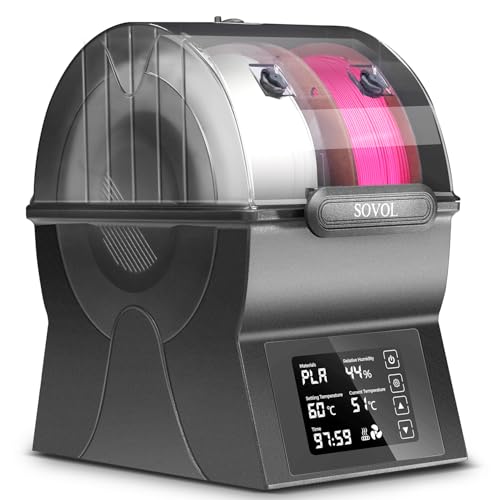
5. Sovol SH02 (2 spools)
2 spools · PTFE tube ports
A two-spool dryer with two ports where the filament exits through a tube to the printer.
Temperatures and times: brands disagree
Manufacturers don't agree on temperatures, so check the recommendations on your filament's packaging too. Here are the values from the sources:
- PLA: Snapmaker says 131 °F (55 °C) for 6 hours, Prusa says 113 °F (45 °C).
- PETG: Snapmaker says 149 °F (65 °C) for 6 hours, Prusa says 131 °F (55 °C).
- TPU: Snapmaker says 158 °F (70 °C) for 6 hours, always before printing.
- Fiber-filled nylon (PA6-CF, PAHT-CF): Bambu Lab says 185 °F (85 °C) for 12 hours.
Bambu Lab warns that at 149 °F (65 °C) nylon may not dry fully. Prusa, on the other hand, says going above the recommended temperature softens the filament and sticks the coils together.
In practice, a dryer that goes up to 158 °F (70 °C) will handle PLA, PETG and TPU. For nylon you need a model that reaches 185 °F (85 °C).
Fun fact: according to Prusa, an older Prusament spool heated above 113 °F (45 °C) can fall apart, which is why it gets screwed together for drying.
SnapDryer, RFID and the Top Cover
According to the Snapmaker FAQ, the official SnapDryer set is one heating station and four spool boxes. Three power levels give roughly 122, 140 and 158 °F (50, 60 and 70 °C) at the outlet. That's enough for PLA, PETG and TPU, but you can't dry nylon this way.
FauxHammer points out two limitations. The station dries only one spool at a time, so the four boxes are more of a storage rack than four dryers. The recommended box connection also bypasses the side buffers, which takes away some of the convenience of automatic loading.
RFID doesn't work when you print straight from the SnapDryer. You then enter the filament type and color on the printer's screen.
According to the Snapmaker FAQ, the Top Cover passively heats the chamber to 122 °F (50 °C). It doesn't replace a dryer, because it won't dry spools sitting outside.
Fun fact: in the rotating drying mode, the spool in the Bambu Lab dryer turns 30° every 5 minutes so it heats evenly.
Frequently asked questions about a dryer for the U1
Does the Snapmaker U1 have built-in filament drying?
No. The spools sit on open holders, and there's no drying chamber. You dry filament with a separate dryer.
Can you print straight from a dryer with the Snapmaker U1?
Yes, if the filament leaves the dryer in a gentle curve through a tube. If there's too much resistance, automatic loading will stop and you'll have to load manually.
Does a dryer from another brand work with the Snapmaker U1?
According to the Snapmaker FAQ, it can. It all depends on how much resistance the filament meets in the tight path. With a long PTFE tube, check that the filament feeds smoothly.
What temperature should you dry PLA, PETG, TPU and nylon at?
Snapmaker says 131 °F (55 °C) for PLA, 149 °F (65 °C) for PETG and 158 °F (70 °C) for TPU, each for 6 hours. For fiber-filled nylon, Bambu Lab says 185 °F (85 °C) for 12 hours. Prusa recommends lower values for PLA and PETG, so check your filament's instructions too.
Does the SnapDryer dry four spools at once?
No. The set has four boxes, but according to FauxHammer the station dries only one spool at a time. If you want to dry four spools simultaneously, look for a separate four-spool dryer.
Sources
- 3Dnatives Lab: Review of the Snapmaker U1 - industry article (3dnatives.com)
- Snapmaker Wiki: FAQ for U1 - manufacturer page (wiki.snapmaker.com)
- Snapmaker Wiki: U1 automatic loading failure - manufacturer page (wiki.snapmaker.com)
- Snapmaker: How to Dry 3D Printer Filament Safely - manufacturer page (snapmaker.com)
- Bambu Lab Wiki: Filament Drying Recommendations - industry article (wiki.bambulab.com)
- Prusa Knowledge Base: Drying filament - industry article (help.prusa3d.com)
- FauxHammer: Snapmaker U1 Top Cover Review - industry article (fauxhammer.com)
- 3DWithUs: SnapDryer and filament drying solutions for Snapmaker - industry article (3dwithus.com)

Leave a comment
This site is protected by hCaptcha and the hCaptcha Privacy Policy and Terms of Service apply.