








As an Amazon Associate I earn from qualifying purchases.
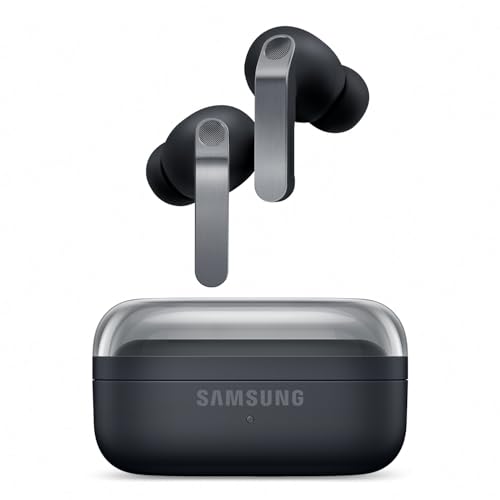
Quick answer: our top pick is Samsung 15W Wireless Charger Pad EP-P2400 (original Samsung · Qi · pad).
Best charger for Galaxy Buds4 Pro? A USB-C power adapter or a Qi pad is all you need
You don't need anything special for the Galaxy Buds4 Pro. You can charge the case with a USB-C power adapter, or set it on a regular Qi wireless charging pad, because it supports wireless charging.
If you already have a phone charger at home, that charger and a USB-C cable will do the job right away. If not, buy a power adapter or a pad. The earbuds were announced on February 25, 2026, and went on sale in March 2026.
Below we explain how each method works, how much power you actually need, and how to use a single pad to charge both your phone and your earbuds at once.

Three ways to charge the case
You can power the case in three ways. Each one works and none requires expensive gear, so pick the one that fits your day.
USB-C cable and power adapter
This is the simplest option. You plug the cable into the case, connect the other end to the power adapter, and you're done. It works well at a desk, in the kitchen, or while traveling, when you have one charger for everything.
Qi pad
The case supports wireless charging, so you just place it on a Qi charging pad. There's no cable to look for and no plug to fumble with in the dark. It works well on a nightstand, where the pad stays in place permanently.
The case is small, measuring 51 x 51 x 28.3 mm (about 2 x 2 x 1.1 inches). Place it in the center of the pad so the coils line up and charging starts without any trouble.
Galaxy phone and Wireless PowerShare
If you have a Galaxy phone with Wireless PowerShare, you can charge the case from the back of it. Turn the feature on in your phone, place the case on the back of the phone, and the phone shares some of its energy. It's a handy solution on the road when you forget your power adapter, since your phone is always with you.
Keep in mind that the energy comes from your phone's battery. Before a long day away from home, it's better not to do this when your phone's charge is low.
Below you'll find a USB-C power adapter and Qi pads that we picked for everyday case charging like this.
Chargers for Galaxy Buds4 Pro we recommend
1. Samsung 15W Wireless Charger Pad EP-P2400
original Samsung · Qi · pad
Original Samsung pad. You set the Buds4 Pro case in the middle, and in the evening the same pad is taken over by your phone.
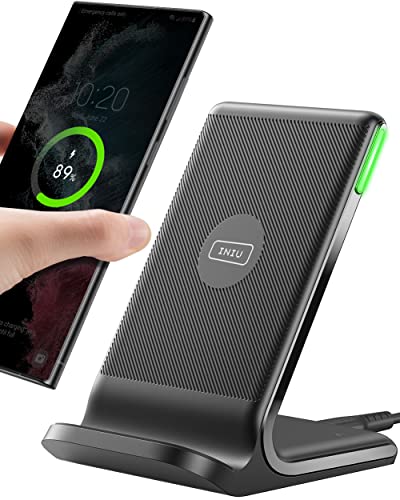
2. INIU 15W Wireless Charger
Qi · affordable · dimmed LED
A popular Qi pad, cheaper than the original Samsung one. It charges the earbuds case like any other Qi charger.
How much power the Buds4 Pro case needs
Not much. The case and earbuds have small batteries, so there is no point in hunting for the most powerful charger on the market. A 25 W power adapter is more than enough, and a 15 W Qi pad handles the job too.
In practice, more power than that will not noticeably speed up charging the earbuds. The case draws only what it needs, and the rest of the power goes unused. So don't pay extra for specs the case can't take advantage of.
Samsung quotes up to 6 hours of music with ANC on a single charge of the earbuds alone. For most people, that is a full day of commuting or several workouts before the earbuds go back in the case.
Fun fact: with the case, the Buds4 Pro earbuds play for up to 26 hours with ANC, according to Samsung.
With that much headroom, there's no need to rush. You can choose the power adapter based on what else you'll charge with it, not just the earbuds.
One pad for your phone and earbuds
The most convenient setup is a single pad that handles both your phone and the case. In the morning you grab your phone and the case stays put, or the other way around. In the evening you set both devices down in the same spot and forget about cables.
With a single pad, pay attention to three things:
- the pad's power output must be enough for your phone, because it draws the most, and the case will make do with the rest,
- the surface should be large enough to place the case in the center, not on the edge,
- the power adapter connected to the pad should match its requirements, so check what the manufacturer recommends.
The manufacturer's original pad makes sure your Galaxy phone gets what it expects. A third-party alternative usually costs less and will also work with the case, because it charges it like any other Qi charger. The differences mainly affect the phone, not the earbuds.
If you charge your phone with a cable and the pad is only for the case, the simplest model is enough. In that case, what matters is a stable placement and reliable power, not maximum output.
Frequently asked questions about charging the Buds4 Pro
Which charger for Galaxy Buds4 Pro?
A USB-C power adapter with a cable or a Qi pad is enough. A 25 W adapter gives you plenty of headroom, and a 15 W pad will work well too. The case doesn't need more.
Do the Galaxy Buds4 Pro charge wirelessly?
Yes, the case supports wireless charging. You place it on a Qi pad, preferably in the center, and charging starts on its own. The earbuds charge while they are in the case.
Can a Samsung phone charge the Buds4 Pro?
Yes, if it's a Galaxy phone with Wireless PowerShare. You place the case on the back of the phone and turn the feature on. The energy comes from the phone's battery.
Is a charger included in the Galaxy Buds4 Pro box?
You can use the charger from your phone or buy a new one. It also helps to keep a USB-C cable handy.
How long does it take to charge the Galaxy Buds4 Pro?
Samsung doesn't state a full charging time. What is known is that on a single charge the earbuds play for up to 6 hours with ANC. Charging time doesn't shrink as the power adapter's output goes up, because the case needs very little energy.
Sources
- Samsung Newsroom: Galaxy Buds4 series - manufacturer page (news.samsung.com)
- Notebookcheck: Galaxy Buds 4 Pro go official - industry article (notebookcheck.net)
- Gizmochina: Galaxy Buds 4 Pro launch and specs - industry article (gizmochina.com)
- BGR: Everything new with the Galaxy Buds 4 Pro - industry article (bgr.com)

Leave a comment
This site is protected by hCaptcha and the hCaptcha Privacy Policy and Terms of Service apply.