









As an Amazon Associate I earn from qualifying purchases.
Quick answer: our top pick is Apple Pencil Pro (Apple original · pressure · squeeze · Find My).
Which Apple Pencil for iPad Air M4?
For the iPad Air M4, you have two official choices from Apple: Apple Pencil Pro and Apple Pencil USB-C. If you plan to draw, paint digitally, or care about complete convenience with gestures, choose Apple Pencil Pro. For regular text notes, marking up PDF documents, or signing, Apple Pencil USB-C is completely sufficient, and for occasional writing, an inexpensive third-party alternative will do the job.
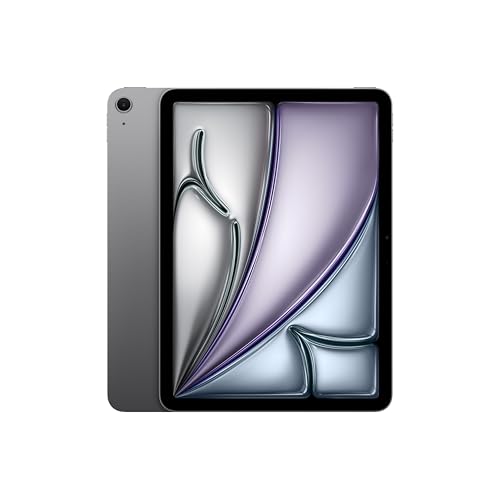
In the box with the iPad Air M4, you will find only the tablet, a 1-meter USB-C cable, and a 20 W power adapter. You have to purchase the stylus separately, regardless of whether you choose the 11-inch or 13-inch version. Both tablet versions feature a magnetic connector on the side and support the exact same stylus models.
Keep in mind one very important thing before buying. Your previous Apple Pencil 2nd generation from an older iPad will not work with the new M4 model. Apple does not include it on the compatibility list for Air M4, so you need to pick a newer stylus.
Pencil Pro vs Pencil USB-C in daily use
The difference between these two models is huge, and you will feel it from the very first minute of use. Apple Pencil Pro is an advanced tool for creators that offers full pressure and tilt sensitivity. The harder you press the tip against the screen, the thicker or darker the line you get, which is essential for sketching or shading.
Pencil Pro also introduces gestures that speed up your workflow without taking your hand off the screen. You can double-tap your finger on the barrel to switch tools to the eraser, or squeeze the stylus to bring up a tool palette. Additionally, the built-in haptic engine confirms these actions with a gentle vibration, and the barrel roll feature lets you precisely control brush orientation.
The second major advantage of the Pro version is charging convenience. You attach the stylus magnetically to the side of the iPad Air M4, where it automatically pairs and charges wirelessly. Thanks to this, the stylus is always charged and ready to go whenever you pick up the tablet.
Apple Pencil USB-C is a much simpler model stripped of many features. It features pixel-perfect precision, low latency, and tilt sensitivity, but it does not respond to pressure sensitivity at all. No matter how hard you press it against the glass, the line will have the exact same thickness.
The USB-C version also lacks the double-tap gesture, squeeze, barrel roll, and haptic feedback. Importantly, the magnetic connector on this model is used solely for conveniently attaching the stylus to the side of the tablet during transport. To pair or charge it, you must slide open the cap and plug a USB-C cable into the port on the stylus body.
Both official Apple models support the Apple Pencil hover feature. It lets you preview the point where the tip will meet the screen before you actually touch it.
Fun fact: Apple Pencil Pro works with the Find My network, so if you leave it on an office desk or lose it in a cafe, you can locate it on a map in the Find My app just like an AirTag tracker.
Third-party alternatives: is it worth saving money?
On the market, you will find many cheaper third-party styluses, such as Metapen A8, MYSTILUCK, KEEPRO, or ESR Geo Digital Pencil. However, before you decide to buy such an accessory, you need to check the technical specifications. Most cheaper alternatives do not offer pressure sensitivity, and manufacturers do not mention this feature in their descriptions.
Palm rejection and tilt sensitivity, on the other hand, are standard in third-party alternatives. Palm rejection lets you rest your hand on the iPad screen while writing without the risk of accidental stray marks or shifting the view. This makes third-party styluses well suited for taking lecture notes, filling out forms, or casual browsing.
Pay attention to the charging method specified in the product description. Models such as Metapen A8 or MYSTILUCK charge via a cable through a built-in USB-C port. The ESR Geo Digital Pencil stands out with its support for Apple's Find My network, making it easier to locate, but just like other third-party alternatives, it does not offer wireless charging from the side of the iPad.
Below are both Apple styluses and third-party alternatives that list the iPad Air M4 in their descriptions.
Recommended pencils for iPad Air M4

1. Apple Pencil Pro
Apple original · pressure · squeeze · Find My
Apple's most capable pencil: pressure and tilt sensitivity, double-tap, squeeze, barrel roll, haptic feedback and Find My. It pairs and charges magnetically on the side of the iPad. Apple lists it for the iPad Air M2-M4, Pro M4/M5 and mini A17 Pro, but not for the iPad A16.

2. Apple Pencil (USB-C)
Apple original · tilt · charges over USB-C
Apple's cheaper pencil. It has precision and tilt sensitivity, but no pressure sensitivity and no double-tap. It pairs and charges over a USB-C cable and only attaches magnetically for storage. Apple lists it for all four current iPads, including the A16.

3. Metapen A8
Alternative · tilt · palm rejection · USB-C
The best-selling stylus in Amazon's tablet stylus category. Its listing names the iPad A16, Air M4 and Pro M5. It has tilt sensitivity and palm rejection and charges over USB-C; the maker does not claim pressure sensitivity.

4. ESR Geo Digital Pencil with Find My
Alternative · Find My · tilt
A stylus that works with Apple's Find My network, so you can locate it in the Find My app if you lose it. Its listing names the iPad A16, Air M4, Pro M5 and mini A17 Pro. It does not charge wirelessly.
11-inch vs. 13-inch screen size and choosing a stylus
Choosing between the smaller and larger iPad Air M4 model depends on your workflow, not on your accessories. The 11-inch version is lighter and more portable for travel, while the 13-inch variant offers significantly more screen real estate for multitasking with multiple windows and a more comfortable canvas for drawing graphic designs.
The stylus remains exactly the same in both cases. Apple Pencil Pro and Apple Pencil USB-C work identically with the 11-inch screen as they do with the 13-inch screen.
If you are upgrading from an older iPad Air 4th or 5th generation and already own an Apple Pencil 2, you will unfortunately need to replace the stylus. The new Air M4 will not recognize this model and will not allow it to pair or charge.
Fun fact: The iPad Air M4 completely dropped support for the Apple Pencil 2nd generation, even though the previous two generations of this tablet relied on this proven magnetic charging standard.
Frequently Asked Questions about the iPad Air M4 stylus
Which Apple Pencil is compatible with the iPad Air M4?
There are two styluses officially compatible with the iPad Air M4: Apple Pencil Pro and Apple Pencil with a USB-C connector. No other model from Apple's portfolio, including the Apple Pencil 2nd generation, will work with this tablet. You can also choose a compatible third-party alternative that explicitly lists the Air M4 model in its description.
Does Apple Pencil 2 work with iPad Air M4?
No, the Apple Pencil 2nd generation does not work with the iPad Air M4 in either size option. Apple does not include it on the tablet's compatibility list. The second-generation stylus works exclusively with the older iPad Air 4 and 5, iPad mini 6, and older Pro models.
Is it worth paying extra for the Apple Pencil Pro?
It is worth the extra cost if you care about drawing, shading, and the convenience of daily charging. Apple Pencil Pro is the only one to offer pressure sensitivity, squeeze gestures, barrel roll, and tracking via the Find My app. If you only need a stylus for highlighting text and simple note-taking, the more affordable USB-C model will be more than enough.
Does the same stylus fit both the 11-inch and 13-inch iPad Air?
Yes, the same stylus works seamlessly with both variants of the iPad Air M4. Whether you have the smaller 11-inch model or the larger 13-inch model, the Apple Pencil Pro and the USB-C model pair and function identically. There are no separate stylus versions tailored to a specific display size.
Does a cheap stylus for the iPad Air M4 support pressure sensitivity?
Inexpensive third-party styluses typically do not detect pressure, and manufacturers do not list this feature in their specifications. Alternatives usually offer only tilt sensitivity and palm rejection. If you need variable line thickness based on how hard you press, you must choose the genuine Apple Pencil Pro.
Sources
- Apple Support: Apple Pencil compatibility - manufacturer page (support.apple.com)
- Apple: iPad Air - Technical Specifications - manufacturer page (apple.com)
- Apple: Apple Pencil - manufacturer page (apple.com)
- Tom's Guide: Apple iPad Air M4 review - industry article (tomsguide.com)
- TechRadar: I tested the iPad Air with M4 - industry article (techradar.com)
- IT Brief: Hands-on review, iPad Air M4 - industry article (itbrief.com.au)

Leave a comment
This site is protected by hCaptcha and the hCaptcha Privacy Policy and Terms of Service apply.